需要登入
請使用您的 iOSGods 帳戶登入以繼續。
請使用您的 iOSGods 帳戶登入以繼續。
無限金錢和無限生命值將改變你在聖安地列斯的遊戲體驗,這是一款適用於 iOS 的 Grand Theft Auto: San Andreas Mod IPA hack。卡爾·約翰遜回到洛聖都時,當你消除磨練、探索廣闊的 1990 年代犯罪世界、完成任務,以及在沒有資源限制的情況下統治街道時,將變得勢不可擋。
免費遊戲
破解版本可在此找到: https://app.iosgods.com/store/appdetails/1080-grand-theft-auto-san-andreas-hack
此應用程式也內建 iGameGod,讓你可以使用 Auto Touch 自動執行重複操作、透過 App Speed Manager 調整遊戲速度、使用 Memory Engine 修改記憶體數值,以及更多強大的 iOS 遊戲工具。
從上方連結下載 Grand Theft Auto: San Andreas modded IPA。點選安裝按鈕並依照畫面指示在 iPhone、iPad 或 Apple Silicon 上安裝此 iOS 應用程式修改版。
需要更多協助?請查看我們的 iOSGods 應用程式常見問題 以獲得詳細解答與疑難排解。
***PLEASE NOTE: This game is officially supported on the following devices only: iPhone 4s, 5, 5s, 5c, 6, 6s, 6 Plus, SE, 7, 7 Plus, iPod Touch 6th Gen, iPad Mini 1, 2, 3 & 4, iPad 2, 3rd Gen, 4th Gen, iPad Air 1 & 2, and iPad Pro.***
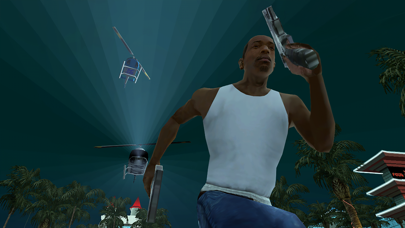
Five years ago, Carl Johnson escaped from the pressures of life in Los Santos, San Andreas, a city tearing itself apart with gang trouble, drugs and corruption. Where filmstars and millionaires do their best to avoid the dealers and gangbangers.
Now, it’s the early 90’s. Carl’s got to go home. His mother has been murdered, his family has fallen apart and his childhood friends are all heading towards disaster.
On his return to the neighborhood, a couple of corrupt cops frame him for homicide. CJ is forced on a journey that takes him across the entire state of San Andreas, to save his family and to take control of the streets.
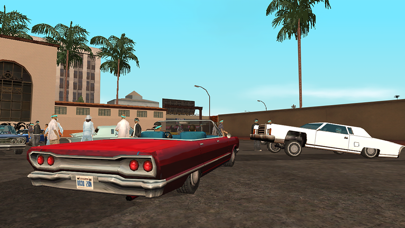
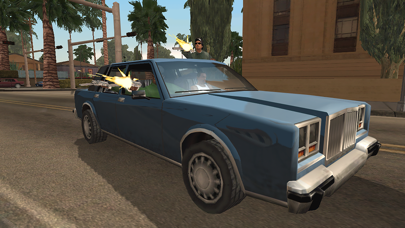
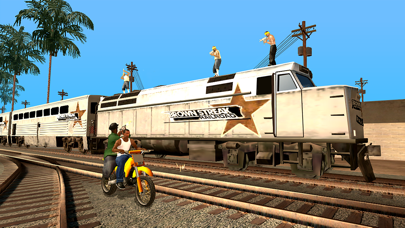
Rockstar Games brings its biggest release to mobile yet with a vast open-world covering the state of San Andreas and its three major cities – Los Santos, San Fierro and Las Venturas – with enhanced visual fidelity and over 70 hours of gameplay.
Grand Theft Auto: San Andreas features:
• Remastered, high-resolution graphics built specifically for mobile including lighting enhancements, an enriched color palette and improved character models.
• Enhanced for the iPhone 5 series and iPad 4th Gen and above with dynamic detailed shadows and real-time environmental reflections.
• Physical controller support for all Made for iOS controllers.
• Cloud save support for playing across all your iOS devices for Rockstar Social Club Members.
• Dual analog stick controls for full camera and movement control.
• Three different control schemes and customizable controls with contextual options to display buttons only when you need them.
Languages Supported: English, French, Italian, German, Spanish, Russian and Japanese.
*To listen to your custom playlist, simply create a playlist titled “GTASA”, launch the game, and select the radio station “MIXTAPE”.
Mobile Version developed by War Drum Studios
www.wardrumstudios.com
Find out more:
www.rockstargames.com
See videos:
www.youtube.com/rockstargames
Follow us:
www.facebook.com/rockstargames
www.twitter.com/rockstargames

- 未越獄/受限或已越獄的 iPhone 或 iPad。
- Sideloadly 或替代方案。
- 執行 Windows/macOS/Linux 且已安裝 iTunes 的電腦。
步驟 1: 透過上方連結將已破解的 .IPA 檔案下載到您的電腦。若要從 iOSGods App 下載,請參閱我們的 iOSGods App IPA 下載教學,其中包含影片範例。
步驟 2: 下載 Sideloadly 並將其安裝在您的 Windows 或 Mac 上。
步驟 3: 在電腦上開啟 Sideloadly,連接您的 iOS 裝置,並等待裝置名稱出現在 Sideloadly 中。
步驟 4: 當 Sideloadly 辨識到您的 iOS 裝置後,將下載好的修改版 .IPA 檔案拖曳並放到 Sideloadly 應用程式中。
步驟 5: 輸入您的 Apple Account 電子郵件,然後按下「Start」。系統會要求您輸入密碼,請依指示提供所需資訊。
步驟 6: 等待 Sideloadly 完成已破解 IPA 的旁載/安裝。如果安裝過程中發生問題,請閱讀下方的注意事項。
步驟 7: 安裝完成並在主畫面上看到該應用程式後,您需要前往 設定 → 一般 → 描述檔 / VPN 與裝置管理。進入後,點選您在步驟 6 中輸入的電子郵件,然後點選「信任 [email protected]」。
步驟 8: 現在回到主畫面並開啟新安裝的應用程式,一切應該都能正常運作。您可能需要依照遊戲內破解彈出視窗中的進一步指示操作。
注意: 在 iOS/iPadOS 16 及更新版本上,您必須 啟用開發者模式。若使用免費的 Apple Developer 帳號,您將需要每 7 天重複此程序。如有任何疑問或問題,請閱讀我們的 主題中的 Sideloadly 常見問題區段。


![[Puzzle & Dragons JP] パズル&ドラゴンズ Hack](https://is1-ssl.mzstatic.com/image/thumb/Purple211/v4/ca/88/05/ca880549-d75e-5b3d-321e-b111dbb2fcda/AppIcon-0-0-1x_U007emarketing-0-8-0-85-220.png/100x100bb.jpg)


