Connexion requise
Connectez-vous avec votre compte iOSGods pour continuer.
Hack Features:
- Unlimited Coins [ViP]
- Unlimited Diamonds [ViP]
- Unlimited Nitro Use
- VIP Enabled
Cette app est livrée avec iGameGod, qui vous donne accès à Auto Touch pour automatiser les tâches répétitives, App Speed Manager pour ajuster la vitesse de jeu, à l'édition de valeurs avec Memory Engine, et à d'autres outils puissants pour les jeux iOS.
Téléchargez SUP Multiplayer Racing Hack modded IPA depuis les liens ci-dessus. Appuyez sur le bouton d'installation et suivez les instructions pour installer ce hack iOS sur votre iPhone, iPad ou Apple Silicon.
Besoin de plus d'aide ? Consultez notre FAQ de l'app iOSGods pour des réponses détaillées et des conseils de dépannage.
Why is SUP unique?
- SUP was designed as a multiplayer game : enjoy online games and compete with people from all over the world
- A wide variety of vehicles to discover : Formula 1, motorcycles, monster trucks, rally cars, hot rods, quad bikes, tanks... collect them all
- Graphics are really cool : cars, drivers, skins... all inGame elements respect a colorful DA. It’s clearly what makes SUP different.
- SUP is a racing game, aimed at a wide variety of game players : whoever who you are, you can play and enjoy SUP
Race on SUP
- You can collect more than 30 cars : advance through the levels to gain a wide choice of cars and become the best
- You can personalize your cars : Discover a wide range of skins. There are approximately ten skins available for each car. All are super fun
- You can compete with up to 3 opponents : team up with your friends online & race in team mode with people from around the world
- Share your performance : Discover your rank on the leaderboard and share your position with your friends
How to win on SUP
- Select the car you want : According to your strategy and your level, choose the best car to win the competition. Each car has it’s own abilities.
- Take control : this game is easy to control, only 2 buttons. Control what direction you want to go in, and speed up when needed
- Upgrade your cars : Check out the store where you can buy gearbox, brakes, turbo... Select the most powerful parts to upgrade your car and find the best configuration
- Watch your game in replay : replay your race and improve your driving skills to become better
Exclusives features on SUP
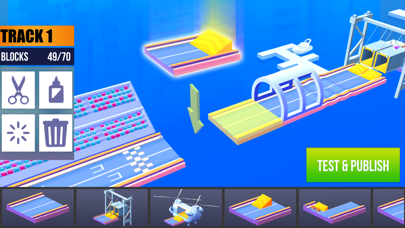
- Build your own custom tracks: Using the level editor add hills, bridges, trackside banners... Create the race you want, then share on-line and challenge your friends
- With over a thousand community-created race tracks, drive, wreck and rule through hundreds of various obstacles and paths
- Real time multiplayer : play against players from around the world in real time races to win trophies. Earn achievements and climb to the top of the leaderboard
- Huge community : Get involved in Club. Share replays of your most insane races with the whole world! Compete with your friends for the first place in amazing, fast-paced, real-time races
--------------------
Subscription service conditions - Monthly subscription which unlock the following:
- No ads
- Infinite energy
- 20% gold bonus after each race
- 15 % bonus on all gold coin and diamonds packs
- Payment will be charged to your iTunes Account at confirmation of purchase
- Your subscription automatically renews unless auto-renew is turned off at least 24-hours before the end of the current period
- Your account will be charged for renewal within 24-hours prior to the end of the current period
- You can manage your subscription and switch off the auto-renewal by accessing your Account Settings after purchase
- You cannot cancel the current subscription during the active subscription period
- Any unused portion of a free trial period, if offered, will be forfeited when the user purchases a subscription to that publication, where applicable
For more information, please visit https://support.apple.com/HT207865
If you have any question, feel free to contact us at [email protected]
Privacy policy: https://www.ohbibi.com/privacy-policy
Terms of Service: https://www.ohbibi.com/terms-services
Follow us to get news and updates:
https://www.facebook.com/OhBiBiCommunity
https://twitter.com/oh_bibi
https://www.ohbibi.com/
- iPhone ou iPad avec ou sans Jailbreak.
- Sideloadly ou alternatives.
- Ordinateur sous Windows/macOS/Linux avec iTunes installé.
ÉTAPE 1: Téléchargez le fichier .IPA pré-modifié depuis le lien ci-dessus sur votre ordinateur. Pour le télécharger depuis l'iOSGods App, consultez notre Tutoriel de téléchargement de l'IPA depuis l'iOSGods App qui comprend un exemple en vidéo.
ÉTAPE 2: Téléchargez Sideloadly et installez-le sur votre Windows ou Mac.
ÉTAPE 3: Ouvrez Sideloadly sur votre ordinateur, connectez votre appareil iOS et attendez que le nom de votre appareil apparaisse dans Sideloadly.
ÉTAPE 4: Une fois votre iDevice reconnu, glissez le fichier .IPA modifié que vous avez téléchargé et déposez-le dans l'application Sideloadly.
ÉTAPE 5: Saisissez l'adresse e-mail de votre Apple Account, puis appuyez sur « Start ». Il vous sera ensuite demandé d'entrer votre mot de passe. Fournissez les informations requises.
ÉTAPE 6: Attendez que Sideloadly termine le sideloading/l'installation de l'IPA modifié. En cas de problème durant l'installation, veuillez lire la remarque ci-dessous.
ÉTAPE 7: Une fois l'installation terminée et l'app visible sur votre écran d'accueil, vous devez aller dans Réglages → Général → Profils / VPN et gestion de l'appareil. Là, appuyez sur l'adresse e-mail saisie à l'étape 6, puis appuyez sur « Faire confiance à [email protected] ».
ÉTAPE 8: Allez maintenant sur votre écran d'accueil et ouvrez l'app nouvellement installée ; tout devrait fonctionner correctement. Vous devrez peut-être suivre des instructions supplémentaires propres à chaque app, dans la fenêtre du hack en jeu.
REMARQUE : À partir d'iOS/iPadOS 16, vous devez activer le mode Développeur. Pour les comptes Apple Developer gratuits, vous devrez répéter ce processus tous les 7 jours. Pour toute question ou problème, lisez notre section FAQ Sideloadly du sujet.