需要登入
請使用您的 iOSGods 帳戶登入以繼續。
請使用您的 iOSGods 帳戶登入以繼續。
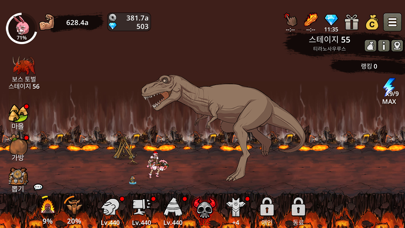
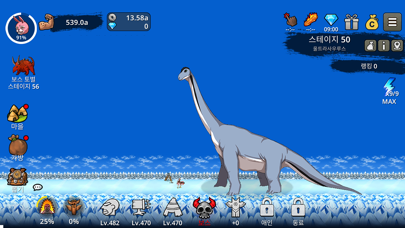
這款閒置點擊RPG遊戲讓你透過點擊狩獵、升級兄弟並解鎖跨越時代的強大武器來建立原始文明。Primitive Brothers Mod IPA提供無限貨幣,讓你加快進度並解鎖內容,無需為資源而磨練。
- 無限貨幣 → 自由花費在升級和解鎖上
此應用程式也內建 iGameGod,讓你可以使用 Auto Touch 自動執行重複操作、透過 App Speed Manager 調整遊戲速度、使用 Memory Engine 修改記憶體數值,以及更多強大的 iOS 遊戲工具。
從上方連結下載 Primitive Brothers: Idle Game iOS Mod IPA。點選安裝按鈕並依照畫面指示在 iPhone、iPad 或 Apple Silicon 上安裝此 iOS 應用程式修改版。
需要更多協助?請查看我們的 iOSGods 應用程式常見問題 以獲得詳細解答與疑難排解。
6500萬年前,恐龍為何滅絕?行星撞擊?還是火山爆發?
想知道真相嗎?快來游戲裡一探究竟吧!
◆ 遊戲特色 ◆
๏ 沉浸式角色扮演體驗
親身體驗原始人的進化史
๏ 獵殺上百種恐龍和原始怪獸
劍龍、擬棘龍、矮暴龍、羽暴龍、無齒翼龍、科莫多巨蜥……
๏ 探索各種文明
古埃及、古巴比倫、古印度、古中國……
๏ 解鎖圖騰來提高實力
圖騰是一種信仰,它能賜予你力量
๏ 在煉金工坊升級你的裝備
想快速升級裝備嗎?去煉金工坊看看吧!
๏ 與世界各地的其他玩家一較高下,秀出你的實力
1V1原始戰鬥,保證樂趣無窮
Primitive Brothers is free to play, but there are optional in-game items will require payment. You can turn off the payment feature in your device's settings if you wish to disable the feature.
Privacy Policy: https://tghelp.freshdesk.com/support/solutions/articles/154000136237-privacy-policy

- 未越獄/受限或已越獄的 iPhone 或 iPad。
- Sideloadly 或替代方案。
- 執行 Windows/macOS/Linux 且已安裝 iTunes 的電腦。
步驟 1: 透過上方連結將已破解的 .IPA 檔案下載到您的電腦。若要從 iOSGods App 下載,請參閱我們的 iOSGods App IPA 下載教學,其中包含影片範例。
步驟 2: 下載 Sideloadly 並將其安裝在您的 Windows 或 Mac 上。
步驟 3: 在電腦上開啟 Sideloadly,連接您的 iOS 裝置,並等待裝置名稱出現在 Sideloadly 中。
步驟 4: 當 Sideloadly 辨識到您的 iOS 裝置後,將下載好的修改版 .IPA 檔案拖曳並放到 Sideloadly 應用程式中。
步驟 5: 輸入您的 Apple Account 電子郵件,然後按下「Start」。系統會要求您輸入密碼,請依指示提供所需資訊。
步驟 6: 等待 Sideloadly 完成已破解 IPA 的旁載/安裝。如果安裝過程中發生問題,請閱讀下方的注意事項。
步驟 7: 安裝完成並在主畫面上看到該應用程式後,您需要前往 設定 → 一般 → 描述檔 / VPN 與裝置管理。進入後,點選您在步驟 6 中輸入的電子郵件,然後點選「信任 [email protected]」。
步驟 8: 現在回到主畫面並開啟新安裝的應用程式,一切應該都能正常運作。您可能需要依照遊戲內破解彈出視窗中的進一步指示操作。
注意: 在 iOS/iPadOS 16 及更新版本上,您必須 啟用開發者模式。若使用免費的 Apple Developer 帳號,您將需要每 7 天重複此程序。如有任何疑問或問題,請閱讀我們的 主題中的 Sideloadly 常見問題區段。




![[Seven Deadly Sins] 七つの大罪 光と闇の交戦 : グラクロ iOS Mod IPA](https://is1-ssl.mzstatic.com/image/thumb/Purple221/v4/4e/03/9a/4e039aff-8bc1-b305-fac3-58e9f9b98e5f/AppIcon-1x_U007emarketing-0-8-0-85-220-0.png/100x100bb.jpg)


![[The Battle Cats JP] にゃんこ大戦争 iOS Mod IPA](https://is1-ssl.mzstatic.com/image/thumb/Purple221/v4/d5/5d/5e/d55d5ecc-9bbd-3446-2092-56eef81db097/AppIcon-0-0-1x_U007epad-0-1-85-220.png/100x100bb.jpg)


