需要登入
請使用您的 iOSGods 帳戶登入以繼續。
請使用您的 iOSGods 帳戶登入以繼續。

- All planed unlocked!
Made by ThanhDark1909
此應用程式也內建 iGameGod,讓你可以使用 Auto Touch 自動執行重複操作、透過 App Speed Manager 調整遊戲速度、使用 Memory Engine 修改記憶體數值,以及更多強大的 iOS 遊戲工具。
從上方連結下載 X-Plane Flight Simulator Hack modded IPA。點選安裝按鈕並依照畫面指示在 iPhone、iPad 或 Apple Silicon 上安裝此 iOS 應用程式修改版。
需要更多協助?請查看我們的 iOSGods 應用程式常見問題 以獲得詳細解答與疑難排解。
The most realistic aircraft. The world at your fingertips. It’s not a game, it’s a flight simulator.
▶ "Highly recommended." — Mel Martin, Engadget ◀
▶ Featured by Apple in "Best New Games" ◀
▶ Over 1 million downloads! ◀
Come experience why real pilots fly X-Plane.
It starts with the flight model—the same flight model used in our FAA-certified desktop simulator—that’s complete enough to model the flex in your wings & the tilt in your landing gear.
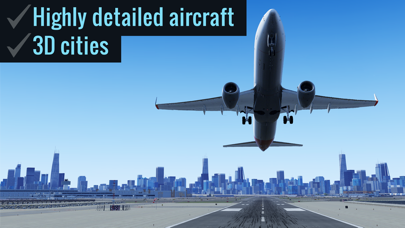
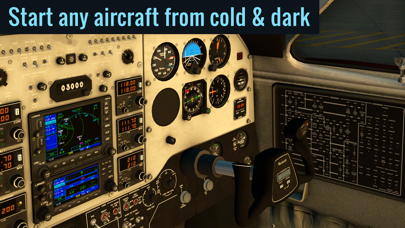
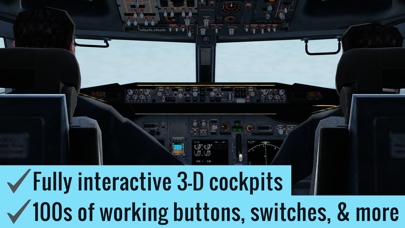
Add to that our desktop-quality aircraft with multiple liveries and interactive 3-D cockpits—so detailed you can do a full startup procedure using the hundreds of buttons, knobs, & switches in the cockpit. With working gauges, flight displays, & more, these cockpits are as realistic as those in our full desktop sim.
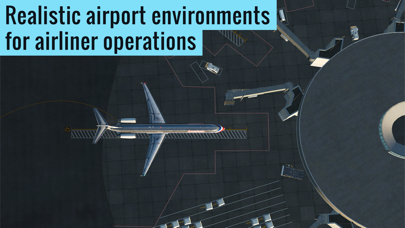
But aircraft are no good without a place to fly them. That's why each of our 5 ▸free◂ regions features detailed terrain, lifelike city buildings, & 3D airports—complete with terminal buildings, jetways, hangars, & more.
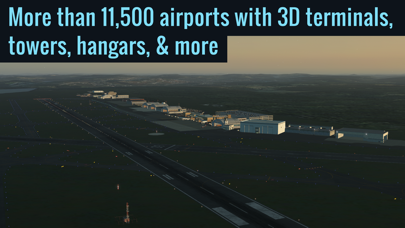
Want more? Subscribe to unlock global scenery, and get access to over 37,000 airports, with more than 11,500 airports featuring 3D terminals, hangars, & more.
▶ FEATURES
√ 9 ▸free◂ tutorials, teaching the basics of takeoffs & landings, traffic patterns, helicopters, & more
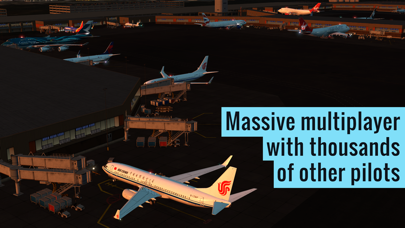
√ Massive multiplayer with thousands of other pilots and controllers in a single shared world (Professional subscribers only; non-subscribers can get free trial flights for a limited time)
√ Fully interactive cockpits on many aircraft, wired to real systems models, with working gauges, displays, buttons, & switches
√ Full startup procedures supported on many aircraft (optionally start any aircraft from cold & dark)
√ More than 50 systems modeled, each of which can be failed on command
√ Emergency scenarios
√ Combat missions
▶ AIRCRAFT
The app includes 2 aircraft (plus 5 scenery regions) for free. In addition, the following aircraft are available as in-app purchases:
• ▸Free!◂ Cessna 172SP w/ 4 liveries
• ▸Free!◂ Cirrus Vision SF50 w/ 5 liveries
• Cirrus SR22 w/ 3 liveries
• Cessna Citation X w/ 3 liveries
• Airbus A320 Airliner w/ 3 liveries
• Airbus A330-300 Airliner w/ 3 liveries
• Boeing B737-800 Airliner w/ 3 liveries
• Boeing B777-200ER Airliner w/ 3 liveries
• Boeing B747-400 Jumbo Jet w/ 3 liveries
• Bombardier CRJ200 Regional Jet w/ 3 liveries
• Douglas DC-3 Airliner w/ 3 liveries
• McDonnell Douglas MD-80 w/ 3 liveries
• A-10 Thunderbolt II (“Warthog”) Fighter
• F-22 Raptor Fighter
• F-4 Phantom II Fighter
• Beechcraft Baron B58
• Beechcraft King Air C90B
• Piper PA-18 Super Cub
• Piaggio P.180 Avanti
• Sikorsky S76 Helicopter
▶ SCENERY
5 scenery regions are ▸free◂ for everyone!
• Oahu, Hawaii
• Grand Canyon
• Seattle/Tacoma, Washington
• Juneau, Alaska
• Innsbruck, Austria
Global scenery is available by purchasing a monthly or yearly subscription.
▶ MULTIPLAYER
Come join tens of thousands of other pilots and controllers in a single, shared world!
Try the Fly-In of the Day to meet up with hundreds of other pilots, or explore the MMO world for more chance encounters.
Massive multiplayer is in early access—we wanted to get it in your hands as soon as possible—so we’re going to continue adding new features & improvements over the coming months.
Terms of Service available at: https://www.x-plane.com/x-plane-mobile-terms-of-service/
Download X-Plane now to experience aviation like never before.
- 未越獄/受限或已越獄的 iPhone 或 iPad。
- Sideloadly 或替代方案。
- 執行 Windows/macOS/Linux 且已安裝 iTunes 的電腦。
步驟 1: 透過上方連結將已破解的 .IPA 檔案下載到您的電腦。若要從 iOSGods App 下載,請參閱我們的 iOSGods App IPA 下載教學,其中包含影片範例。
步驟 2: 下載 Sideloadly 並將其安裝在您的 Windows 或 Mac 上。
步驟 3: 在電腦上開啟 Sideloadly,連接您的 iOS 裝置,並等待裝置名稱出現在 Sideloadly 中。
步驟 4: 當 Sideloadly 辨識到您的 iOS 裝置後,將下載好的修改版 .IPA 檔案拖曳並放到 Sideloadly 應用程式中。
步驟 5: 輸入您的 Apple Account 電子郵件,然後按下「Start」。系統會要求您輸入密碼,請依指示提供所需資訊。
步驟 6: 等待 Sideloadly 完成已破解 IPA 的旁載/安裝。如果安裝過程中發生問題,請閱讀下方的注意事項。
步驟 7: 安裝完成並在主畫面上看到該應用程式後,您需要前往 設定 → 一般 → 描述檔 / VPN 與裝置管理。進入後,點選您在步驟 6 中輸入的電子郵件,然後點選「信任 [email protected]」。
步驟 8: 現在回到主畫面並開啟新安裝的應用程式,一切應該都能正常運作。您可能需要依照遊戲內破解彈出視窗中的進一步指示操作。
注意: 在 iOS/iPadOS 16 及更新版本上,您必須 啟用開發者模式。若使用免費的 Apple Developer 帳號,您將需要每 7 天重複此程序。如有任何疑問或問題,請閱讀我們的 主題中的 Sideloadly 常見問題區段。