Anmeldung erforderlich
Melden Sie sich mit Ihrem iOSGods-Konto an, um fortzufahren.
Hack Features:
- PRO
Laden Sie PDF Expert: PDF Editor, Reader Hack modded IPA über die obigen Links herunter. Tippen Sie auf den Installations-Button und folgen Sie den Anweisungen, um diese iOS-App auf Ihrem iPhone, iPad oder Apple Silicon zu installieren.
Brauchen Sie mehr Hilfe? In unseren iOSGods App häufig gestellten Fragen finden Sie ausführliche Antworten und Tipps zur Fehlerbehebung.
PDF Expert is the ultimate PDF app you’re looking for. It’s fast, intuitive, and powerful to let you effortlessly complete literally any PDF task.
“PDF Expert is one of my must-have iPad apps and a desktop-class PDF reader”. – MacStories.net
“I was blown away at how easy the app is to use”. – MakeUseOf
“The best app for managing, editing, and reading PDFs on your iPad”. – The Sweet Setup
*** WITH PDF EXPERT YOU CAN ***
READ PDFs WITH EASE
• Quickly open PDF documents from email, the web, or any app that supports “Open In…”
• Enable full-text search, scroll, zoom in and out.
• Choose Single Page or Continuous scroll mode.
• Use the Text to Speech feature to hear the selected text read out loud.
HIGHLIGHT AND ANNOTATE PDFs
• Mark important info in books or documents with the first class annotation tools: highlight, underline, strikethrough and others.
• Insert predesigned stamps such as Approved, Not Approved, Confidential, and more.
WORK IN THE CLOUD
• Connect to other document storage providers like Dropbox, iCloud Drive, Box, OneDrive, Google Drive, etc.
• Enable 2-way sync with storage to provide continuous work with documents among all devices.
CREATE NOTES
• Add comments to the texts you read using sticky notes and drawing tools.
MAKE BOOKMARKS
• Make Bookmarks when it comes to intuitive navigation through PDF files.
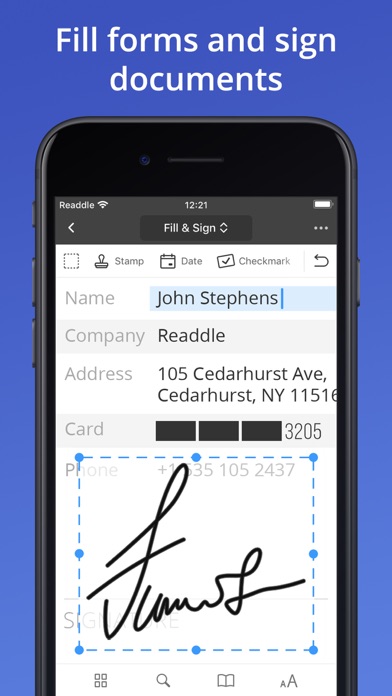
FILL FORMS
• Work with static PDF forms created in Adobe Acrobat.
• Fill out any PDF forms with interactive fields such as text fields, checkboxes and radio buttons.
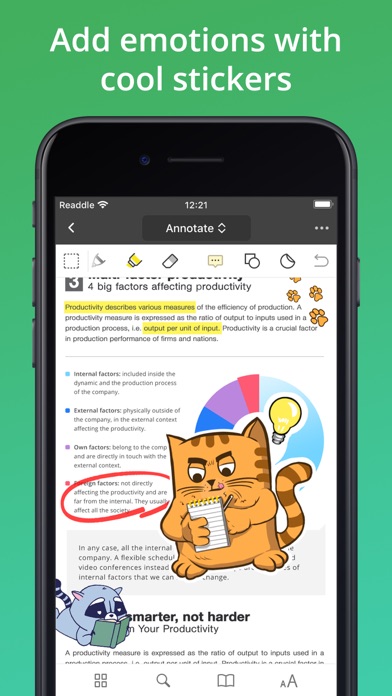
ADD EMOTION WITH STICKERS
• Express yourself with amazing stickers that can be used right inside your PDFs.
*** WITH PRO FEATURES OF THE SUBSCRIPTION***
With the additional PRO subscription, you can get unique PDF superpowers.
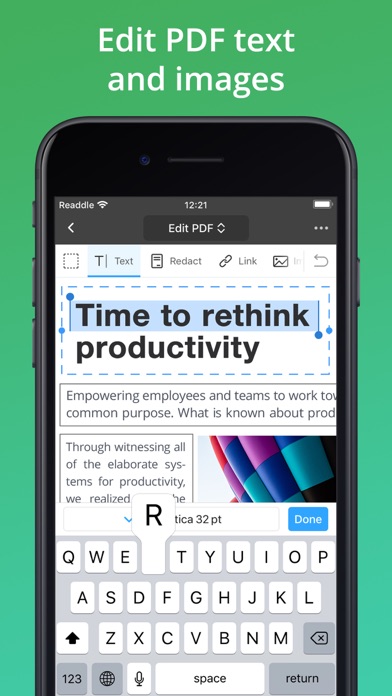
EDIT ORIGINAL PDF TEXT
• Edit or modify existing text. The font, size, and opacity of the original text are automatically detected, so you can make edits easily.
ADD AND EDIT IMAGES
• Easily add, replace and resize images in your PDFs. Or change a logo or a graph. PDF Expert will handle those edits easily.
SIGN DOCUMENTS
• Use e-signatures to sign contracts and agreements on the go.
• Sign documents with signatures synchronized across all your devices: Mac, iPhone, iPad.
PROTECT CONTENT WITH PASSWORD
• Restrict access to PDF Expert with a password.
• Protect your files from unauthorized reading with a password.
FAVORITES TOOLBAR
• Quickly access your favorite tools with a fully customizable toolbar.
CONSTRUCTION TOOLS
• Scale and measurement tools.
• Polygon and polyline shapes.
• Redline tools.
ADD LINKS
• Now linking any part of the text to a different page or even a website is fast. Moreover, links can be added to images.
REDACT SENSITIVE DATA
• Using the Redact feature you can permanently erase or hide any sensitive information in your PDFs.
PDF CONVERTER
• Now you can magically convert PDFs to Word, Excel, PPT, JPG/PNG, and TXT, and vice versa. Converting happens locally on your device, so your files are absolutely secure.
If you choose to purchase PDF Expert PRO, payment will be charged to your iTunes account, and your account will be charged for renewal within 24-hours prior to the end of the current period. Auto-renewal may be turned off at any time by going to your settings in the iTunes Store after purchase. The current PDF Expert PRO subscription price starts at $49.99 USD/year. Prices are in US dollars, may vary in countries other than the US, and are subject to change without notice. If you don’t choose to purchase PDF Expert PRO, you can simply continue using PDF Expert for free. Any unused portion of a free trial period, if offered, will be forfeited when you purchase a subscription, where applicable.
Read more about our terms and conditions here:
https://pdfexpert.com/privacy
https://pdfexpert.com/terms
- Nicht-Jailbroken/Jailed oder Jailbroken iPhone oder iPad.
- Sideloadly oder Alternativen.
- Computer mit Windows/macOS/Linux und installiertem iTunes.
SCHRITT 1: Laden Sie die vorinstallierte .IPA-Datei über den obigen Link auf Ihren Computer herunter. Zum Herunterladen aus der iOSGods-App siehe unser iOSGods App IPA Download-Tutorial mit Videobeispiel.
SCHRITT 2: Laden Sie Sideloadly herunter und installieren Sie es auf Ihrem Windows oder Mac.
SCHRITT 3: Öffnen Sie Sideloadly auf Ihrem Computer, verbinden Sie Ihr iOS-Gerät und warten Sie, bis Ihr Gerätename in Sideloadly erscheint.
SCHRITT 4: Sobald Ihr iDevice erkannt wird, ziehen Sie die heruntergeladene gemoddete .IPA-Datei in die Sideloadly-Anwendung.
SCHRITT 5: Geben Sie Ihre Apple-Account-E-Mail ein und drücken Sie „Start". Sie werden dann nach Ihrem Passwort gefragt. Geben Sie die erforderlichen Informationen ein.
SCHRITT 6: Warten Sie, bis Sideloadly das Sideloading/Installieren der gehackten IPA abgeschlossen hat. Bei Problemen während der Installation lesen Sie bitte den Hinweis unten.
SCHRITT 7: Sobald die Installation abgeschlossen ist und die App auf Ihrem Home-Bildschirm angezeigt wird, müssen Sie zu Einstellungen → Allgemein → Profile / VPN & Geräteverwaltung gehen. Tippen Sie dort auf die E-Mail, die Sie in Schritt 6 eingegeben haben, und dann auf „Trust [email protected]".
SCHRITT 8: Gehen Sie nun zu Ihrem Home-Bildschirm und öffnen Sie die neu installierte App – alles sollte einwandfrei funktionieren. Möglicherweise müssen Sie weitere App-spezifische Anweisungen im Hack-Popup im Spiel befolgen.
HINWEIS: iOS/iPadOS 16 und höher: Sie müssen den Entwicklermodus aktivieren. Bei kostenlosen Apple Developer-Accounts müssen Sie diesen Vorgang alle 7 Tage wiederholen. Bei Fragen oder Problemen lesen Sie bitte unsere Sideloadly-FAQ-Sektion im Thema.