Connexion requise
Connectez-vous avec votre compte iOSGods pour continuer.
Hack Features:
- PRO
Cette app est livrée avec iGameGod, qui vous donne accès à Auto Touch pour automatiser les tâches répétitives, App Speed Manager pour ajuster la vitesse de jeu, à l'édition de valeurs avec Memory Engine, et à d'autres outils puissants pour les jeux iOS.
Téléchargez PDF Expert: PDF Editor, Reader Hack modded IPA depuis les liens ci-dessus. Appuyez sur le bouton d'installation et suivez les instructions pour installer ce hack iOS sur votre iPhone, iPad ou Apple Silicon.
Besoin de plus d'aide ? Consultez notre FAQ de l'app iOSGods pour des réponses détaillées et des conseils de dépannage.
PDF Expert is the ultimate PDF app you’re looking for. It’s fast, intuitive, and powerful to let you effortlessly complete literally any PDF task.
“PDF Expert is one of my must-have iPad apps and a desktop-class PDF reader”. – MacStories.net
“I was blown away at how easy the app is to use”. – MakeUseOf
“The best app for managing, editing, and reading PDFs on your iPad”. – The Sweet Setup
*** WITH PDF EXPERT YOU CAN ***
READ PDFs WITH EASE
• Quickly open PDF documents from email, the web, or any app that supports “Open In…”
• Enable full-text search, scroll, zoom in and out.
• Choose Single Page or Continuous scroll mode.
• Use the Text to Speech feature to hear the selected text read out loud.
HIGHLIGHT AND ANNOTATE PDFs
• Mark important info in books or documents with the first class annotation tools: highlight, underline, strikethrough and others.
• Insert predesigned stamps such as Approved, Not Approved, Confidential, and more.
WORK IN THE CLOUD
• Connect to other document storage providers like Dropbox, iCloud Drive, Box, OneDrive, Google Drive, etc.
• Enable 2-way sync with storage to provide continuous work with documents among all devices.
CREATE NOTES
• Add comments to the texts you read using sticky notes and drawing tools.
MAKE BOOKMARKS
• Make Bookmarks when it comes to intuitive navigation through PDF files.
FILL FORMS
• Work with static PDF forms created in Adobe Acrobat.
• Fill out any PDF forms with interactive fields such as text fields, checkboxes and radio buttons.
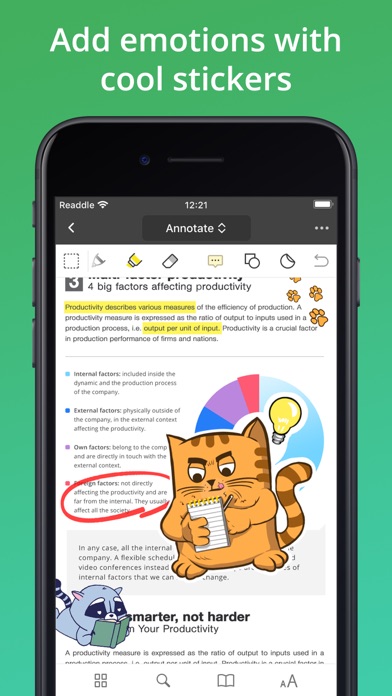
ADD EMOTION WITH STICKERS
• Express yourself with amazing stickers that can be used right inside your PDFs.
*** WITH PRO FEATURES OF THE SUBSCRIPTION***
With the additional PRO subscription, you can get unique PDF superpowers.
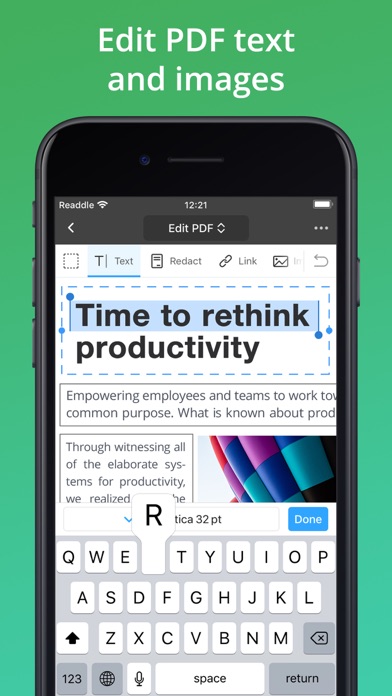
EDIT ORIGINAL PDF TEXT
• Edit or modify existing text. The font, size, and opacity of the original text are automatically detected, so you can make edits easily.
ADD AND EDIT IMAGES
• Easily add, replace and resize images in your PDFs. Or change a logo or a graph. PDF Expert will handle those edits easily.
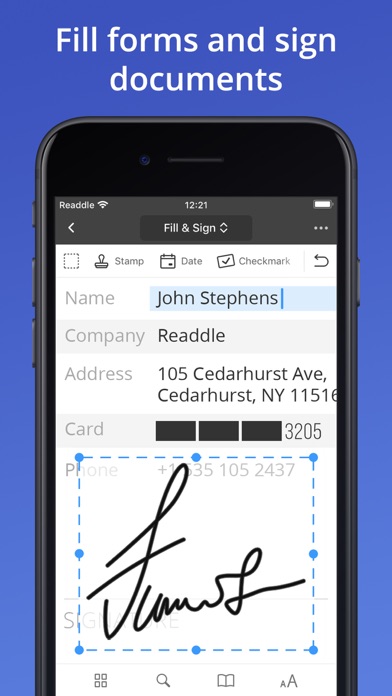
SIGN DOCUMENTS
• Use e-signatures to sign contracts and agreements on the go.
• Sign documents with signatures synchronized across all your devices: Mac, iPhone, iPad.
PROTECT CONTENT WITH PASSWORD
• Restrict access to PDF Expert with a password.
• Protect your files from unauthorized reading with a password.
FAVORITES TOOLBAR
• Quickly access your favorite tools with a fully customizable toolbar.
CONSTRUCTION TOOLS
• Scale and measurement tools.
• Polygon and polyline shapes.
• Redline tools.
ADD LINKS
• Now linking any part of the text to a different page or even a website is fast. Moreover, links can be added to images.
REDACT SENSITIVE DATA
• Using the Redact feature you can permanently erase or hide any sensitive information in your PDFs.
PDF CONVERTER
• Now you can magically convert PDFs to Word, Excel, PPT, JPG/PNG, and TXT, and vice versa. Converting happens locally on your device, so your files are absolutely secure.
If you choose to purchase PDF Expert PRO, payment will be charged to your iTunes account, and your account will be charged for renewal within 24-hours prior to the end of the current period. Auto-renewal may be turned off at any time by going to your settings in the iTunes Store after purchase. The current PDF Expert PRO subscription price starts at $49.99 USD/year. Prices are in US dollars, may vary in countries other than the US, and are subject to change without notice. If you don’t choose to purchase PDF Expert PRO, you can simply continue using PDF Expert for free. Any unused portion of a free trial period, if offered, will be forfeited when you purchase a subscription, where applicable.
Read more about our terms and conditions here:
https://pdfexpert.com/privacy
https://pdfexpert.com/terms
- iPhone ou iPad avec ou sans Jailbreak.
- Sideloadly ou alternatives.
- Ordinateur sous Windows/macOS/Linux avec iTunes installé.
ÉTAPE 1: Téléchargez le fichier .IPA pré-modifié depuis le lien ci-dessus sur votre ordinateur. Pour le télécharger depuis l'iOSGods App, consultez notre Tutoriel de téléchargement de l'IPA depuis l'iOSGods App qui comprend un exemple en vidéo.
ÉTAPE 2: Téléchargez Sideloadly et installez-le sur votre Windows ou Mac.
ÉTAPE 3: Ouvrez Sideloadly sur votre ordinateur, connectez votre appareil iOS et attendez que le nom de votre appareil apparaisse dans Sideloadly.
ÉTAPE 4: Une fois votre iDevice reconnu, glissez le fichier .IPA modifié que vous avez téléchargé et déposez-le dans l'application Sideloadly.
ÉTAPE 5: Saisissez l'adresse e-mail de votre Apple Account, puis appuyez sur « Start ». Il vous sera ensuite demandé d'entrer votre mot de passe. Fournissez les informations requises.
ÉTAPE 6: Attendez que Sideloadly termine le sideloading/l'installation de l'IPA modifié. En cas de problème durant l'installation, veuillez lire la remarque ci-dessous.
ÉTAPE 7: Une fois l'installation terminée et l'app visible sur votre écran d'accueil, vous devez aller dans Réglages → Général → Profils / VPN et gestion de l'appareil. Là, appuyez sur l'adresse e-mail saisie à l'étape 6, puis appuyez sur « Faire confiance à [email protected] ».
ÉTAPE 8: Allez maintenant sur votre écran d'accueil et ouvrez l'app nouvellement installée ; tout devrait fonctionner correctement. Vous devrez peut-être suivre des instructions supplémentaires propres à chaque app, dans la fenêtre du hack en jeu.
REMARQUE : À partir d'iOS/iPadOS 16, vous devez activer le mode Développeur. Pour les comptes Apple Developer gratuits, vous devrez répéter ce processus tous les 7 jours. Pour toute question ou problème, lisez notre section FAQ Sideloadly du sujet.