Connexion requise
Connectez-vous avec votre compte iOSGods pour continuer.
Connectez-vous avec votre compte iOSGods pour continuer.

- Free Store
- Premium
- Multiply Attack
- Multiply Defense
- Auto Win
Cette app est également livrée avec iGameGod, qui vous donne accès à Auto Touch pour automatiser les tâches répétitives, App Speed Manager pour ajuster la vitesse de jeu, à l'édition de valeurs avec Memory Engine, et à d'autres outils puissants pour les jeux iOS.
Téléchargez Animal Warfare: Idle Battler iOS Mod IPA depuis les liens ci-dessus. Appuyez sur le bouton d'installation et suivez les instructions pour installer ce hack iOS sur votre iPhone, iPad ou Apple Silicon.
Besoin de plus d'aide ? Consultez notre FAQ de l'app iOSGods pour des réponses détaillées et des conseils de dépannage.
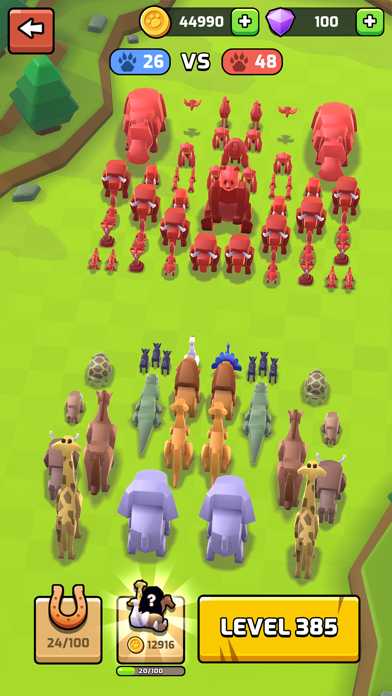
Take the auto-battle sim genre and add a splash of ridiculous by adding dozens of cute and vicious animals to the fray! Pack your animal army with lions, dogs, bears, and more before sending them into battle to win gold and glory in Animal Warfare.
Each animal fights differently and no battle is the same! Build and upgrade your army your way to take on challenging fights.
Animal Warfare features:
- Deep and addictive progression systems
- A crisp and minimalistic art style
- An expansive campaign with 100s of unique levels
- A huge roster of animals to collect, each with unique perks and abilities
- A Challenge Mode where you can earn bonus rewards
- Epic Boss Battles to test your skill!
VIP membership subscription:
You can subscribe to our Animal Kingdom VIP membership, which gives you 4500 coins and 100 gems daily, unlocks all Animal Perks no matter what level they are, and grants 50% faster Chest unlock speeds
The VIP membership has three duration options: Per Week, Per Month and Per Year.
1)Weekly Subscription costs $6.99 and starts after 3 days of the free trial.
2)Monthly Subscription costs $9.99 and starts after 3 days of the free trial.
3)Yearly Subscription costs $99.99 and starts after 3 days of the free trial.
Payment will be charged to iTunes Account at confirmation of purchase.
You will be able to use premium features for the duration of the subscription.
Subscription automatically renews at the same price unless auto-renewal is turned off at least 24-hours before the end of the current period.
Subscriptions can be managed by the user and after purchase, auto-renewal may be turned off in the user's iTunes Account Settings.
No cancellation of the current subscription period is allowed.
You may cancel a subscription during its free trial period via the subscription setting through your iTunes account. This must be done 24 hours before the end of the trial period to avoid being charged. Please visit https://support.apple.com/HT202039 for more information.
Our privacy policy and terms of use:
www.playsidestudios.com/privacy-policy
- iPhone ou iPad avec ou sans Jailbreak.
- Sideloadly ou alternatives.
- Ordinateur sous Windows/macOS/Linux avec iTunes installé.
ÉTAPE 1: Téléchargez le fichier .IPA pré-modifié depuis le lien ci-dessus sur votre ordinateur. Pour le télécharger depuis l'iOSGods App, consultez notre Tutoriel de téléchargement de l'IPA depuis l'iOSGods App qui comprend un exemple en vidéo.
ÉTAPE 2: Téléchargez Sideloadly et installez-le sur votre Windows ou Mac.
ÉTAPE 3: Ouvrez Sideloadly sur votre ordinateur, connectez votre appareil iOS et attendez que le nom de votre appareil apparaisse dans Sideloadly.
ÉTAPE 4: Une fois votre iDevice reconnu, glissez le fichier .IPA modifié que vous avez téléchargé et déposez-le dans l'application Sideloadly.
ÉTAPE 5: Saisissez l'adresse e-mail de votre Apple Account, puis appuyez sur « Start ». Il vous sera ensuite demandé d'entrer votre mot de passe. Fournissez les informations requises.
ÉTAPE 6: Attendez que Sideloadly termine le sideloading/l'installation de l'IPA modifié. En cas de problème durant l'installation, veuillez lire la remarque ci-dessous.
ÉTAPE 7: Une fois l'installation terminée et l'app visible sur votre écran d'accueil, vous devez aller dans Réglages → Général → Profils / VPN et gestion de l'appareil. Là, appuyez sur l'adresse e-mail saisie à l'étape 6, puis appuyez sur « Faire confiance à [email protected] ».
ÉTAPE 8: Allez maintenant sur votre écran d'accueil et ouvrez l'app nouvellement installée ; tout devrait fonctionner correctement. Vous devrez peut-être suivre des instructions supplémentaires propres à chaque app, dans la fenêtre du hack en jeu.
REMARQUE : À partir d'iOS/iPadOS 16, vous devez activer le mode Développeur. Pour les comptes Apple Developer gratuits, vous devrez répéter ce processus tous les 7 jours. Pour toute question ou problème, lisez notre section FAQ Sideloadly du sujet.