Login Diperlukan
Masuk dengan akun iOSGods kamu untuk melanjutkan.
Masuk dengan akun iOSGods kamu untuk melanjutkan.
Buka sumber daya tak terbatas dengan Toko Gratis dan akses Premium dalam Animal Warfare Mod IPA ini, memungkinkan Anda membangun tentara hewan tanpa grinding untuk emas. Lewati penantian dan langsung mulai memimpin skuad sempurna Anda dengan singa, anjing, beruang, dan banyak lagi.
Baik Anda mengejar level kampanye paling sulit atau bereksperimen dengan komposisi tentara yang berbeda, hack ini menghilangkan hambatan kemajuan sehingga Anda dapat fokus pada strategi dan kesenangan. Kalikan statistik serangan dan pertahanan Anda untuk mendominasi pertempuran secara instan, atau biarkan Kemenangan Otomatis menangani grinding sambil Anda merencanakan langkah berikutnya.
- Toko Gratis → beli item tanpa mengeluarkan mata uang
- Premium → akses fitur dan konten premium
- Kalikan Serangan → tingkatkan output kerusakan hewan Anda
- Kalikan Pertahanan → tingkatkan daya tahan tentara Anda
- Kemenangan Otomatis → menang pertempuran secara otomatis
Aplikasi ini juga dilengkapi dengan iGameGod, yang memberi Anda akses ke Auto Touch untuk mengotomatiskan tugas berulang, App Speed Manager untuk mengatur kecepatan permainan, pengeditan nilai Memory Engine, dan alat permainan iOS lainnya yang lebih canggih.
Unduh Animal Warfare: Idle Battler iOS Mod IPA dari tautan di atas. Ketuk tombol pasang dan ikuti petunjuk di layar untuk memasang hack iOS ini di iPhone, iPad, atau Apple Silicon.
Butuh bantuan lebih lanjut? Lihat Pertanyaan yang Sering Diajukan untuk Aplikasi iOSGods kami untuk jawaban dan tips lengkap.
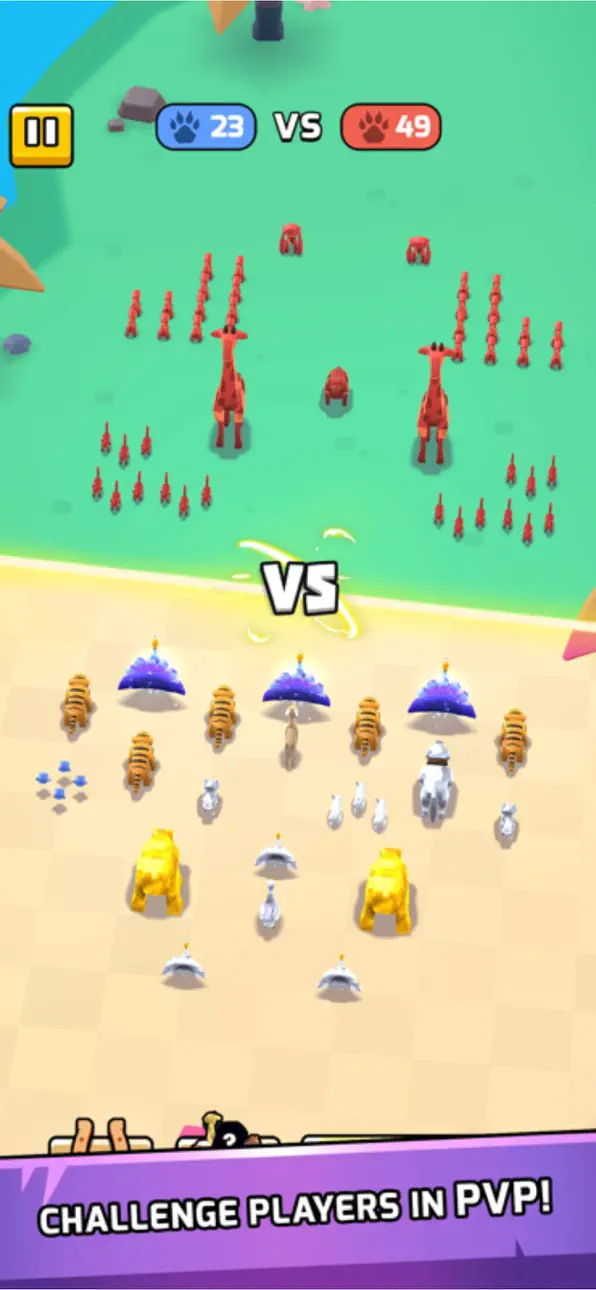
Take the auto-battle sim genre and add a splash of ridiculous by adding dozens of cute and vicious animals to the fray! Pack your animal army with lions, dogs, bears, and more before sending them into battle to win gold and glory in Animal Warfare.
Each animal fights differently and no battle is the same! Build and upgrade your army your way to take on challenging fights.
Animal Warfare features:
- Deep and addictive progression systems
- A crisp and minimalistic art style
- An expansive campaign with 100s of unique levels
- A huge roster of animals to collect, each with unique perks and abilities
- A Challenge Mode where you can earn bonus rewards
- Epic Boss Battles to test your skill!
VIP membership subscription:
You can subscribe to our Animal Kingdom VIP membership, which gives you 4500 coins and 100 gems daily, unlocks all Animal Perks no matter what level they are, and grants 50% faster Chest unlock speeds
The VIP membership has three duration options: Per Week, Per Month and Per Year.
1)Weekly Subscription costs $6.99 and starts after 3 days of the free trial.
2)Monthly Subscription costs $9.99 and starts after 3 days of the free trial.
3)Yearly Subscription costs $99.99 and starts after 3 days of the free trial.
Payment will be charged to iTunes Account at confirmation of purchase.
You will be able to use premium features for the duration of the subscription.
Subscription automatically renews at the same price unless auto-renewal is turned off at least 24-hours before the end of the current period.
Subscriptions can be managed by the user and after purchase, auto-renewal may be turned off in the user's iTunes Account Settings.
No cancellation of the current subscription period is allowed.
You may cancel a subscription during its free trial period via the subscription setting through your iTunes account. This must be done 24 hours before the end of the trial period to avoid being charged. Please visit https://support.apple.com/HT202039 for more information.
Our privacy policy and terms of use:
www.playsidestudios.com/privacy-policy
Tangkapan layar © pemiliknya masing-masing · App Store


iOSGods tidak berafiliasi, tidak didukung, dan tidak disponsori oleh Apple Inc., Google LLC, maupun pengembang aplikasi yang terdaftar di sini. Apple, iOS, dan App Store adalah merek dagang Apple Inc. Android dan Google Play adalah merek dagang Google LLC. Semua nama aplikasi, ikon, gambar, dan merek dagang lainnya adalah milik pemiliknya masing-masing.

- iPhone atau iPad tanpa Jailbreak atau dengan Jailbreak.
- Sideloadly atau alternatifnya.
- Komputer dengan Windows/macOS/Linux dan iTunes terpasang.
LANGKAH 1: Unduh file .IPA yang sudah di-hack dari tautan di atas ke komputer Anda. Untuk mengunduhnya dari iOSGods App, silakan lihat Tutorial Mengunduh IPA dari iOSGods App kami yang dilengkapi contoh video.
LANGKAH 2: Unduh Sideloadly dan pasang di Windows atau Mac Anda.
LANGKAH 3: Buka Sideloadly di komputer Anda, sambungkan perangkat iOS Anda, dan tunggu hingga nama perangkat Anda muncul di Sideloadly.
LANGKAH 4: Setelah iDevice Anda terdeteksi, seret file .IPA yang sudah dimodifikasi dan lepaskan ke dalam aplikasi Sideloadly.
LANGKAH 5: Masukkan email Apple Account Anda, lalu tekan "Start". Anda kemudian akan diminta memasukkan kata sandi. Silakan isi informasi yang diminta.
LANGKAH 6: Tunggu hingga Sideloadly selesai melakukan sideloading/pemasangan IPA yang di-hack. Jika terjadi masalah saat pemasangan, silakan baca catatan di bawah ini.
LANGKAH 7: Setelah pemasangan selesai dan Anda melihat aplikasi di Layar Beranda, Anda perlu masuk ke Pengaturan → Umum → Profil / VPN & Manajemen Perangkat. Setelah itu, ketuk email yang Anda masukkan pada langkah 6, lalu ketuk "Percayai [email protected]".
LANGKAH 8: Sekarang buka Layar Beranda dan jalankan aplikasi yang baru saja dipasang; semuanya seharusnya berjalan normal. Anda mungkin perlu mengikuti petunjuk tambahan per aplikasi yang muncul di popup hack di dalam game.
CATATAN: Pada iOS/iPadOS 16 dan yang lebih baru, Anda harus mengaktifkan Mode Pengembang. Untuk akun Apple Developer gratis, Anda perlu mengulangi proses ini setiap 7 hari. Jika Anda memiliki pertanyaan atau masalah, silakan baca bagian FAQ Sideloadly di topik tersebut kami.
Game Name iOS Mod IPA is an action adventure game enhanced with powerful gameplay boosts and quality-of-life improvements. Win battles faster, earn rewards quicker, and enjoy uninterrupted play without ads.
- Unlimited Gold - spend freely to unlock premium content
- Damage Multiplier - deal significantly more damage in combat
- Defense Multiplier - take less damage and survive longer
- Reward Multiplier - earn more loot from every battle
- Max Level - instantly reach the highest player rank
- No Ads - play without interruptions or advertisements
This app also comes with iGameGod, giving you access to Auto Touch to automate repetitive tasks, App Speed Manager for adjustable gameplay speed, Memory Engine value editing, and more powerful iOS game tools.
Unduh Game Name Mod IPA dari tautan di atas. Ketuk tombol pasang dan ikuti petunjuk di layar untuk memasang hack iOS ini di iPhone, iPad, atau Apple Silicon.
Butuh bantuan lebih lanjut Lihat Pertanyaan yang Sering Diajukan untuk Aplikasi iOSGods kami untuk jawaban dan tips lengkap.
----------------------------------------------------------
--------------------------------------------------