Login Required
Sign in with your iOSGods account to continue.
Sign in with your iOSGods account to continue.

- Unlimited Cash -> Will increase instead of decrease.
- Unlimited Energy -> Will increase instead of decrease.
- No Ads -> Head to Settings and toggle the Support button.
This app also comes with iGameGod, giving you access to Auto Touch to automate repetitive tasks, App Speed Manager for adjustable gameplay speed, Memory Engine value editing, and more powerful iOS game tools.
Download My Supermarket Simulator 3D® iOS Mod IPA from the links above. Tap the install button and follow the on-screen instructions to install this iOS app hack on your iPhone, iPad, or Apple Silicon.
Need more help? Check out our iOSGods App Frequently Asked Questions for detailed answers and troubleshooting tips.
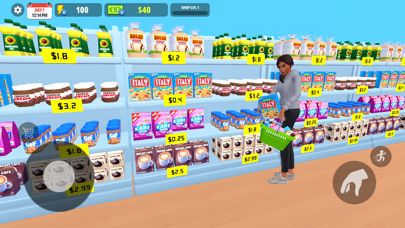
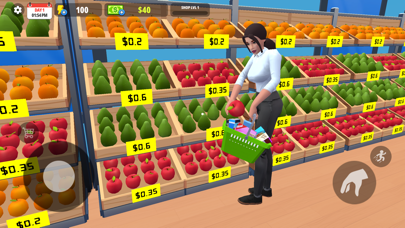
My Supermarket Simulator 3D – Build, manage, and grow your own supermarket empire from a small grocery store into the town’s top shopping destination!
Take charge as a supermarket manager in this exciting retail store simulator game. Stock shelves, manage employees, serve customers, handle checkout counters, and expand your business step by step. Experience the complete journey of running a successful grocery store in a highly detailed management simulation game.
Key Features:
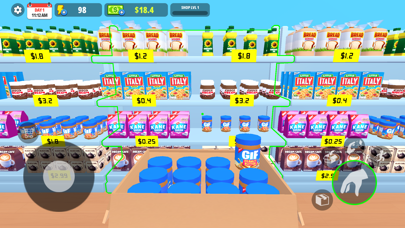
Stock & Organize Shelves
Keep shelves fully stocked and organize products efficiently using your storage room.
Smart Pricing System
Set product prices strategically to maximize profits and attract more customers.
Fast Checkout & Earn Tips
Scan products quickly, manage rush hours, and earn extra tips from satisfied customers.
Hire & Manage Employees
Recruit cashiers, shelvers, stockers, and cleaners to automate and grow your supermarket.
Unlock New Products
Expand your catalog with new product licenses and keep customers happy with variety.
Expand Your Supermarket
Unlock new sections, increase your store size, and turn your small market into a retail empire.
Customize Your Store
Set your own store name and decorate your supermarket with unique themes, colors, and décor.
Utilize Your Storage Room
Store extra inventory, organize stock efficiently, and keep your supermarket shelves filled without running out of products.
Employee Management System
Manage and upgrade your cashiers, cleaners, stockers, and shelvers to improve their speed, efficiency, and overall productivity to grow your supermarket faster.
Seasonal Events & Special Content
Participate in exciting seasonal events, discover limited-time content, and enjoy fresh updates regularly added to the game.
Keep Your Store Clean
Clean dirt and spills to maintain a perfect shopping environment for customers, and upgrade your cleaning tools for faster and more efficient cleaning.
Enjoy an Open World Experience
Explore outside your supermarket freely and enjoy fun side activities, including an interactive Mini Basket Game.
Build your dream grocery store, manage daily operations, and become the ultimate supermarket tycoon in one of the most satisfying store management simulator games!
- Non-Jailbroken/Jailed or Jailbroken iPhone or iPad.
- Sideloadly or alternatives.
- Computer running Windows/macOS/Linux with iTunes installed.
STEP 1: Download the pre-hacked .IPA file from the link above to your computer. To download from the iOSGods App, see our iOSGods App IPA Download Tutorial which includes a video example.
STEP 2: Download Sideloadly and install it on your Windows or Mac.
STEP 3: Open Sideloadly on your computer, connect your iOS device, and wait until your device name appears in Sideloadly.
STEP 4: Once your iDevice is recognized, drag the modded .IPA file you downloaded and drop it into the Sideloadly application.
STEP 5: Enter your Apple Account email, then press “Start.” You’ll then be asked to enter your password. Go ahead and provide the required information.
STEP 6: Wait for Sideloadly to finish sideloading/installing the hacked IPA. If there are issues during installation, please read the note below.
STEP 7: Once the installation is complete and you see the app on your Home Screen, you will need to go to Settings → General → Profiles / VPN & Device Management. Once there, tap on the email you entered from step 6, and then tap on “Trust [email protected]”.
STEP 8: Now go to your Home Screen and open the newly installed app and everything should work fine. You may need to follow further per app instructions inside the hack's popup in-game.
NOTE: iOS/iPadOS 16 and later, you must enable Developer Mode. For free Apple Developer accounts, you will need to repeat this process every 7 days. If you have any questions or problems, read our Sideloadly FAQ section of the topic.




![Virtual Villagers 7 iOS Mod IPA [ Cheats Menu ]](https://is1-ssl.mzstatic.com/image/thumb/Purple221/v4/f1/73/db/f173db9a-cf5b-bedb-7f93-33f7469f8157/AppIcon-0-0-1x_U007emarketing-0-8-0-85-220.png/100x100bb.jpg)


![Among Us! iOS Mod IPA [ ESP Boxes, Lines ]](https://is1-ssl.mzstatic.com/image/thumb/Purple211/v4/57/dc/f8/57dcf861-9c14-e964-6f5b-09f8c4fff8d2/AppIcon-0-0-1x_U007emarketing-0-8-0-85-220.png/100x100bb.jpg)


