Accesso richiesto
Accedi con il tuo account iOSGods per continuare.
Hack Features
- X10 Stats
- Massive Stats
- Weak Enemies
Scarica Crusaders Quest iOS Mod IPA dai link sopra. Tocca il pulsante di installazione e segui le istruzioni per installare questo hack iOS sul tuo iPhone, iPad o Mac con Apple Silicon.
Hai bisogno di altro aiuto? Consulta le nostre Domande frequenti sull'app iOSGods per risposte dettagliate e consigli per la risoluzione dei problemi.
Experience the nostalgic dot-aesthetic of classic RPG right in your hands in this story of adventure
where children become adults and adults become children!
A century after the Apostles' War, a crisis looms over Hasla due to the sudden appearance of a mysterious woman, 'Sylunis', in the Hyro Forest.
As the newly appointed Captain of 'Hero Town', you are the only one who can prevent Sylunis' conspiracy to free the Apostles sealed in the Soulstone.
Assist the apprentice goddess, Sera, save the goddesses and prevent the resurrection of the Apostles!
Experience the pixel action RPG unfolding in Hasla, "Crusaders Quest."
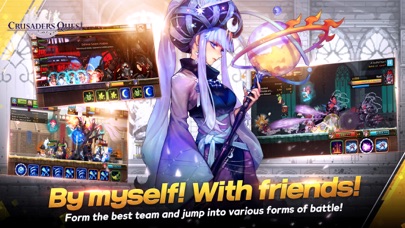
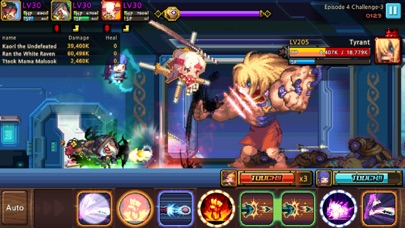
■ Puzzle? Action! Skill Block Match Play
Collect skill blocks and use them together!
Use heroes that create skill synergy to become stronger!
Simple yet strategic battle play
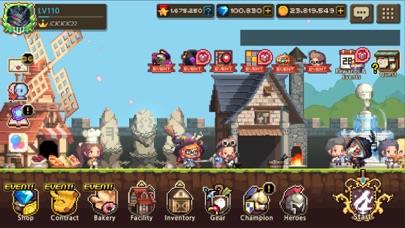
■ Dots, all dots! Retro aesthetic graphics
Loved for nearly a decade, the unique pixel art of Crusader Quest
Constantly pushing the boundaries of what can be expressed each year!
Filled with charming pixel art embodying cuteness, splendor, grandeur, and wit
Even with stunning and captivating illustrations...!
■ Choose and enjoy events and battles in your own style
Zero pressure for guild play! Battle Delegation available!
Gameplay featuring single-player-centric battle contents and events,
Choose and proceed according to your play style
■ A relatively easy-to-collect RPG
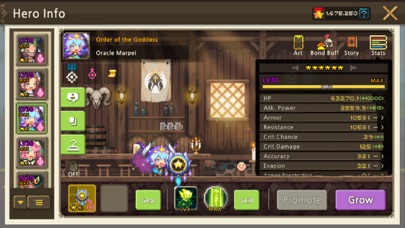
No need for duplicate heroes for hero growth
Paid currency obtainable in Arena every week
Maximum hero growth achievable within a day
■ Familiar events, innovative events
Familiar events like world raid bosses, consecutive boss battles, deal competitions, random team competition
Mini-game events like rhythm games, bread tycoon, maze finding, bingo, fishing
Experimental events like stock market, prize lottery, auction, roguelike dungeon
■ Delivering the latest information through official channels
⊙ Official website: https://cq-official.online/en
⊙ Official Twitter: https://twitter.com/CrusadersQuest
⊙ Official YouTube: https://www.youtube.com/channel/UCnhS12kc_rJiiPtz0kXHtcQ
■ Minimum device specifications
iOS 11 and above / RAM 2GB and above
■ Device app access permission guide
We request the minimum optional permissions required for smooth gameplay.
You can refuse to grant optional access rights, but please understand that this may restrict the use of certain features.
[Optional Access Rights]
- Notifications: Used when receiving push notifications
- Photos/Camera: For attaching screenshots when reporting bugs and inconveniences to the Customer Support Center
[How to change access rights]
Settings > Crusader > Set each access right
- iPhone o iPad non jailbroken/jailed oppure jailbroken.
- Sideloadly o alternative.
- Computer con Windows/macOS/Linux con iTunes installato.
PASSO 1: Scarica il file .IPA pre-modificato dal link sopra sul tuo computer. Per scaricarlo dall'iOSGods App, consulta il nostro Tutorial download IPA dell'iOSGods App, che include un esempio video.
PASSO 2: Scarica Sideloadly e installalo sul tuo Windows o Mac.
PASSO 3: Apri Sideloadly sul tuo computer, collega il tuo dispositivo iOS e attendi finché il nome del dispositivo non appare in Sideloadly.
PASSO 4: Una volta riconosciuto il tuo iDevice, trascina il file .IPA moddato che hai scaricato e rilascialo nell'applicazione Sideloadly.
PASSO 5: Inserisci l'email del tuo Apple Account, poi premi “Start”. Ti verrà quindi chiesto di inserire la password. Procedi e fornisci le informazioni richieste.
PASSO 6: Attendi che Sideloadly completi il sideload/installazione dell'IPA modificata. Se ci sono problemi durante l'installazione, leggi la nota qui sotto.
PASSO 7: Una volta completata l'installazione e vista l'app sulla schermata Home, dovrai andare in Impostazioni → Generali → Profili / Gestione VPN e dispositivi. Una volta lì, tocca l'email inserita al passo 6 e poi tocca “Autorizza [email protected]”.
PASSO 8: Ora vai sulla schermata Home e apri l'app appena installata: tutto dovrebbe funzionare correttamente. Potrebbe essere necessario seguire ulteriori istruzioni specifiche all'interno del popup dell'hack nel gioco.
NOTA: Per iOS/iPadOS 16 e versioni successive, devi attivare la Modalità sviluppatore. Per gli account Apple Developer gratuiti, dovrai ripetere questa procedura ogni 7 giorni. Se hai domande o problemi, leggi la nostra sezione FAQ Sideloadly del topic.