Login necessário
Entre com sua conta iOSGods para continuar.
Entre com sua conta iOSGods para continuar.
Desbloqueie recursos ilimitados em Star2 Random Defense com este mod iOS gratuito, apresentando moedas congeladas e truques premium que permitem dominar cada batalha sem grind. Congele sua comida, prata, essência, éter, ouro, diamantes e energia para manter controle perfeito, ou ative recursos ViP para suprimentos ilimitados que crescem em vez de diminuir.
- Congelar Comida → mantém seu suprimento constante
- Congelar Prata → previne perda de moeda
- Congelar Essência → mantém seu saldo de essência
- Congelar Éter → bloqueia éter no nível atual
- Congelar Ouro → impede que o ouro diminua
- Congelar Diamantes → preserva sua contagem de diamantes
- Congelar Energia → impede que a energia se esgote
ViP
- Ouro Ilimitado → aumentará em vez de diminuir
- Diamantes Ilimitados → aumentarão em vez de diminuir
- Energia Ilimitada → aumentará em vez de diminuir
Este app também vem com iGameGod, oferecendo acesso ao Auto Touch para automatizar tarefas repetitivas, App Speed Manager para ajustar a velocidade do jogo, edição de valores com Memory Engine e outras ferramentas avançadas para jogos iOS.
Baixe Star2 Random Defense(S2RD) iOS Mod IPA dos links acima. Toque no botão de instalação e siga as instruções para instalar este hack iOS no seu iPhone, iPad ou Apple Silicon.
Precisa de mais ajuda? Confira nossas Perguntas frequentes sobre o app iOSGods para respostas detalhadas e dicas de solução de problemas.
Star2 Random Defense: S2RD
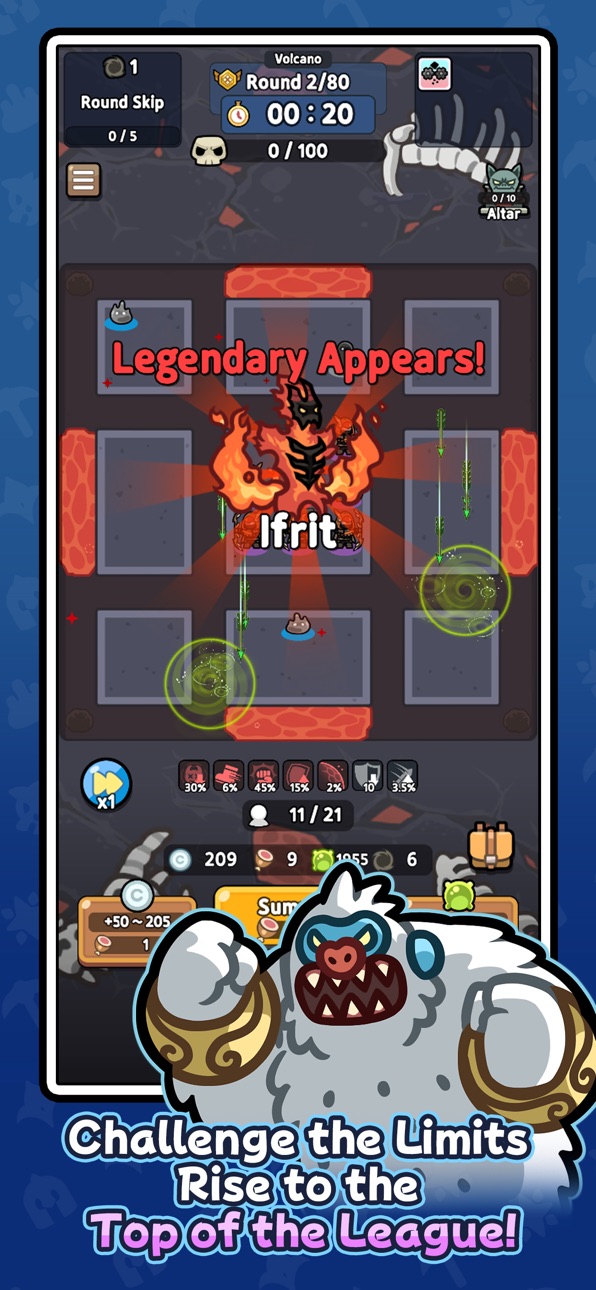
Relive the nostalgia, now in your hands! Crafted by the original creator, this mobile version of the classic random combination defense game is here. Dive into a vertical strategy defense game packed with unpredictable battles and endless strategic possibilities. Feel the thrill where a single choice can turn the tide of victory!
Random Summons and Strategic Choices
Every battle brings completely random heroes! Use limited resources to draw cards and craft the ultimate combination. A single card can shift the battle, and one decision can secure your win. Luck? Strategy? You’ll need both to triumph!
Trait System for Your Unique Build
Create your own playstyle with over 100 unique traits. Every match births a new build! Grow your heroes through a 7-tier system from basic to legendary and unleash overwhelming power.
Diverse Regions, Infinite Challenges
Jungle swamps, desert sandstorms, volcanic lava—each region demands a distinct strategy. With over 88 unique heroes and 200+ distinct cards, no two battles are ever the same.
Why S2RD?
- Thrill of Randomness: The excitement of unpredictable summons!
- Depth of Strategy: Endless combinations with cards and traits.
- Casual Fun: Vertical gameplay, perfect for anytime, anywhere!
With ever-changing combinations and tactics, no battle is ever repeated.
Level up heroes from the lowest tier to legendary through a 7-stage system and create your ultimate combination! Test the limits of luck and strategy with S2RD now. Every match is a new adventure!
※ Purchasing paid items incurs additional charges (including randomized items).
※ Payment amount and method: Subject to the payment amount and method specified for each product.
※ Payments in foreign currency may vary due to exchange rates and fees.
※ In-app purchases are subject to VAT.
[Terms and Conditions]
Capturas © respectivos proprietários · App Store


A iOSGods não é afiliada, endossada nem patrocinada pela Apple Inc., pela Google LLC ou pelos desenvolvedores dos apps listados aqui. Apple, iOS e App Store são marcas da Apple Inc. Android e Google Play são marcas da Google LLC. Todos os demais nomes de apps, ícones, imagens e marcas pertencem aos seus respectivos proprietários.

- iPhone ou iPad sem jailbreak/jailed ou com jailbreak.
- Sideloadly ou alternativas.
- Computador com Windows/macOS/Linux e iTunes instalado.
PASSO 1: Baixe o arquivo .IPA pré-hackeado do link acima para o seu computador. Para baixar pelo iOSGods App, veja nosso Tutorial de download de IPA do iOSGods App, que inclui um exemplo em vídeo.
PASSO 2: Baixe o Sideloadly e instale-o no seu Windows ou Mac.
PASSO 3: Abra o Sideloadly no seu computador, conecte seu dispositivo iOS e aguarde até que o nome do dispositivo apareça no Sideloadly.
PASSO 4: Assim que seu iDevice for reconhecido, arraste o arquivo .IPA modificado que você baixou e solte-o no aplicativo Sideloadly.
PASSO 5: Digite o e-mail da sua Apple Account e pressione “Start”. Em seguida, será solicitada a sua senha. Prossiga e forneça as informações solicitadas.
PASSO 6: Aguarde o Sideloadly finalizar o sideload/instalação do IPA hackeado. Se houver problemas durante a instalação, leia a observação abaixo.
PASSO 7: Quando a instalação estiver concluída e você vir o app na Tela de Início, será necessário acessar Ajustes → Geral → Perfis / Gerenciamento de VPN e Dispositivo. Lá, toque no e-mail que você inseriu no passo 6 e, em seguida, toque em “Confiar em [email protected]”.
PASSO 8: Agora vá para a Tela de Início e abra o app recém-instalado; tudo deve funcionar normalmente. Você pode precisar seguir instruções adicionais específicas no popup do hack dentro do jogo.
OBSERVAÇÃO: No iOS/iPadOS 16 e versões posteriores, você deve ativar o Modo de Desenvolvedor. Para contas Apple Developer gratuitas, será necessário repetir este processo a cada 7 dias. Se tiver dúvidas ou problemas, leia nossa seção de FAQ do Sideloadly no tópico.
Game Name iOS Mod IPA is an action adventure game enhanced with powerful gameplay boosts and quality-of-life improvements. Win battles faster, earn rewards quicker, and enjoy uninterrupted play without ads.
- Unlimited Gold - spend freely to unlock premium content
- Damage Multiplier - deal significantly more damage in combat
- Defense Multiplier - take less damage and survive longer
- Reward Multiplier - earn more loot from every battle
- Max Level - instantly reach the highest player rank
- No Ads - play without interruptions or advertisements
This app also comes with iGameGod, giving you access to Auto Touch to automate repetitive tasks, App Speed Manager for adjustable gameplay speed, Memory Engine value editing, and more powerful iOS game tools.
Baixe Game Name Mod IPA dos links acima. Toque no botão de instalação e siga as instruções para instalar este hack iOS no seu iPhone, iPad ou Apple Silicon.
Precisa de mais ajuda Confira nossas Perguntas frequentes sobre o app iOSGods para respostas detalhadas e dicas de solução de problemas.
----------------------------------------------------------
--------------------------------------------------




![Darts Club iOS Mod IPA [ Debug Menu ]](https://is1-ssl.mzstatic.com/image/thumb/Purple211/v4/20/ca/b5/20cab585-7efb-a015-0ada-7d65148821dd/AppIcon-0-0-1x_U007emarketing-0-8-0-85-220.png/100x100bb.jpg)


