Inicio de sesión requerido
Inicia sesión con tu cuenta de iOSGods para continuar.
Hack Features
- Damage Multiplier
- Defense Multiplier
- No ADS
Descarga Animal Busters : Idle RPG iOS Mod IPA desde los enlaces de arriba. Toca el botón de instalación y sigue las instrucciones para instalar este hack iOS en tu iPhone, iPad o Mac con Apple Silicon.
¿Necesitas más ayuda? Consulta nuestras Preguntas frecuentes de la app iOSGods para respuestas detalladas y consejos de solución de problemas.
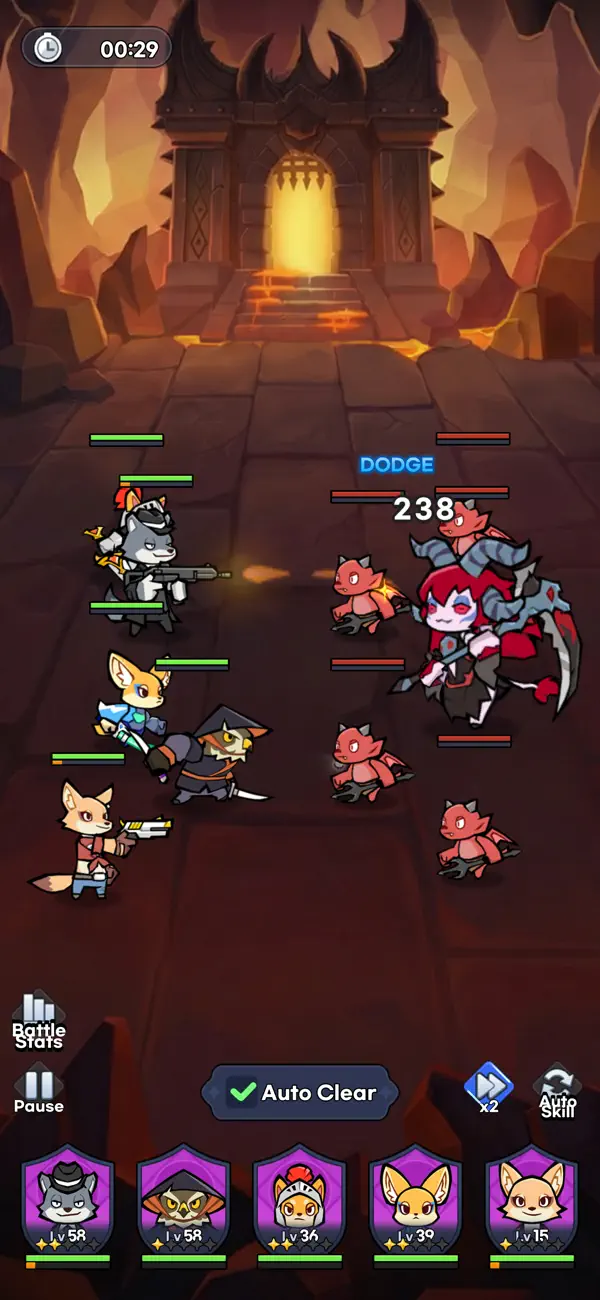
Only the Strongest Animals Survive!
Introducing a survival-of-the-fittest idle RPG!
Step into the world of Animal Busters, where you grow stronger just by letting it run!
■ Auto Growth? Auto Battle!
An upgraded idle RPG with Busters-level battling and growth!
Enjoy a grow-your-characters game with auto-hunting and full auto-battle!
■ Tactical Lineups? A Truly Strategic System!
Experience the fun of a collection RPG! Combine diverse factions of animals
to build the ultimate army and defeat powerful boss monsters!
■ Legendary Gear? Welcome to Field Farming!
Just 10 minutes a day puts legendary weapons in your hands!
Feel the thrill of real farming you can't get from ordinary idle games!
■ Arena Brawls! Real-Time PvP
Claim victory through superior strategies!
The strongest Animal Busters army can be yours!
■ Log In Daily and Watch the Rewards Roll In!
Including events that bring explosive growth just for logging in!
A stress-free idle mobile RPG you can enjoy anytime!
[Optional Access]
The following access is requested upon use. You may still continue using the service without the specific feature even if access is declined.
- Photos/Media/Files: Allows attaching files saved in the device when contacting Support.
[How to Remove Access]
- Settings > Apps > App permissions > App info > App settings > Permissions > Allow or remove access
[Information on Paid Contents and Usage]
※ Probabilistic items are included in the game.
※ Purchasing paid contents will incur additional charges.
- Provider: ⓒ LINE Games Corporation
- Terms of Service and Service Period: Refer to the information provided in-game
(If service period is not shown, the game service end date is to be regarded as the service period)
- Payment amount and method: Refer to the amounts and methods provided for each content in-game
- Content Provision Method: Issued directly to the game account that carried out the purchase or issued to the in-game mailbox
- Information on Refunds: Refer to Articles 29 to 31 of the Terms of Service
- Compensation for damages and handling of complaints: Refer to Articles 32 and 34 of the Terms of Service
- Inquiries: Submitted online through the in-game Support feature
- Terms of Service: https://cs.line.games/policy/store/terms?companyCd=LINE_GAMES&svcCd=STORE&countryCd=GL
- Privacy Policy: https://cs.line.games/policy/store/privacy?companyCd=LINE_GAMES&svcCd=STORE&langCd=en
- E-mail: [email protected]
ⓒ LINE Games Corporation. ⓒ SUPERAWESOME Inc. All Rights Reserved.
- iPhone o iPad con o sin Jailbreak.
- Sideloadly u otras alternativas.
- Ordenador con Windows/macOS/Linux e iTunes instalado.
PASO 1: Descargue el archivo .IPA pre-modificado desde el enlace de arriba a su ordenador. Para descargarlo desde la iOSGods App, consulte nuestro Tutorial de descarga del IPA desde la iOSGods App, que incluye un ejemplo en vídeo.
PASO 2: Descargue Sideloadly e instálelo en su Windows o Mac.
PASO 3: Abra Sideloadly en su ordenador, conecte su dispositivo iOS y espere hasta que el nombre del dispositivo aparezca en Sideloadly.
PASO 4: Una vez que su iDevice sea reconocido, arrastre el archivo .IPA modificado que descargó y suéltelo en la aplicación Sideloadly.
PASO 5: Introduzca el correo electrónico de su Apple Account y, a continuación, pulse «Start». Le pedirá que introduzca su contraseña. Proporcione la información solicitada.
PASO 6: Espere a que Sideloadly termine de hacer sideload/instalar el IPA modificado. Si surgen problemas durante la instalación, por favor lea la nota a continuación.
PASO 7: Una vez completada la instalación y al ver la app en la pantalla de inicio, deberá ir a Ajustes → General → Perfiles / VPN y Gestión de Dispositivos. Una vez allí, toque el correo electrónico que introdujo en el paso 6 y, después, toque en «Confiar en [email protected]».
PASO 8: Ahora vaya a la pantalla de inicio y abra la app recién instalada; todo debería funcionar correctamente. Es posible que tenga que seguir instrucciones adicionales específicas de cada app dentro del popup del hack en el juego.
NOTA: En iOS/iPadOS 16 y posteriores, debe activar el Modo Desarrollador. Para cuentas gratuitas de Apple Developer, deberá repetir este proceso cada 7 días. Si tiene alguna pregunta o problema, lea nuestra sección de Preguntas Frecuentes de Sideloadly del tema.