تسجيل الدخول مطلوب
سجّل الدخول بحساب iOSGods للمتابعة.
- Set Immortal
- End game (turn on and then instantly off)
! This is an online game
Use this hack at your own risk! It should be safe for now
قم بتنزيل Beam of Magic – Roguelike RPG Hack modded IPA من الروابط أعلاه. اضغط على زر التثبيت واتبع التعليمات لتثبيت هذا التعديل لـ iOS على iPhone أو iPad أو Apple Silicon.
هل تحتاج إلى مزيد من المساعدة؟ راجع الأسئلة الشائعة لتطبيق iOSGods للحصول على إجابات مفصلة ونصائح لاستكشاف الأخطاء.
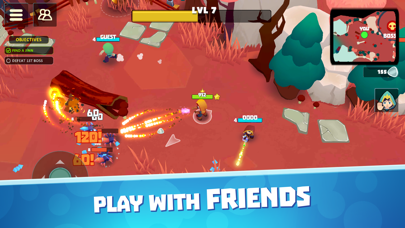
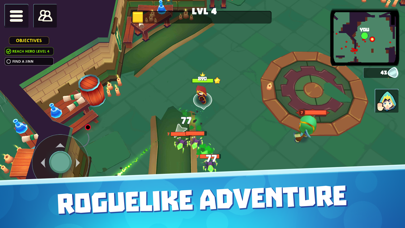
Beam of Magic is a multiplayer RPG game in which you explore dungeons and open-world locations, destroy a bunch of enemies, and fight bosses. You can play this exciting RPG multiplayer alone or in an online co-op with friends.
Magic Shooter Features:
- Huge map – fight against hordes of enemies in PvE mode on big locations. We are updating maps all the time, making gameplay more diverse and keeping you on your toes.
- Monsters and beasts – learn how to defeat scary creatures living in the dungeons and deep inside the forest. There’s going to be more and more of them! If you are on your own, things might get desperate. Invite friends to join the magic adventure and get to know this arcade hunter together.
- Level-up system – level up your hero over the course of the game. Choose one of three random perks that will define your tactics in this exciting RPG adventure.
- Challenging bosses – enjoy all the advantages of this magic shooter. Destroy big bosses and get a massive reward.
- Online multiplayer – play with other players or with your friends. Battle multiplayer mode can bring your gameplay to new heights!
Looking for dope roguelike games? Stop right now, you’ve just found the game you’ve been looking for! Try it out online!
Beam of Magic is a top-down age-of-knight adventure with a choice of 3 random skills per level up. As you progress through the map, you will discover several different sections with multiple bosses. Each location brings a new inventory and equipment. Stronger enemies will spice up your progress in this PvE shooter.
Killing monsters together with other players makes it more fun. Action-adventure games online like this won’t let you get bored. Ready to impress everyone with your skills?
Beam of Magic combines the best of fantasy games, magic RPG online, as well as dungeon games. Your way won’t be easy - follow it through multiple dungeons filled with monsters and treasure.
Join thousands of players who have already started playing Beam of Magic - one of the best magic games out there. We continue to work on the gameplay, adding new locations and levels to keep it nice and fun.
Do you like PvE online, multiplayers, battle simulators, or games similar to “Enter the Gungeon”? Try Beam of Magic today to add a new title to your list of favorite games!
- iPhone أو iPad بجيلبريك أو بدون جيلبريك.
- Sideloadly أو بدائلها.
- كمبيوتر يعمل بنظام Windows/macOS/Linux مع تثبيت iTunes.
الخطوة 1: قم بتنزيل ملف .IPA المعدّل مسبقًا من الرابط أعلاه إلى الكمبيوتر الخاص بك. للتنزيل من تطبيق iOSGods App، اطلع على دليل تنزيل IPA من تطبيق iOSGods App الذي يتضمن مثالًا بالفيديو.
الخطوة 2: قم بتنزيل Sideloadly وتثبيته على جهاز Windows أو Mac.
الخطوة 3: افتح Sideloadly على الكمبيوتر، ووصّل جهاز iOS الخاص بك، وانتظر حتى يظهر اسم جهازك داخل Sideloadly.
الخطوة 4: بمجرد التعرّف على جهاز iDevice الخاص بك، اسحب ملف .IPA المعدّل الذي قمت بتنزيله وأفلِته داخل تطبيق Sideloadly.
الخطوة 5: أدخل البريد الإلكتروني لحساب Apple Account الخاص بك، ثم اضغط على «Start». سيُطلب منك بعد ذلك إدخال كلمة المرور. تابع وأدخل المعلومات المطلوبة.
الخطوة 6: انتظر حتى ينتهي Sideloadly من تحميل/تثبيت ملف IPA المعدّل. في حال واجهت أي مشاكل أثناء التثبيت، يرجى قراءة الملاحظة أدناه.
الخطوة 7: بعد اكتمال التثبيت ورؤية التطبيق على الشاشة الرئيسية، انتقل إلى Settings → General → Profiles / VPN & Device Management. ثم اضغط على البريد الإلكتروني الذي أدخلته في الخطوة 6، ثم اضغط على «الوثوق بـ [email protected]».
الخطوة 8: الآن انتقل إلى الشاشة الرئيسية وافتح التطبيق الذي تم تثبيته للتو وسيعمل كل شيء بشكل صحيح. قد تحتاج إلى اتباع تعليمات إضافية خاصة بكل تطبيق داخل النافذة المنبثقة للتعديل أثناء اللعب.
ملاحظة: بدءًا من iOS/iPadOS 16 وما بعده، يجب تفعيل وضع المطور (Developer Mode). بالنسبة لحسابات Apple Developer المجانية، ستحتاج إلى تكرار هذه العملية كل 7 أيام. إذا كانت لديك أي أسئلة أو مشاكل، يرجى قراءة قسم الأسئلة الشائعة حول Sideloadly في الموضوع.