Inicio de sesión requerido
Inicia sesión con tu cuenta de iOSGods para continuar.
Inicia sesión con tu cuenta de iOSGods para continuar.
La inmortalidad y el desbloqueo instantáneo de progresión de final de juego abren nuevas posibilidades en Beam of Magic, un hack roguelike RPG para iOS que transforma tu aventura de exploración de mazmorras. Este mod IPA te otorga una resistencia divina y la capacidad de saltar al contenido de final de juego, permitiéndote experimentar la acción multijugador en tus propios términos.
- Establecer Inmortal → volverse invulnerable al daño enemigo
- Final de juego (activar y luego desactivar instantáneamente) → progresar instantáneamente al contenido de final de juego
! Este es un juego en línea
¡Usa este hack bajo tu propio riesgo! Debería ser seguro por ahora
Esta app también incluye iGameGod, que te ofrece acceso a Auto Touch para automatizar tareas repetitivas, App Speed Manager para ajustar la velocidad del juego, edición de valores con Memory Engine y más potentes herramientas para juegos de iOS.
Descarga Beam of Magic – Roguelike RPG Hack modded IPA desde los enlaces de arriba. Toca el botón de instalación y sigue las instrucciones para instalar este hack iOS en tu iPhone, iPad o Mac con Apple Silicon.
¿Necesitas más ayuda? Consulta nuestras Preguntas frecuentes de la app iOSGods para respuestas detalladas y consejos de solución de problemas.
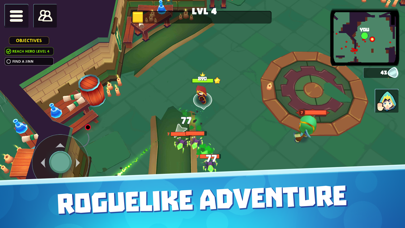
Beam of Magic es un juego de rol multijugador en el que exploras mazmorras y lugares de mundo abierto, destruyes un montón de enemigos y luchas contra jefes. Puedes jugar este emocionante juego multijugador solo o en línea con amigos.
Características de Tirador Mágico:
- Mapa enorme – lucha contra las hordas de enemigos en el modo PvE en grandes espacios. Actualizamos mapas todo el tiempo, haciendo que el juego sea más diverso y manteniéndote alerta.
- Monstruos y bestias – aprende a derrotar a las aterradoras criaturas que viven en las mazmorras y en las profundidades del bosque. ¡Habrá más y más! Si estás solo, las cosas pueden volverse desesperantes. Invita a tus amigos a unirse a esta mágica aventura y conocer juntos este emocionante juego de arcade.
- Sistema de subir de nivel – sube de nivel a tu héroe a lo largo del juego. Elige uno de las tres mejoras aleatorias que definirán tus tácticas en esta emocionante aventura de rol.
- Jefes desafiantes – disfruta de todas las ventajas de este mágico juego de disparos. Destruye a los grandes jefes y obtén una jugosa recompensa.
- Multijugador en línea – juega con otros jugadores o con tus amigos. ¡El modo multijugador de batalla puede llevar tu juego a nuevas alturas!
¿Buscas juegos roguelike cautivadores? ¡Detente ahora mismo, pues acabas de encontrar el juego que estabas buscando! ¡Pruébalo en línea!
Beam of Magic es una aventura de la era de los caballeros de principio a fin, con una selección de 3 habilidades aleatorias por nivel. A medida que vayas avanzando en el mapa, descubrirás varias secciones diferentes con múltiples jefes. Cada ubicación trae un nuevo inventario y equipamiento. Los enemigos más fuertes darán vida a tu progreso en este juego de disparos PvE.
Matar monstruos junto con otros jugadores lo hace más divertido. Los juegos de acción y aventuras en línea como este no te permitirán aburrirte. ¿Listo para impresionar a todos con tus habilidades?
Beam of Magic combina lo mejor de los juegos de fantasía, los juegos de rol mágicos en línea, así como los juegos de mazmorras. Tu camino no será fácil - síguelo a través de múltiples mazmorras llenas de monstruos y tesoros.
Únete a miles de jugadores que ya han comenzado a jugar a Beam of Magic - uno de los mejores juegos de magia que existen. Continuamos trabajando en el juego, agregando nuevas ubicaciones y niveles para que sea agradable y divertido.
¿Te gusta PvE en línea, multijugador, simuladores de batalla o juegos similares a ""Enter the Gungeon""? ¡Pues prueba Beam of Magic hoy mismo para agregar un nuevo título a tu lista de juegos favoritos!
- iPhone o iPad con o sin Jailbreak.
- Sideloadly u otras alternativas.
- Ordenador con Windows/macOS/Linux e iTunes instalado.
PASO 1: Descargue el archivo .IPA pre-modificado desde el enlace de arriba a su ordenador. Para descargarlo desde la iOSGods App, consulte nuestro Tutorial de descarga del IPA desde la iOSGods App, que incluye un ejemplo en vídeo.
PASO 2: Descargue Sideloadly e instálelo en su Windows o Mac.
PASO 3: Abra Sideloadly en su ordenador, conecte su dispositivo iOS y espere hasta que el nombre del dispositivo aparezca en Sideloadly.
PASO 4: Una vez que su iDevice sea reconocido, arrastre el archivo .IPA modificado que descargó y suéltelo en la aplicación Sideloadly.
PASO 5: Introduzca el correo electrónico de su Apple Account y, a continuación, pulse «Start». Le pedirá que introduzca su contraseña. Proporcione la información solicitada.
PASO 6: Espere a que Sideloadly termine de hacer sideload/instalar el IPA modificado. Si surgen problemas durante la instalación, por favor lea la nota a continuación.
PASO 7: Una vez completada la instalación y al ver la app en la pantalla de inicio, deberá ir a Ajustes → General → Perfiles / VPN y Gestión de Dispositivos. Una vez allí, toque el correo electrónico que introdujo en el paso 6 y, después, toque en «Confiar en [email protected]».
PASO 8: Ahora vaya a la pantalla de inicio y abra la app recién instalada; todo debería funcionar correctamente. Es posible que tenga que seguir instrucciones adicionales específicas de cada app dentro del popup del hack en el juego.
NOTA: En iOS/iPadOS 16 y posteriores, debe activar el Modo Desarrollador. Para cuentas gratuitas de Apple Developer, deberá repetir este proceso cada 7 días. Si tiene alguna pregunta o problema, lea nuestra sección de Preguntas Frecuentes de Sideloadly del tema.