ต้องเข้าสู่ระบบ
เข้าสู่ระบบด้วยบัญชี iOSGods เพื่อดำเนินการต่อ
Hack Features:
- x1.25 AttackSpeed
ดาวน์โหลด TALION Hack modded IPA จากลิงก์ด้านบน แตะปุ่มติดตั้งและทำตามคำแนะนำบนหน้าจอเพื่อติดตั้งแฮ็กแอป iOS นี้บน iPhone, iPad หรือ Apple Silicon
ต้องการความช่วยเหลือเพิ่มเติม? ดู คำถามที่พบบ่อยของแอป iOSGods สำหรับคำตอบโดยละเอียดและเคล็ดลับการแก้ไขปัญหา
■About the Game■
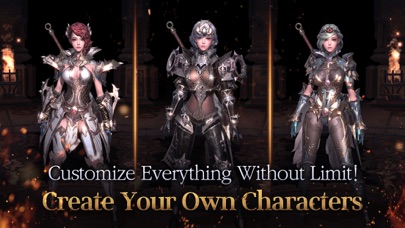
▶ Customize your characters!
Create character designs that are uniquely you!
Design your characters however you want, from adorable to charismatic!
Express yourself through character gestures. There's even dancing!
▶ Accessories aren't just there for looks! They also boost your Combat Power!
Spruce up your characters with Costumes, Guardian Fairies, Rides, and Wings!
- Rides: Explore the world of TALION with unique Rides designed after different creatures, such as ostriches, rays, etc.
- Costumes: Try on various weapon and outfit Costumes for that perfect style match, from traditional ones to exotic!
- Wings: Wings add a finishing touch to your look! Choose a set of wings that suit you best!
- Guardian Fairies: Set out on a journey with these adorable yet reliable combat assistants!
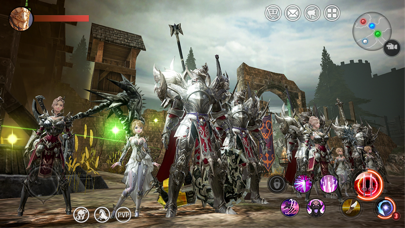
▶ Become part of a guild and enjoy all that it has to offer!
Engage in thrilling Guild Raids together with your guild members!
Fight against other guilds in Guild Battle and bring honor to your guild!
▶ Take on mighty bosses!
Take down powerful bosses alongside your Alliance members!
Encounter all sorts of creatures including field bosses and the Great Gate's Planerin!
▶ Fend off the powerful Planerin!
Reclaim the Great Gate from this massive dragon!
Join forces with your Alliance members and bring peace to the world of TALION!
▣ Follow us on official communities to get latest news and updates ▣
▶ Facebook: https://www.facebook.com/TalionNA
▶ Youtube: https://www.youtube.com/talionGV
▶ Discord: https://discord.gg/aDbVVuX
* Minimum requirements : iPhone 7, OS 10.0 or later
** This game is available in 한국어, English, 日本語, 中文简体, 中文繁體, Deutsch, Français, Português, Русский and ไทย
** There may be additional costs when trying to obtain certain items.
▶ Permissions
The following permissions are requested to allow you access to the listed in-game features.
[Optional Permissions]
- CAMERA: Permission is required to take photos in-game.
- PHOTOS: Permission is required to upload photos in-game.
- NOTIFICATIONS: Permission is required to receive push notifications from the game.
* Optional permissions are not required to play. However, disabling them will restrict access to related features.
▶ How to Revoke Permissions
You can reset or revoke permissions using the following steps:
[Manage Privacy Permissions]
Open Settings > Privacy > Select a permissions category > Allow or deny access to specific apps
[Manage App Permissions]
Open Settings > Scroll down to the list of apps > Select app > Allow or deny access to individual permissions
* Com2uS Holdings Official Website : https://www.withhive.com
* Com2uS Holdings Customer Support : https://m.withhive.com/customer/inquire
Terms of Service: http://terms.withhive.com/terms/policy/view/M3#T1
Privacy Policy: http://terms.withhive.com/terms/policy/view/M3#T3
- iPhone หรือ iPad ที่ไม่ได้เจลเบรก/ไม่ได้เจลเบรก หรือเจลเบรกแล้ว
- Sideloadly หรือทางเลือกอื่น
- คอมพิวเตอร์ที่ใช้ Windows/macOS/Linux และติดตั้ง iTunes ไว้
ขั้นตอนที่ 1: ดาวน์โหลดไฟล์ .IPA ที่แฮกไว้ล่วงหน้าจากลิงก์ด้านบนลงในคอมพิวเตอร์ของคุณ หากต้องการดาวน์โหลดจากแอป iOSGods โปรดดู วิธีดาวน์โหลด IPA ในแอป iOSGods ซึ่งมีตัวอย่างวิดีโอประกอบ
ขั้นตอนที่ 2: ดาวน์โหลด Sideloadly แล้วติดตั้งบน Windows หรือ Mac ของคุณ
ขั้นตอนที่ 3: เปิด Sideloadly บนคอมพิวเตอร์ เชื่อมต่ออุปกรณ์ iOS แล้วรอจนกว่าชื่ออุปกรณ์ของคุณจะปรากฏใน Sideloadly
ขั้นตอนที่ 4: เมื่อ iDevice ของคุณถูกตรวจพบแล้ว ให้ลากไฟล์ .IPA ที่ม็อดมาวางลงในโปรแกรม Sideloadly
ขั้นตอนที่ 5: กรอกอีเมล Apple Account ของคุณ จากนั้นกด "Start" ระบบจะถามรหัสผ่าน กรอกข้อมูลที่จำเป็นให้เรียบร้อย
ขั้นตอนที่ 6: รอจนกว่า Sideloadly จะ sideload/ติดตั้งไฟล์ IPA ที่แฮกเสร็จ หากเกิดปัญหาระหว่างติดตั้ง โปรดอ่านหมายเหตุด้านล่าง
ขั้นตอนที่ 7: เมื่อการติดตั้งเสร็จสิ้นและเห็นแอปบนหน้าจอหลักแล้ว ให้ไปที่ การตั้งค่า → ทั่วไป → โปรไฟล์ / VPN และการจัดการอุปกรณ์ จากนั้นแตะที่อีเมลที่คุณกรอกในขั้นตอนที่ 6 แล้วแตะ "เชื่อถือ [email protected]"
ขั้นตอนที่ 8: จากนั้นไปที่หน้าจอหลักและเปิดแอปที่ติดตั้งใหม่ ทุกอย่างควรทำงานได้ปกติ คุณอาจต้องทำตามคำแนะนำเพิ่มเติมเฉพาะแอปในป๊อปอัปของม็อดในเกม
หมายเหตุ: สำหรับ iOS/iPadOS 16 ขึ้นไป คุณต้อง เปิดโหมดนักพัฒนา (Developer Mode) สำหรับบัญชี Apple Developer แบบฟรี คุณต้องทำขั้นตอนนี้ซ้ำทุก 7 วัน หากมีคำถามหรือพบปัญหา โปรดอ่าน หัวข้อ FAQ ของ Sideloadly ในกระทู้