Cần đăng nhập
Đăng nhập bằng tài khoản iOSGods để tiếp tục.
Đăng nhập bằng tài khoản iOSGods để tiếp tục.
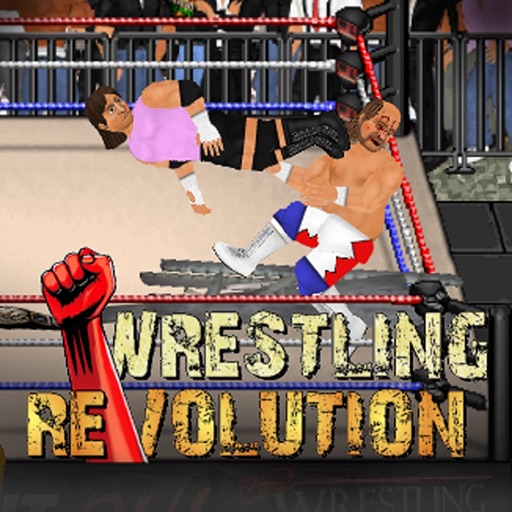
Mở khóa iAP miễn phí nội dung cao cấp mà không cần thanh toán trong Wrestling Revolution iOS Mod IPA này, cho phép bạn truy cập trạng thái Pro và tất cả các chế độ sự nghiệp ngay lập tức. Xây dựng đế chế đấu vật của bạn với 400 đô vật và 9 công ty với mọi tính năng có sẵn từ đầu.
- iAP Miễn Phí (Mua Hàng Trong Ứng Dụng) → mở khóa nội dung cao cấp mà không cần thanh toán
Ứng dụng này cũng đi kèm với iGameGod, cho phép bạn truy cập Auto Touch để tự động hóa các thao tác lặp lại, App Speed Manager để điều chỉnh tốc độ chơi game, chỉnh sửa giá trị bằng Memory Engine, và nhiều công cụ mạnh mẽ khác cho game iOS.
Tải Wrestling Revolution iOS Mod IPA từ các liên kết ở trên. Nhấn nút cài đặt và làm theo hướng dẫn để cài bản hack iOS lên iPhone, iPad hoặc Apple Silicon.
Cần thêm trợ giúp? Hãy xem Câu hỏi thường gặp ứng dụng iOSGods để có câu trả lời chi tiết và mẹo khắc phục sự cố.
For the first time in 2D, start your own career either side of the curtain - with wrestling and booking modes available in one epic game! Create your own star and embark on an endless career full of possibilities, as you attempt to make all the right moves backstage as well as in the ring. Lose yourself in a gigantic universe of 400 wrestlers spread across 9 different promotions - and as many of them in the ring as your device can handle!
When you want to get serious, upgrade to "Pro" status to enjoy each career mode at its best - starting with anyone, anywhere. You can also make the world your own by saving your changes to all characters and pitting them against each other in "Exhibitions" where YOU make the rules!
BUTTON CONTROLS
Please play through the tutorial for full instructions.
A = Attack (with a direction to aim high, without to aim low)
G = Grapple
R = Run
P = Pick up / Drop (with a direction to throw)
T = Taunt / Pin / Referee duties
* To set fire to a handheld weapon, press the R and P buttons simultaneously next to one on the ground. This torch can then be used to set fire to a larger item using the same command.
TOUCH CONTROLS
- TOUCH anywhere in the arena to walk towards it.
- SWIPE to run or trigger moves.
- TAP your opponent to attack that part of their body.
- PINCH to grab or pick-up.
- PART your fingers to taunt, pin, or cancel an action.
- Touch the clock to PAUSE the game, and then the arrow to EXIT.
MENU CONTROLS
- Touch either side of a value or box to browse its contents left or right.
- When selecting characters, touching their slot once will display their stats and touching again will proceed to access them. Touch the company logo to choose a different roster.
- Hold your finger over a character slot to move it and switch with another. Move it to the company logo to switch rosters.
- At the calendar screen, touch any date to view its contents. Touch your character to edit them, touch the stats to train them, touch the company logo to view the whole roster, touch the match title to see an exact description of the rules.
- When setting up an exhibition, touch a character to replace them and touch the match title to change the rules. From that screen, touch the table icon to add weapons and touch the ring icon to edit the arena.
- Touch any speech bubbles to speed up conversations.
Ảnh chụp © chủ sở hữu tương ứng · App Store


iOSGods không liên kết, không được chứng thực hay tài trợ bởi Apple Inc., Google LLC hoặc các nhà phát triển của những ứng dụng được liệt kê ở đây. Apple, iOS và App Store là thương hiệu của Apple Inc. Android và Google Play là thương hiệu của Google LLC. Mọi tên ứng dụng, biểu tượng, hình ảnh và thương hiệu khác đều thuộc về chủ sở hữu tương ứng.
- iPhone hoặc iPad chưa jailbreak/đã đóng hoặc đã jailbreak.
- Sideloadly hoặc các lựa chọn thay thế.
- Máy tính chạy Windows/macOS/Linux đã cài iTunes.
BƯỚC 1: Tải tệp .IPA đã được hack sẵn từ liên kết phía trên về máy tính của bạn. Để tải từ iOSGods App, hãy xem Hướng dẫn tải IPA bằng iOSGods App của chúng tôi, có kèm ví dụ bằng video.
BƯỚC 2: Tải Sideloadly và cài đặt trên Windows hoặc Mac của bạn.
BƯỚC 3: Mở Sideloadly trên máy tính, kết nối thiết bị iOS của bạn và chờ cho đến khi tên thiết bị hiển thị trong Sideloadly.
BƯỚC 4: Khi thiết bị iOS của bạn đã được nhận diện, hãy kéo tệp .IPA đã chỉnh sửa mà bạn tải về và thả vào ứng dụng Sideloadly.
BƯỚC 5: Nhập email Apple Account của bạn, sau đó nhấn "Start." Bạn sẽ được yêu cầu nhập mật khẩu. Hãy cung cấp các thông tin cần thiết.
BƯỚC 6: Chờ Sideloadly hoàn tất quá trình sideload/cài đặt tệp IPA đã hack. Nếu gặp sự cố trong quá trình cài đặt, vui lòng đọc lưu ý bên dưới.
BƯỚC 7: Khi cài đặt hoàn tất và bạn thấy ứng dụng trên Màn hình chính, bạn cần truy cập Cài đặt → Cài đặt chung → Hồ sơ / VPN & Quản lý thiết bị. Tại đó, nhấn vào email bạn đã nhập ở bước 6, rồi nhấn "Tin cậy [email protected]".
BƯỚC 8: Bây giờ hãy về Màn hình chính và mở ứng dụng vừa cài đặt, mọi thứ sẽ hoạt động bình thường. Bạn có thể cần làm theo hướng dẫn riêng của từng ứng dụng trong cửa sổ popup của bản hack trong game.
LƯU Ý: Trên iOS/iPadOS 16 trở lên, bạn phải bật Chế độ nhà phát triển. Với tài khoản Apple Developer miễn phí, bạn sẽ cần lặp lại quy trình này mỗi 7 ngày. Nếu bạn có thắc mắc hoặc gặp sự cố, hãy đọc mục FAQ về Sideloadly trong chủ đề của chúng tôi.
Game Name iOS Mod IPA is an action adventure game enhanced with powerful gameplay boosts and quality-of-life improvements. Win battles faster, earn rewards quicker, and enjoy uninterrupted play without ads.
- Unlimited Gold - spend freely to unlock premium content
- Damage Multiplier - deal significantly more damage in combat
- Defense Multiplier - take less damage and survive longer
- Reward Multiplier - earn more loot from every battle
- Max Level - instantly reach the highest player rank
- No Ads - play without interruptions or advertisements
This app also comes with iGameGod, giving you access to Auto Touch to automate repetitive tasks, App Speed Manager for adjustable gameplay speed, Memory Engine value editing, and more powerful iOS game tools.
Tải Game Name Mod IPA từ các liên kết ở trên. Nhấn nút cài đặt và làm theo hướng dẫn để cài bản hack iOS lên iPhone, iPad hoặc Apple Silicon.
Cần thêm trợ giúp Hãy xem Câu hỏi thường gặp ứng dụng iOSGods để có câu trả lời chi tiết và mẹo khắc phục sự cố.
----------------------------------------------------------
--------------------------------------------------


