تسجيل الدخول مطلوب
سجّل الدخول بحساب iOSGods للمتابعة.
سجّل الدخول بحساب iOSGods للمتابعة.
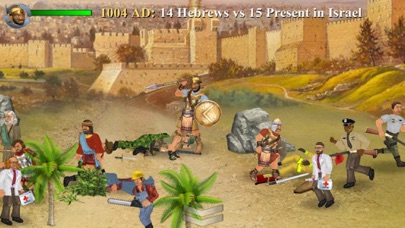
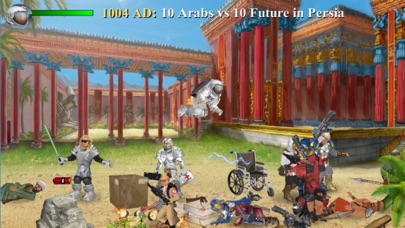
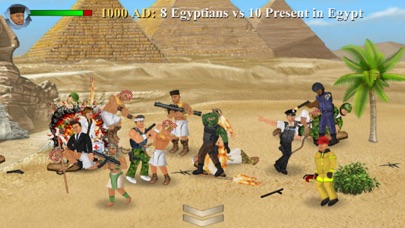
Back Wars iOS Mod IPA هي لعبة استراتيجية السفر عبر الزمن حيث تقود مقاومة عالمية ضد جيش من المستقبل، وتقود مئات المحاربين عبر معارك تفاعلية بالكامل. يفتح هذا التهكير المجاني عمليات الشراء المدفوعة داخل التطبيق، مما يتيح لك ترقية وتخصيص تجربتك دون إنفاق أموال حقيقية.
- PREMIUM (Free iAP) → فتح الترقيات المدفوعة مجاناً
يأتي هذا التطبيق أيضًا مع iGameGod، مما يتيح لك الوصول إلى Auto Touch لأتمتة المهام المتكررة، وApp Speed Manager لضبط سرعة اللعب، وتعديل القيم عبر Memory Engine، والمزيد من أدوات ألعاب iOS القوية.
قم بتنزيل Back Wars iOS Mod IPA من الروابط أعلاه. اضغط على زر التثبيت واتبع التعليمات لتثبيت هذا التعديل لـ iOS على iPhone أو iPad أو Apple Silicon.
هل تحتاج إلى مزيد من المساعدة؟ راجع الأسئلة الشائعة لتطبيق iOSGods للحصول على إجابات مفصلة ونصائح لاستكشاف الأخطاء.
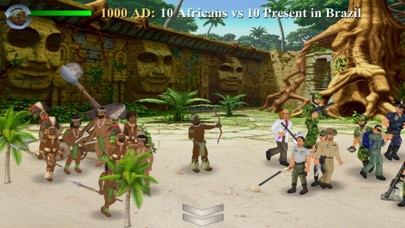
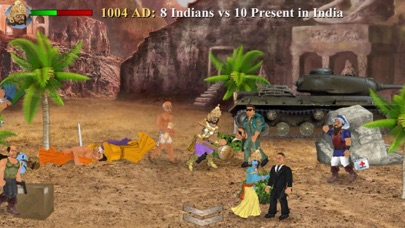
When an army travels back in time to rule the world 1,000 years in advance, they get more than they bargained for from their primitive counterparts! Lead the resistance with hundreds of warriors from different cultures all over the world. Focus on one individual or step back to command an entire army at your fingertips. Combining world-dominating strategy with fully interactive battles, this game offers the best of both worlds! And just when you think it's over, history might just repeat itself...
UPGRADES
The game is mostly free to play, but you can upgrade to take control of your experience - choosing which side and how much territory to start with. You can also blow off steam with fantasy battles between any 2 cultures - and as many warriors as your device can handle! For what it's worth, you can also edit every character in the world - but please note that this game uses up to 1,000 of them that are regularly replaced.
CONTROLS
When controlling a specific character, this game offers either the "Classic" 1-handed control system or "Dual Wield" where each hand is controlled separately. If you are not already familiar with these from previous games in the series, you can pause the action at any time by hitting the dateline and then study the "Controls" guide. Also look out for in-game hints from scrolls or books that you can read.
In this game, you can change which member of the team you are controlling at any time by either tapping the health meter or literally pointing to them on the battlefield. By tapping the arrows at the bottom of the screen, you can also activate "Commander" mode where you step back and direct any active member of your team by simply swiping from their location to another. Whether you intend them to relocate, fight an enemy, or pick up an object, they will try to make sense of your instructions. But please bear in mind that they can only do so at their convenience and may have other priorities!
Whatever device or control method you are using, you can always zoom in or out by pinching at the centre of the screen.
MAP
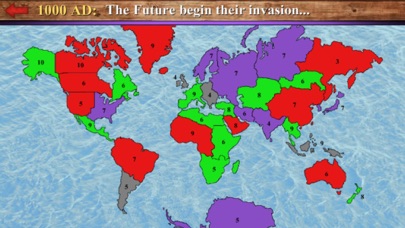
The main "Campaign" game mode requires you to increase your territory by moving units from one area to any connected one. You can either "fortify" an existing territory or attempt to seize a rival territory. Note that only 50% of the units in a territory will be available to travel - which necessarily makes it harder to invade than it is to defend.
The population of any inhabited territory may grow after each round, so it is important to control as many as possible. Notice that units will also gradually heal over time, so it is a good idea to work with different locations each turn.
PERFORMANCE
Please note that this is the largest scale game I have made yet, and may require a high-end device to run at 100%. Consider keeping the "Population" low to reduce the number of characters on screen, or tone down other features in the "Display" options.
I regret there is more to this game than I could ever explain here, so I hope you enjoy figuring some things out for yourself!
- iPhone أو iPad بجيلبريك أو بدون جيلبريك.
- Sideloadly أو بدائلها.
- كمبيوتر يعمل بنظام Windows/macOS/Linux مع تثبيت iTunes.
الخطوة 1: قم بتنزيل ملف .IPA المعدّل مسبقًا من الرابط أعلاه إلى الكمبيوتر الخاص بك. للتنزيل من تطبيق iOSGods App، اطلع على دليل تنزيل IPA من تطبيق iOSGods App الذي يتضمن مثالًا بالفيديو.
الخطوة 2: قم بتنزيل Sideloadly وتثبيته على جهاز Windows أو Mac.
الخطوة 3: افتح Sideloadly على الكمبيوتر، ووصّل جهاز iOS الخاص بك، وانتظر حتى يظهر اسم جهازك داخل Sideloadly.
الخطوة 4: بمجرد التعرّف على جهاز iDevice الخاص بك، اسحب ملف .IPA المعدّل الذي قمت بتنزيله وأفلِته داخل تطبيق Sideloadly.
الخطوة 5: أدخل البريد الإلكتروني لحساب Apple Account الخاص بك، ثم اضغط على «Start». سيُطلب منك بعد ذلك إدخال كلمة المرور. تابع وأدخل المعلومات المطلوبة.
الخطوة 6: انتظر حتى ينتهي Sideloadly من تحميل/تثبيت ملف IPA المعدّل. في حال واجهت أي مشاكل أثناء التثبيت، يرجى قراءة الملاحظة أدناه.
الخطوة 7: بعد اكتمال التثبيت ورؤية التطبيق على الشاشة الرئيسية، انتقل إلى Settings → General → Profiles / VPN & Device Management. ثم اضغط على البريد الإلكتروني الذي أدخلته في الخطوة 6، ثم اضغط على «الوثوق بـ [email protected]».
الخطوة 8: الآن انتقل إلى الشاشة الرئيسية وافتح التطبيق الذي تم تثبيته للتو وسيعمل كل شيء بشكل صحيح. قد تحتاج إلى اتباع تعليمات إضافية خاصة بكل تطبيق داخل النافذة المنبثقة للتعديل أثناء اللعب.
ملاحظة: بدءًا من iOS/iPadOS 16 وما بعده، يجب تفعيل وضع المطور (Developer Mode). بالنسبة لحسابات Apple Developer المجانية، ستحتاج إلى تكرار هذه العملية كل 7 أيام. إذا كانت لديك أي أسئلة أو مشاكل، يرجى قراءة قسم الأسئلة الشائعة حول Sideloadly في الموضوع.








![[The Battle Cats JP] にゃんこ大戦争 iOS Mod IPA](https://is1-ssl.mzstatic.com/image/thumb/Purple221/v4/d5/5d/5e/d55d5ecc-9bbd-3446-2092-56eef81db097/AppIcon-0-0-1x_U007epad-0-1-85-220.png/100x100bb.jpg)


