需要登入
請使用您的 iOSGods 帳戶登入以繼續。
請使用您的 iOSGods 帳戶登入以繼續。
無限白銀、黃金和彈藥在 Into the Dead 2 iOS Mod IPA 中解鎖無敵火力,讓你在殭屍末日中暢通無阻,不受資源限制或裝彈延遲的困擾。
這個破解將生存轉變為純粹的動作遊戲:儲備無限手榴彈、啟動一擊必殺,並在穿越 7 個故事章節拯救家人時獲得 ViP Membership 特權。無論你是在追逐獨家《活死人之夜》和《捉鬼敢死隊》活動,還是在進行數百項挑戰,無限能量意味著你永遠不會停止戰鬥。
- 無限白銀 → 用於升級的無限貨幣
- 無限黃金 → 無盡的高級貨幣
- 無限彈藥 → 永遠不會缺少子彈
- 無限手榴彈 → 無限爆炸威力
- 即時手榴彈 → 無延遲投擲
- 無需裝彈 → 持續射擊
- 無限能量 → 無體力限制遊玩
- ViP Membership → 獲得獨家特權
- 一擊必殺 → 瞬間消滅敵人
此應用程式也內建 iGameGod,讓你可以使用 Auto Touch 自動執行重複操作、透過 App Speed Manager 調整遊戲速度、使用 Memory Engine 修改記憶體數值,以及更多強大的 iOS 遊戲工具。
從上方連結下載 Into the Dead 2 iOS Mod IPA。點選安裝按鈕並依照畫面指示在 iPhone、iPad 或 Apple Silicon 上安裝此 iOS 應用程式修改版。
需要更多協助?請查看我們的 iOSGods 應用程式常見問題 以獲得詳細解答與疑難排解。
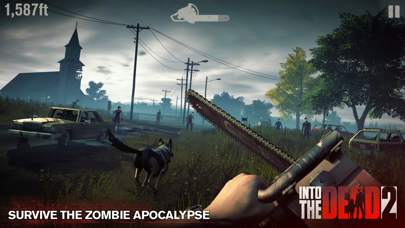
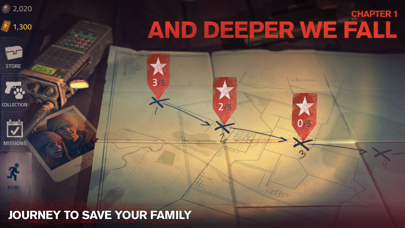
Journey through the zombie apocalypse in a race to save your family. Arm yourself with an arsenal of powerful weapons and do whatever it takes to survive. Maim, mow down, and massacre the Dead - anything to keep moving! In a world where no one is safe, how far will you go to make it out alive?
Continue the nightmare with exclusive story events including a terrifying prequel to Night of the Living Dead and an expansion to the Ghostbusters universe.
FEATURES:
• Evolving story and multiple endings — complete 7 action-packed chapters, 60 stages, and hundreds of challenges
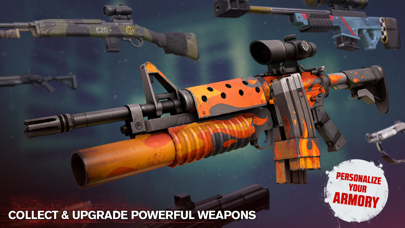
• Powerful weapons and ammo perks — unlock and upgrade melee weapons, firearms, explosives, and more!
• Varied gameplay — fire from military gun emplacements, slay the hordes from atop vehicles, stab them to stay alive, or risk going after them on foot
• Multiple, immersive environments — discover different locations, from oil fields and military bases to campsites and rural farm communities
• Ever-increasing zombie threats — adapt your tactics to annihilate different hordes, including armoured and running zombies!
• 5 additional story events — from burning forests to frozen mountain tops
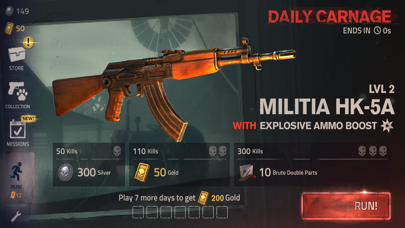
• Daily and special event modes — prove your skills to win exclusive prizes
• Loyal canine companions — fend off zombies and stay protected in the field
• Play offline — take your game anywhere, no internet connection required
Into the Dead 2 is free to play but offers some game items for purchase with real money.
We love to hear from our players! On Twitter? Drop us a line @PikPokGames and join the conversation with #IntoTheDead
Terms of Service: http://pikpok.com/terms-of-use/
Monthly VIP Subscription for 1 Month with great daily in-game benefits. This subscription will auto-renew every month and must be cancelled at least 24 hours before renewal.
Monthly VIP Subscription will renew automatically unless auto-renew is turned off at least 24-hours before the end of the current period. Payment will be charged to iTunes Account at confirmation of purchase. Account will be charged for renewal within 24-hours prior to the end of the current period. Renewal costs 9.99 USD/month (or local equivalent).
Subscriptions may be managed by the user and auto-renewal may be turned off by going to the user's Account Settings after purchase. No cancellation of the current subscription is allowed during active subscription period. Any unused portion of a free trial period, if offered, will be forfeited when the user purchases a Monthly VIP Subscription, where applicable.

- 未越獄/受限或已越獄的 iPhone 或 iPad。
- Sideloadly 或替代方案。
- 執行 Windows/macOS/Linux 且已安裝 iTunes 的電腦。
步驟 1: 透過上方連結將已破解的 .IPA 檔案下載到您的電腦。若要從 iOSGods App 下載,請參閱我們的 iOSGods App IPA 下載教學,其中包含影片範例。
步驟 2: 下載 Sideloadly 並將其安裝在您的 Windows 或 Mac 上。
步驟 3: 在電腦上開啟 Sideloadly,連接您的 iOS 裝置,並等待裝置名稱出現在 Sideloadly 中。
步驟 4: 當 Sideloadly 辨識到您的 iOS 裝置後,將下載好的修改版 .IPA 檔案拖曳並放到 Sideloadly 應用程式中。
步驟 5: 輸入您的 Apple Account 電子郵件,然後按下「Start」。系統會要求您輸入密碼,請依指示提供所需資訊。
步驟 6: 等待 Sideloadly 完成已破解 IPA 的旁載/安裝。如果安裝過程中發生問題,請閱讀下方的注意事項。
步驟 7: 安裝完成並在主畫面上看到該應用程式後,您需要前往 設定 → 一般 → 描述檔 / VPN 與裝置管理。進入後,點選您在步驟 6 中輸入的電子郵件,然後點選「信任 [email protected]」。
步驟 8: 現在回到主畫面並開啟新安裝的應用程式,一切應該都能正常運作。您可能需要依照遊戲內破解彈出視窗中的進一步指示操作。
注意: 在 iOS/iPadOS 16 及更新版本上,您必須 啟用開發者模式。若使用免費的 Apple Developer 帳號,您將需要每 7 天重複此程序。如有任何疑問或問題,請閱讀我們的 主題中的 Sideloadly 常見問題區段。





![[Puzzle & Dragons JP] パズル&ドラゴンズ Hack](https://is1-ssl.mzstatic.com/image/thumb/Purple211/v4/ca/88/05/ca880549-d75e-5b3d-321e-b111dbb2fcda/AppIcon-0-0-1x_U007emarketing-0-8-0-85-220.png/100x100bb.jpg)


