Giriş Gerekli
Devam etmek için iOSGods hesabınızla giriş yapın.
Devam etmek için iOSGods hesabınızla giriş yapın.
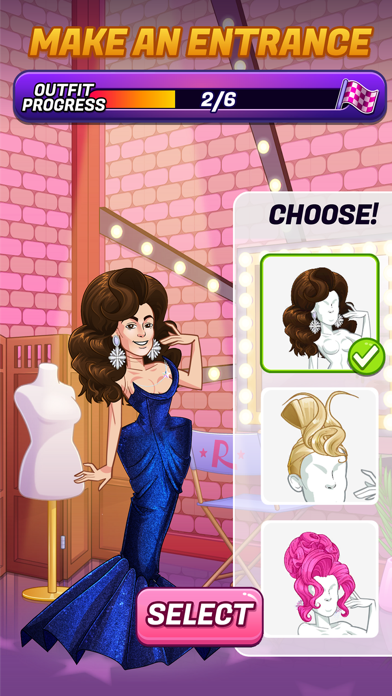
RuPaul's Drag Race Match Queen iOS Mod IPA'da ikonik drag kraliçeleriyle eşleş, bulmaca zorlukları üstesinden gel ve kaynak sınırlamaları olmadan moda koleksiyonu yap, stil içinde yarış ve sıralamada yüksel.
Bu Hack, oyun içi para biriminizi ve canlarınızı dondurarak strateji ve stile odaklanmanızı sağlar, ayrıca otomatik kazanış özelliği ile oyun döngüsünden kurtulmak istediğinizde seviyeleri hızlıca geçebilirsiniz.
- Paraları Dondur → para biriminizi koruyun
- Nakit Dondur → premium para birimini saklı tutun
- Canları Dondur → kalp kaybetmeden oynayın
- Jetonları Dondur → jeton rezervlerinizi muhafaza edin
- Seviye Öncesi Güçlendiricileri Dondur → kurulum güçlendiricilerini ücretsiz kullanın
- Seviye İçi Güçlendiricileri Dondur → güçlendiricileri tüketmeden uygulayın
- Hamleleri Dondur → hamle sayınızı artırın
- Otomatik Kazanış → seviyeleri anında tamamlayın
Bu uygulama ayrıca, tekrar eden görevleri otomatikleştirmek için Auto Touch, ayarlanabilir oyun hızı için App Speed Manager, Memory Engine ile değer düzenleme ve daha pek çok güçlü iOS oyun aracına erişim sağlayan iGameGod ile birlikte gelir.
Yukarıdaki bağlantılardan RuPaul's Drag Race Match Queen iOS Mod IPA indirin. Yükle düğmesine dokunup ekrandaki yönergeleri izleyerek bu iOS uygulama hack'ini iPhone, iPad veya Apple Silicon'a yükleyin.
Daha fazla yardıma mı ihtiyacınız var? Ayrıntılı yanıtlar ve sorun giderme ipuçları için iOSGods Uygulaması Sık Sorulan Sorular sayfamıza bakın.
Welcome to the fabulous world of "RuPaul's Drag Race Match Queen," where charisma, uniqueness, nerve, and talent combine in a fierce new puzzle challenge game! Match drag queens, master challenges, and sashay your way to the top!
• Iconic Queens: Collect fashion from your favorite queens like RuPaul, Jinkx Monsoon, Envy Peru, Jimbo, Kim Chi and more!
• Toot & Boot: Compete wearing your best drag and vote for your favorite looks
• Ultimate Ru-wards: Unlock drag pieces to create the perfect look — collect them all to complete your collection! Earn outfits, accessories, and more as you progress.
• Compete and Conquer: Werk the runway in gagworthy lewks, and flex your puzzle-solving skills!
• Glamourous Gameplay: Solve challenging puzzles with a drag twist!
• Fabulous Updates: Stay tuned for new queens, challenges, and themed events!
Contact us for support at: [email protected]
By downloading this app, you agree to our privacy policy and terms of use, available at:
Terms of Service - http://www.eastsidegames.com/terms
Privacy Policy - http://www.eastsidegames.com/privacy
Please note that this game is free to download and play, but some game items are available for purchase using real money. A network connection is required to play the game.

- Jailbreak'siz/normal ya da jailbreak'li iPhone veya iPad.
- Sideloadly veya alternatifleri.
- iTunes yüklü Windows/macOS/Linux çalıştıran bir bilgisayar.
ADIM 1: Yukarıdaki bağlantıdan önceden hacklenmiş .IPA dosyasını bilgisayarınıza indirin. iOSGods App üzerinden indirmek için video örneği de içeren iOSGods App IPA İndirme Kılavuzu bölümümüze göz atın.
ADIM 2: Sideloadly indirin ve Windows veya Mac'inize kurun.
ADIM 3: Bilgisayarınızda Sideloadly'yi açın, iOS cihazınızı bağlayın ve cihaz adınız Sideloadly'de görünene kadar bekleyin.
ADIM 4: iCihazınız tanındıktan sonra, indirdiğiniz modlu .IPA dosyasını sürükleyip Sideloadly uygulamasına bırakın.
ADIM 5: Apple Account e-posta adresinizi girin ve ardından "Start" düğmesine basın. Sonrasında sizden şifreniz istenecektir. Gerekli bilgileri girin.
ADIM 6: Sideloadly'nin hacklenmiş IPA'yı sideload edip yüklemesini bekleyin. Yükleme sırasında bir sorun olursa lütfen aşağıdaki notu okuyun.
ADIM 7: Yükleme tamamlandıktan ve uygulamayı Ana Ekranınızda gördükten sonra Ayarlar → Genel → Profiller / VPN ve Cihaz Yönetimi bölümüne gitmelisiniz. Burada 6. adımda girdiğiniz e-postaya dokunun ve ardından "[email protected]'a Güven" seçeneğine dokunun.
ADIM 8: Şimdi Ana Ekranınıza gidin ve yeni yüklediğiniz uygulamayı açın; her şey sorunsuz çalışmalıdır. Oyun içindeki hack açılır penceresinde uygulamaya özel ek talimatları takip etmeniz gerekebilir.
NOT: iOS/iPadOS 16 ve sonrasında Geliştirici Modu'nu etkinleştirmeniz gerekir. Ücretsiz Apple Developer hesapları için bu işlemi her 7 günde bir tekrarlamanız gerekir. Sorularınız veya sorunlarınız varsa konunun Sideloadly SSS bölümünü okuyun.





![Pet Pal Paw iOS Mod IPA [ Debug Menu ]](https://is1-ssl.mzstatic.com/image/thumb/Purple211/v4/ae/be/aa/aebeaab6-8c1f-902a-9303-151ad392c387/AppIcon-0-0-1x_U007emarketing-0-8-0-85-220.png/100x100bb.jpg)


![EverMerge: Merge & Match Game Hack [ Cheat Menu ]](https://is1-ssl.mzstatic.com/image/thumb/Purple211/v4/27/51/48/2751480d-c8bd-92d0-ff37-a4e208b616d0/AppIcon-0-0-1x_U007emarketing-0-6-0-85-220.png/100x100bb.jpg)


