تسجيل الدخول مطلوب
سجّل الدخول بحساب iOSGods للمتابعة.
سجّل الدخول بحساب iOSGods للمتابعة.
أتقن دروس القيادة الواقعية وعلامات الطريق في محاكي القيادة المشوق هذا لنظام iOS. يمنحك Driving Academy 2019 Simulator Mod IPA إمكانية الوصول الفوري إلى جميع المركبات والعملات غير المحدودة في اللعبة، حتى تتمكن من التركيز على صقل مهاراتك عبر 100 مستوى أكاديمي دون الحاجة إلى البحث عن الموارد.
- جميع السيارات مملوكة → فتح كل مركبة من البداية
- عملات لا نهائية → أنفق بحرية على الترقيات والتقدم
يأتي هذا التطبيق أيضًا مع iGameGod، مما يتيح لك الوصول إلى Auto Touch لأتمتة المهام المتكررة، وApp Speed Manager لضبط سرعة اللعب، وتعديل القيم عبر Memory Engine، والمزيد من أدوات ألعاب iOS القوية.
قم بتنزيل Driving Academy 2019 Simulator Hack modded IPA من الروابط أعلاه. اضغط على زر التثبيت واتبع التعليمات لتثبيت هذا التعديل لـ iOS على iPhone أو iPad أو Apple Silicon.
هل تحتاج إلى مزيد من المساعدة؟ راجع الأسئلة الشائعة لتطبيق iOSGods للحصول على إجابات مفصلة ونصائح لاستكشاف الأخطاء.
Master the Ultimate Car Simulator – Driving Academy!
Step into the most realistic car simulator and parking game, designed for fans of car games and racing games. Learn road rules, enhance your driving skills, and enjoy the thrill of an authentic experience in one of the best driving simulators available. Pass your tests, practice parking, and explore exciting challenges in stunning open-world cities!
Why Driving Academy Stands Out:
- Learn the Rules of the Road: Practice with over 80 real-world traffic signs in a fun and interactive way.
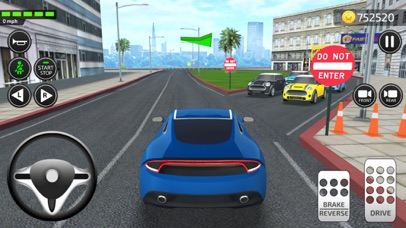
- Realistic Vehicle Controls: Enjoy advanced driving physics and smooth handling for an authentic experience.
- Master Parking Skills: Take on challenging scenarios to sharpen your precision.
- Explore Realistic Cities: Navigate bustling streets in Los Angeles and Washington.
- High-Stakes Driving: Navigate real cities in action-packed police car missions, and save the day!
Game Features You’ll Love:
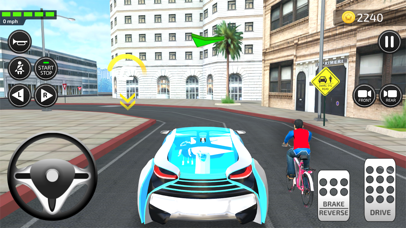
- Two Open World Maps: Drive through vibrant cities with dynamic road conditions.
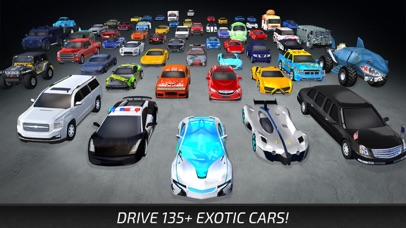
- Over 120 Vehicles: Choose from sports cars, SUVs, muscle vehicles, and more for a diverse driving experience.
- Interactive Academy Mode: Learn traffic rules and parking techniques in a fun, guided environment.
- Exciting Open World Events: Passenger pickups, valet tasks, extreme levels, emergency response missions, and more.
- Dynamic Time of Day: Experience the thrill of driving during day, and night.
- Realistic Mechanics: Enjoy physics and controls that make every moment feel real.
- Free Camera View: Explore every angle of your car and surroundings.
Fun Events in Open World Gameplay:
- 911 Missions: Respond to emergencies in police cars, ambulances, or fire trucks.
- Passenger Tasks: Pick up and drop off passengers across the city safely.
- Valet Parking: Park top-notch vehicles in tricky spots with ease.
- Extreme Levels: Take on daring ramps, thrilling obstacles, and high-speed challenges.
- Rush Hour Mode: Drive through packed roads, avoid traffic jams, and cross the finish line before your rivals!
Challenges Mode:
With over 100 unique scenarios, test your driving abilities in road safety, precision, and adaptability. Prove your mettle as a skilled player in this exciting driving simulator!
Download Driving Academy and Start Your Journey Today!
Whether you’re into car games, simulators, or perfecting your parking, this is the ultimate experience. Learn, test, and enjoy every moment in this thrilling adventure!
Stay Connected:
Like us on Facebook: https://facebook.com/Games2win
Follow us on Twitter: https://twitter.com/Games2win
Developer Contact: [email protected]
Privacy Policy: https://www.games2win.com/corporate/privacy-policy.asp
Terms of Services: https://www.games2win.com/corporate/terms-of-service.asp

- iPhone أو iPad بجيلبريك أو بدون جيلبريك.
- Sideloadly أو بدائلها.
- كمبيوتر يعمل بنظام Windows/macOS/Linux مع تثبيت iTunes.
الخطوة 1: قم بتنزيل ملف .IPA المعدّل مسبقًا من الرابط أعلاه إلى الكمبيوتر الخاص بك. للتنزيل من تطبيق iOSGods App، اطلع على دليل تنزيل IPA من تطبيق iOSGods App الذي يتضمن مثالًا بالفيديو.
الخطوة 2: قم بتنزيل Sideloadly وتثبيته على جهاز Windows أو Mac.
الخطوة 3: افتح Sideloadly على الكمبيوتر، ووصّل جهاز iOS الخاص بك، وانتظر حتى يظهر اسم جهازك داخل Sideloadly.
الخطوة 4: بمجرد التعرّف على جهاز iDevice الخاص بك، اسحب ملف .IPA المعدّل الذي قمت بتنزيله وأفلِته داخل تطبيق Sideloadly.
الخطوة 5: أدخل البريد الإلكتروني لحساب Apple Account الخاص بك، ثم اضغط على «Start». سيُطلب منك بعد ذلك إدخال كلمة المرور. تابع وأدخل المعلومات المطلوبة.
الخطوة 6: انتظر حتى ينتهي Sideloadly من تحميل/تثبيت ملف IPA المعدّل. في حال واجهت أي مشاكل أثناء التثبيت، يرجى قراءة الملاحظة أدناه.
الخطوة 7: بعد اكتمال التثبيت ورؤية التطبيق على الشاشة الرئيسية، انتقل إلى Settings → General → Profiles / VPN & Device Management. ثم اضغط على البريد الإلكتروني الذي أدخلته في الخطوة 6، ثم اضغط على «الوثوق بـ [email protected]».
الخطوة 8: الآن انتقل إلى الشاشة الرئيسية وافتح التطبيق الذي تم تثبيته للتو وسيعمل كل شيء بشكل صحيح. قد تحتاج إلى اتباع تعليمات إضافية خاصة بكل تطبيق داخل النافذة المنبثقة للتعديل أثناء اللعب.
ملاحظة: بدءًا من iOS/iPadOS 16 وما بعده، يجب تفعيل وضع المطور (Developer Mode). بالنسبة لحسابات Apple Developer المجانية، ستحتاج إلى تكرار هذه العملية كل 7 أيام. إذا كانت لديك أي أسئلة أو مشاكل، يرجى قراءة قسم الأسئلة الشائعة حول Sideloadly في الموضوع.





![[Puzzle & Dragons JP] パズル&ドラゴンズ Hack](https://is1-ssl.mzstatic.com/image/thumb/Purple211/v4/ca/88/05/ca880549-d75e-5b3d-321e-b111dbb2fcda/AppIcon-0-0-1x_U007emarketing-0-8-0-85-220.png/100x100bb.jpg)


