تسجيل الدخول مطلوب
سجّل الدخول بحساب iOSGods للمتابعة.
سجّل الدخول بحساب iOSGods للمتابعة.
Hack Features:
- No Graphics Card wear
- Instant Mining
- Instant Deliveries
- Mining Multiplier
يأتي هذا التطبيق أيضًا مع iGameGod، مما يتيح لك الوصول إلى Auto Touch لأتمتة المهام المتكررة، وApp Speed Manager لضبط سرعة اللعب، وتعديل القيم عبر Memory Engine، والمزيد من أدوات ألعاب iOS القوية.
قم بتنزيل PC Creator 2 - PC Building Sim Hack modded IPA من الروابط أعلاه. اضغط على زر التثبيت واتبع التعليمات لتثبيت هذا التعديل لـ iOS على iPhone أو iPad أو Apple Silicon.
هل تحتاج إلى مزيد من المساعدة؟ راجع الأسئلة الشائعة لتطبيق iOSGods للحصول على إجابات مفصلة ونصائح لاستكشاف الأخطاء.
Experience the thrill of building your own perfect PC! Every step is an adventure, and the result will exceed all expectations. Become a tycoon of the computer world!
PC Creator 2 is an innovative PC building simulator that combines the excitement of tycoon games, idle games, and business simulations, offering players an unparalleled experience of building their own PC empire. Immerse yourself in a world of hardware, creativity, and strategy as you design, build, and manage your own PC business.
BUILD YOUR PC
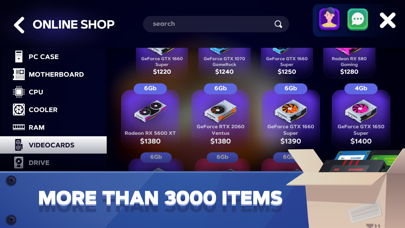
Begin your journey by selecting and building PC components to create the ultimate gaming rig or meet the specific needs of your customers. Experiment with a wide selection of hardware and configurations, giving you the freedom to build your dream PC or push the boundaries of your technical skills.
UPGRADE YOUR PC
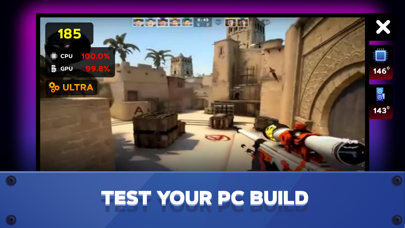
Improve your systems with upgraded parts, run realistic benchmarks, and stress tests to ensure maximum performance. Whether you’re optimizing for gaming, pro use, or mining, every upgrade counts in this detailed PC building simulator.
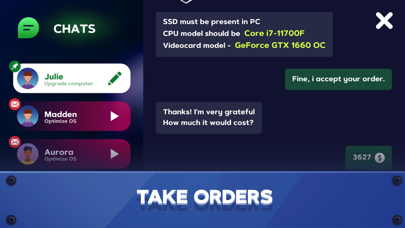
COMPLETE CUSTOMER ASSIGNMENTS
Take on challenging customer requests, each with their own unique requirements and budgets. Successfully completing these orders earns you money, strengthens your reputation, and opens up even more opportunities to expand your business.
MORE THAN JUST BUILDING
Stay motivated with a variety of quests and challenges that keep the gameplay fresh and rewarding. Completing these tasks will help you progress, earn valuable resources, and develop your skills as a PC tycoon.
TRADE AND MINING
Go beyond traditional PC building by assembling mining rigs and delving into the world of cryptocurrency. This adds a new economic layer where your builds can generate cryptocurrency and increase your in-game income.
CUSTOMIZE YOUR WORKPLACE
Create a unique and professional environment by customizing your PC workshop. Adapt your space to suit your style while enhancing the functionality of your business.
BUILD A BUSINESS EMPIRE
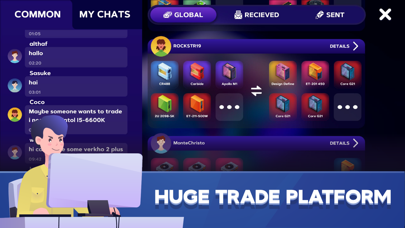
Use the in-game trading system to buy and sell components, manage resources, and find smart deals to help you stay ahead of the game. Strategic trading is key to growing your business empire. Earn and manage both traditional currency and cryptocurrency as you expand your business empire. Invest wisely, optimize your costs, and transform your workshop into a thriving hub of innovation and profit.
With PC Creator 2, you don't just build computers—you build a thriving business, solve customer problems, and explore the endless possibilities of technology. Join now and become the best PC builder and tycoon in this exciting simulator!
Privacy Policy: https://creaty.me/privacy-policy
Terms of Use: https://creaty.me/terms

- iPhone أو iPad بجيلبريك أو بدون جيلبريك.
- Sideloadly أو بدائلها.
- كمبيوتر يعمل بنظام Windows/macOS/Linux مع تثبيت iTunes.
الخطوة 1: قم بتنزيل ملف .IPA المعدّل مسبقًا من الرابط أعلاه إلى الكمبيوتر الخاص بك. للتنزيل من تطبيق iOSGods App، اطلع على دليل تنزيل IPA من تطبيق iOSGods App الذي يتضمن مثالًا بالفيديو.
الخطوة 2: قم بتنزيل Sideloadly وتثبيته على جهاز Windows أو Mac.
الخطوة 3: افتح Sideloadly على الكمبيوتر، ووصّل جهاز iOS الخاص بك، وانتظر حتى يظهر اسم جهازك داخل Sideloadly.
الخطوة 4: بمجرد التعرّف على جهاز iDevice الخاص بك، اسحب ملف .IPA المعدّل الذي قمت بتنزيله وأفلِته داخل تطبيق Sideloadly.
الخطوة 5: أدخل البريد الإلكتروني لحساب Apple Account الخاص بك، ثم اضغط على «Start». سيُطلب منك بعد ذلك إدخال كلمة المرور. تابع وأدخل المعلومات المطلوبة.
الخطوة 6: انتظر حتى ينتهي Sideloadly من تحميل/تثبيت ملف IPA المعدّل. في حال واجهت أي مشاكل أثناء التثبيت، يرجى قراءة الملاحظة أدناه.
الخطوة 7: بعد اكتمال التثبيت ورؤية التطبيق على الشاشة الرئيسية، انتقل إلى Settings → General → Profiles / VPN & Device Management. ثم اضغط على البريد الإلكتروني الذي أدخلته في الخطوة 6، ثم اضغط على «الوثوق بـ [email protected]».
الخطوة 8: الآن انتقل إلى الشاشة الرئيسية وافتح التطبيق الذي تم تثبيته للتو وسيعمل كل شيء بشكل صحيح. قد تحتاج إلى اتباع تعليمات إضافية خاصة بكل تطبيق داخل النافذة المنبثقة للتعديل أثناء اللعب.
ملاحظة: بدءًا من iOS/iPadOS 16 وما بعده، يجب تفعيل وضع المطور (Developer Mode). بالنسبة لحسابات Apple Developer المجانية، ستحتاج إلى تكرار هذه العملية كل 7 أيام. إذا كانت لديك أي أسئلة أو مشاكل، يرجى قراءة قسم الأسئلة الشائعة حول Sideloadly في الموضوع.






![[VIP] Andy Volcano: Tile Match Story Hack](https://is1-ssl.mzstatic.com/image/thumb/Purple211/v4/50/c5/d0/50c5d0f8-a137-ade7-9074-f3fb9544d525/AppIcon-0-0-1x_U007emarketing-0-8-0-85-220.png/100x100bb.jpg)


![[VIP] Brave Merge - Battle & Defense Hack](https://is1-ssl.mzstatic.com/image/thumb/Purple211/v4/81/8d/ce/818dcea0-a5a9-1bd5-f04a-068336537336/AppIcon-0-0-1x_U007emarketing-0-8-0-85-220.png/100x100bb.jpg)