تسجيل الدخول مطلوب
سجّل الدخول بحساب iOSGods للمتابعة.
سجّل الدخول بحساب iOSGods للمتابعة.
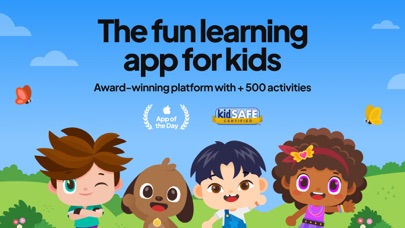
افتح الوصول المميز إلى Papumba: Kids Learning Games، تطبيق تعليمي موثوق يحتوي على أكثر من 500 لعبة وفيديوهات وكتب وقصص صوتية للأطفال من سن 2 إلى 7 سنوات. يزيل هذا Mod IPA الحواجز المدفوعة حتى يتمكن أطفالك من استكشاف جميع محتوى التعلم باللغة الإنجليزية أو الإسبانية أو البرتغالية بدون إعلانات أو قيود على عمليات الشراء داخل التطبيق.
- مميز → وصول كامل إلى جميع المحتوى التعليمي
يأتي هذا التطبيق أيضًا مع iGameGod، مما يتيح لك الوصول إلى Auto Touch لأتمتة المهام المتكررة، وApp Speed Manager لضبط سرعة اللعب، وتعديل القيم عبر Memory Engine، والمزيد من أدوات ألعاب iOS القوية.
قم بتنزيل Papumba: Kids Learning Games iOS Mod IPA من الروابط أعلاه. اضغط على زر التثبيت واتبع التعليمات لتثبيت هذا التعديل لـ iOS على iPhone أو iPad أو Apple Silicon.
هل تحتاج إلى مزيد من المساعدة؟ راجع الأسئلة الشائعة لتطبيق iOSGods للحصول على إجابات مفصلة ونصائح لاستكشاف الأخطاء.
Do you struggle with managing your kid’s screen time and wish they could engage with more educational and interactive content? Are you looking for an app where they can play and learn in English, Spanish, or Portuguese?
Trusted by parents of 2- to 7-year-olds around the world, Papumba is the top app for parents looking for educational screen time for their kids
500+ EDUCATIONAL GAMES, VIDEOS, BOOKS, AUDIO STORIES AND MUCH MORE!
LEARNING THROUGH PLAY
NO ADS, NO IN-APP PURCHASES
Papumba fits into your family's daily life: from independent playtime while you're making breakfast or working on tasks, to shared bonding moments like storytime before bed or fun family road trips.
Whether you're tackling chores, enjoying quality time on weekends, or making rainy days fun indoors, our interactive games and activities are there to keep your kids engaged and learning.
Put simply, it’s just Good Screen Time! TRY 7 DAYS for FREE!
===============
kidSAFE® certified
2023 EdTech Award Winner: “Best Mobile App” for early childhood education!
Awarded the "Gold Seal of Approval” by Mom’s Choice
Associated with the Power of 0’s No-Bully program
===============
Download our app and start the FREE 7-day trial:
→ Play 500+ educational games to learn the ABCs, 123s, and much more!
→ Read and listen to books and bedtime stories in English, Portuguese, and Spanish
→ Learn first words in English, Portuguese, and Spanish for toddlers and preschoolers
→ Watch videos in English, Portuguese, and Spanish to explore the world
→ Enjoy a safe and 100% ad-free environment!
→ Dive into activities that foster social-emotional learning, healthy habits, and good social skills
→ Relax with interactive yoga videos in English, Portuguese, and Spanish
→ Do meditation sessions created specifically for children!
→ Enjoy quality screen time for fun learning moments
Papumba is the go-to app for parents seeking engaging and educational playtime in English, Portuguese, and Spanish for their toddlers and preschoolers.
Join the community that makes learning an exciting part of their kid’s daily life!
===============
THE SMALL PRINT, SUMMED UP IN SIMPLE TERMS
Papumba is a subscription-based app that you can try and enjoy for free for 7 days!
After 7 days, you will become a subscriber. The fee for your chosen plan, monthly or annual, will be charged through your App Store account. Keep in mind that this transaction will renew automatically.
But fear not: you're always in control.
You can cancel your subscription at least 24 hours before the current renewal date. You can also manage and cancel it at any time, or turn off auto-renewal by signing into your App Store account.
===============
Contact us and be part of the Papumba world!
• Feel free to write to us at [email protected]
• Instagram: https://www.instagram.com/papumba
• YouTube: https://www.youtube.com/@Papumba
• Spotify: https://open.spotify.com/show/3oApBXzqvclVqVZ3IJ3Et4?si=1b4d69019a194e04
• Facebook: https://www.facebook.com/papumbagames/
• Website: https://www.papumba.com/es/contact
• Visit Papumba’s Help Center: help.papumba.com/hc/en-us
• Privacy Policy: https://www.papumba.com/es/privacy/en
• Terms of Service: https://www.papumba.com/en/terms/

- iPhone أو iPad بجيلبريك أو بدون جيلبريك.
- Sideloadly أو بدائلها.
- كمبيوتر يعمل بنظام Windows/macOS/Linux مع تثبيت iTunes.
الخطوة 1: قم بتنزيل ملف .IPA المعدّل مسبقًا من الرابط أعلاه إلى الكمبيوتر الخاص بك. للتنزيل من تطبيق iOSGods App، اطلع على دليل تنزيل IPA من تطبيق iOSGods App الذي يتضمن مثالًا بالفيديو.
الخطوة 2: قم بتنزيل Sideloadly وتثبيته على جهاز Windows أو Mac.
الخطوة 3: افتح Sideloadly على الكمبيوتر، ووصّل جهاز iOS الخاص بك، وانتظر حتى يظهر اسم جهازك داخل Sideloadly.
الخطوة 4: بمجرد التعرّف على جهاز iDevice الخاص بك، اسحب ملف .IPA المعدّل الذي قمت بتنزيله وأفلِته داخل تطبيق Sideloadly.
الخطوة 5: أدخل البريد الإلكتروني لحساب Apple Account الخاص بك، ثم اضغط على «Start». سيُطلب منك بعد ذلك إدخال كلمة المرور. تابع وأدخل المعلومات المطلوبة.
الخطوة 6: انتظر حتى ينتهي Sideloadly من تحميل/تثبيت ملف IPA المعدّل. في حال واجهت أي مشاكل أثناء التثبيت، يرجى قراءة الملاحظة أدناه.
الخطوة 7: بعد اكتمال التثبيت ورؤية التطبيق على الشاشة الرئيسية، انتقل إلى Settings → General → Profiles / VPN & Device Management. ثم اضغط على البريد الإلكتروني الذي أدخلته في الخطوة 6، ثم اضغط على «الوثوق بـ [email protected]».
الخطوة 8: الآن انتقل إلى الشاشة الرئيسية وافتح التطبيق الذي تم تثبيته للتو وسيعمل كل شيء بشكل صحيح. قد تحتاج إلى اتباع تعليمات إضافية خاصة بكل تطبيق داخل النافذة المنبثقة للتعديل أثناء اللعب.
ملاحظة: بدءًا من iOS/iPadOS 16 وما بعده، يجب تفعيل وضع المطور (Developer Mode). بالنسبة لحسابات Apple Developer المجانية، ستحتاج إلى تكرار هذه العملية كل 7 أيام. إذا كانت لديك أي أسئلة أو مشاكل، يرجى قراءة قسم الأسئلة الشائعة حول Sideloadly في الموضوع.