Connexion requise
Connectez-vous avec votre compte iOSGods pour continuer.
Connectez-vous avec votre compte iOSGods pour continuer.
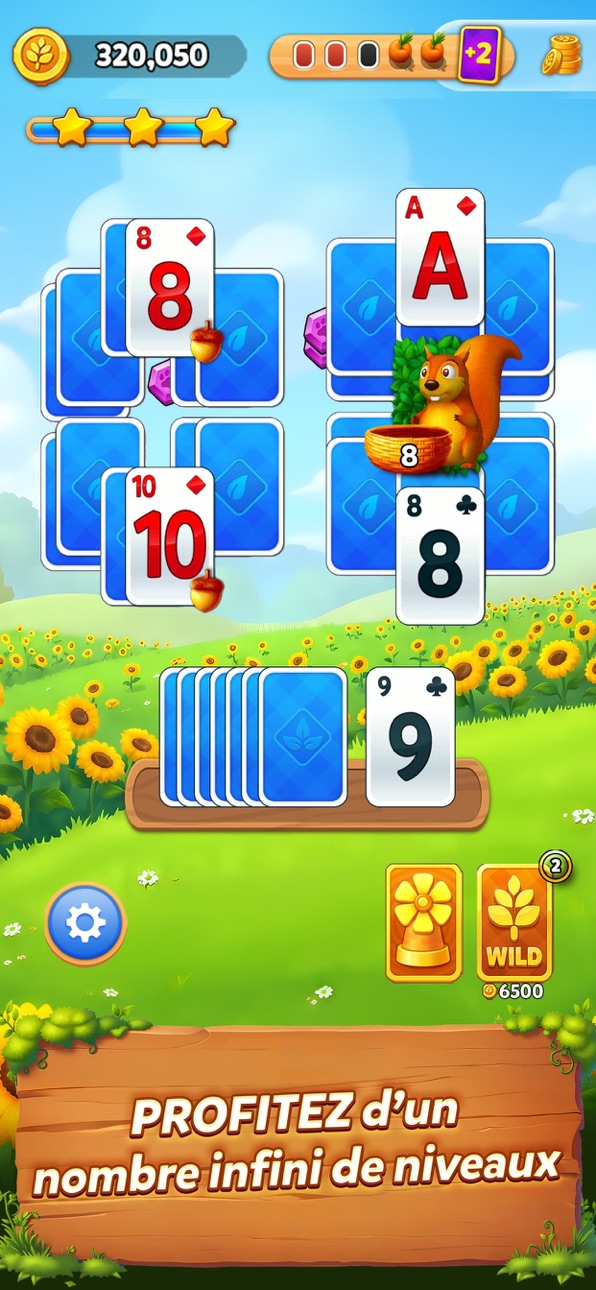
Pièces illimitées, Tickets gratuits, Annulation gratuite et Cartes joker transforment votre expérience Solitaire Grand Harvest Mod IPA, vous permettant de surmonter facilement les défis TriPeaks sans faire de grind pour les ressources. Ce hack gratuit supprime le paywall sur les boosters premium et la monnaie, afin que vous puissiez vous concentrer sur le gameplay relaxant des cartes et construire votre ferme de rêve avec Popeye et ses amis.
- Pièces → monnaie de jeu illimitée
- Ticket gratuit → jouer sans dépenser d'énergie
- Annulation gratuite → inverser les mouvements sans frais
- Carte joker → correspondre à n'importe quelle carte pour dégager le plateau
Cette app est également livrée avec iGameGod, qui vous donne accès à Auto Touch pour automatiser les tâches répétitives, App Speed Manager pour ajuster la vitesse de jeu, à l'édition de valeurs avec Memory Engine, et à d'autres outils puissants pour les jeux iOS.
Téléchargez Solitaire Grand Harvest Hack modded IPA depuis les liens ci-dessus. Appuyez sur le bouton d'installation et suivez les instructions pour installer ce hack iOS sur votre iPhone, iPad ou Apple Silicon.
Besoin de plus d'aide ? Consultez notre FAQ de l'app iOSGods pour des réponses détaillées et des conseils de dépannage.
Bienvenue dans Solitaire Grand Harvest, fermier !
Détendez-vous avec le Solitaire TriPeaks classique dans Solitaire Grand Harvest, disponible sur mobile et sur le web. Évadez-vous dans une ferme paisible où chaque partie aide vos récoltes à pousser, vous fait gagner de précieuses récompenses et donne vie à la ferme de vos rêves.
Des surprises chaque jour
Revenez quotidiennement pour récupérer des cadeaux gratuits, des trésors à collectionner et des offres spéciales qui rendent votre aventure Solitaire encore plus gratifiante.
Pourquoi vous allez adorer Solitaire Grand Harvest
• TriPeaks relaxant – Résolvez des milliers de niveaux de cartes, gagnez des étoiles et de nombreuses récompenses.
• Pièces, gemmes et boosters – Collectez des ressources utiles pour progresser plus facilement.
• Créez la ferme de vos rêves – Personnalisez une campagne pleine de cultures, de décorations et de coins chaleureux.
• Jouez où vous voulez – Profitez de votre Solitaire préféré avec ou sans connexion.
Évadez-vous à la ferme
Éliminez les cartes, relevez des défis captivants et débloquez de nouveaux champs au fil de votre aventure. Chaque niveau vous réserve des cartes bonus, des pièces, des gemmes et bien d'autres surprises.
Récoltez vos cultures, accumulez des gemmes et personnalisez votre ferme. Créez un véritable havre de paix et construisez le foyer idéal pour Sam, votre adorable chien de ferme.
Des fonctionnalités relaxantes
• Bonus quotidiens – Recevez des cadeaux gratuits chaque jour.
• Récoltes – Récupérez vos cultures pour gagner des pièces supplémentaires.
• Roue de la chance – Remportez des boosters, des gemmes et bien plus.
• Sam – Votre fidèle compagnon vous offre régulièrement des pièces bonus et de belles surprises.
• Améliorez vos coffres pour obtenir des récompenses encore plus généreuses. Plus vous jouez, plus vous débloquez de contenu, de surprises et d'améliorations pour votre ferme.
MyFarm
Transformez chaque victoire en une ferme qui vous ressemble. Dépensez les gemmes gagnées en terminant les niveaux pour débloquer de magnifiques décorations, personnaliser votre ferme et créer un endroit chaleureux, avec un espace spécial pour Sam.
Rejoignez des millions de joueurs à travers le monde dans cette aventure relaxante de Solitaire TriPeaks. Que vous soyez un passionné de Solitaire ou un nouveau joueur, Solitaire Grand Harvest associe un gameplay apaisant, une progression gratifiante, une ferme entièrement personnalisable et des heures de détente.
Téléchargez Solitaire Grand Harvest dès aujourd'hui et découvrez le mélange parfait de Solitaire, d'agriculture et de créativité.
À propos du jeu
Solitaire Grand Harvest est un excellent jeu en ligne développé par Supertreat, un studio de Playtika. Il combine un gameplay de cartes relaxant avec la construction d’une ferme.
Solitaire Grand Harvest est-il gratuit ?
Oui ! Solitaire Grand Harvest est gratuit à télécharger et à jouer. Le jeu propose également des achats intégrés optionnels.
Solitaire Grand Harvest est destiné aux joueurs de 18 ans et plus. Le jeu est gratuit à télécharger et à jouer, mais propose des achats intégrés facultatifs, y compris des objets aléatoires. Vous pouvez désactiver les achats intégrés dans les paramètres de votre appareil. Le jeu peut également contenir des publicités. Une connexion Internet peut être nécessaire pour accéder à certaines fonctionnalités et aux fonctions sociales.
En téléchargeant ce jeu, vous acceptez de recevoir les futures mises à jour publiées via votre boutique d'applications ou votre réseau social. Si vous choisissez de ne pas mettre le jeu à jour, certaines fonctionnalités et votre expérience de jeu pourront être limitées.
Version web : https://solitairegrandharvest.com/
Conditions d'utilisation : https://www.playtika.com/terms-service/
Politique de confidentialité : https://www.playtika.com/privacy-notice/
Captures © leurs propriétaires respectifs · App Store


iOSGods n'est ni affilié à Apple Inc., Google LLC ou aux développeurs des applications listées ici, ni approuvé ou sponsorisé par eux. Apple, iOS et App Store sont des marques d'Apple Inc. Android et Google Play sont des marques de Google LLC. Tous les autres noms d'applications, icônes, visuels et marques appartiennent à leurs propriétaires respectifs.

- iPhone ou iPad avec ou sans Jailbreak.
- Sideloadly ou alternatives.
- Ordinateur sous Windows/macOS/Linux avec iTunes installé.
ÉTAPE 1: Téléchargez le fichier .IPA pré-modifié depuis le lien ci-dessus sur votre ordinateur. Pour le télécharger depuis l'iOSGods App, consultez notre Tutoriel de téléchargement de l'IPA depuis l'iOSGods App qui comprend un exemple en vidéo.
ÉTAPE 2: Téléchargez Sideloadly et installez-le sur votre Windows ou Mac.
ÉTAPE 3: Ouvrez Sideloadly sur votre ordinateur, connectez votre appareil iOS et attendez que le nom de votre appareil apparaisse dans Sideloadly.
ÉTAPE 4: Une fois votre iDevice reconnu, glissez le fichier .IPA modifié que vous avez téléchargé et déposez-le dans l'application Sideloadly.
ÉTAPE 5: Saisissez l'adresse e-mail de votre Apple Account, puis appuyez sur « Start ». Il vous sera ensuite demandé d'entrer votre mot de passe. Fournissez les informations requises.
ÉTAPE 6: Attendez que Sideloadly termine le sideloading/l'installation de l'IPA modifié. En cas de problème durant l'installation, veuillez lire la remarque ci-dessous.
ÉTAPE 7: Une fois l'installation terminée et l'app visible sur votre écran d'accueil, vous devez aller dans Réglages → Général → Profils / VPN et gestion de l'appareil. Là, appuyez sur l'adresse e-mail saisie à l'étape 6, puis appuyez sur « Faire confiance à [email protected] ».
ÉTAPE 8: Allez maintenant sur votre écran d'accueil et ouvrez l'app nouvellement installée ; tout devrait fonctionner correctement. Vous devrez peut-être suivre des instructions supplémentaires propres à chaque app, dans la fenêtre du hack en jeu.
REMARQUE : À partir d'iOS/iPadOS 16, vous devez activer le mode Développeur. Pour les comptes Apple Developer gratuits, vous devrez répéter ce processus tous les 7 jours. Pour toute question ou problème, lisez notre section FAQ Sideloadly du sujet.
Hack Features:
- Inf Coins (Spend)
App Installation Instructions:
---------------------------------------------------------
----------------------------------------------------------
If you require more information or help, please read our Frequently Asked Questions topic on iOSGods.com.
----------------------------------------------------------
--------------------------------------------------