تسجيل الدخول مطلوب
سجّل الدخول بحساب iOSGods للمتابعة.
سجّل الدخول بحساب iOSGods للمتابعة.
هذا التهكير للعبة No Way Home Mod IPA، وهي لعبة إطلاق نار ثنائية العصا، يحول القتال المكثف والسريع عبر كون معادٍ إلى مغامرة لا تُقهر حيث تصبح الاشتباكات التكتيكية استكشافاً وتجريباً خالصاً.
مع هذه النسخة المعدلة، يمكنك الاندفاع عبر مهام المرتزقة الخطيرة دون ضغط البقاء على قيد الحياة، وصنع أي سلاح أو معدات على الفور، وفتح تجربة اللعبة الكاملة من البداية، مما يتيح لك التركيز على جمع الغنائم واكتشاف خريطة النجوم والكشف عن القصة بالسرعة التي تناسبك.
- عدم الموت أبداً → البقاء على قيد الحياة دون هزيمة في أي مواجهة
- تجميد الموارد → الحفاظ على إمداداتك إلى الأبد
- صنع أي شيء → إنشاء أي سلاح أو معدات على الفور
- اللعبة الكاملة مشتراة → فتح جميع الفصول بدون عملية شراء داخل التطبيق
يأتي هذا التطبيق أيضًا مع iGameGod، مما يتيح لك الوصول إلى Auto Touch لأتمتة المهام المتكررة، وApp Speed Manager لضبط سرعة اللعب، وتعديل القيم عبر Memory Engine، والمزيد من أدوات ألعاب iOS القوية.
قم بتنزيل No Way Home Hack modded IPA من الروابط أعلاه. اضغط على زر التثبيت واتبع التعليمات لتثبيت هذا التعديل لـ iOS على iPhone أو iPad أو Apple Silicon.
هل تحتاج إلى مزيد من المساعدة؟ راجع الأسئلة الشائعة لتطبيق iOSGods للحصول على إجابات مفصلة ونصائح لاستكشاف الأخطاء.
*TRY BEFORE YOU BUY* - Play the opening chapters of No Way Home for free. A one-time in-app purchase unlocks the full game. No ads.
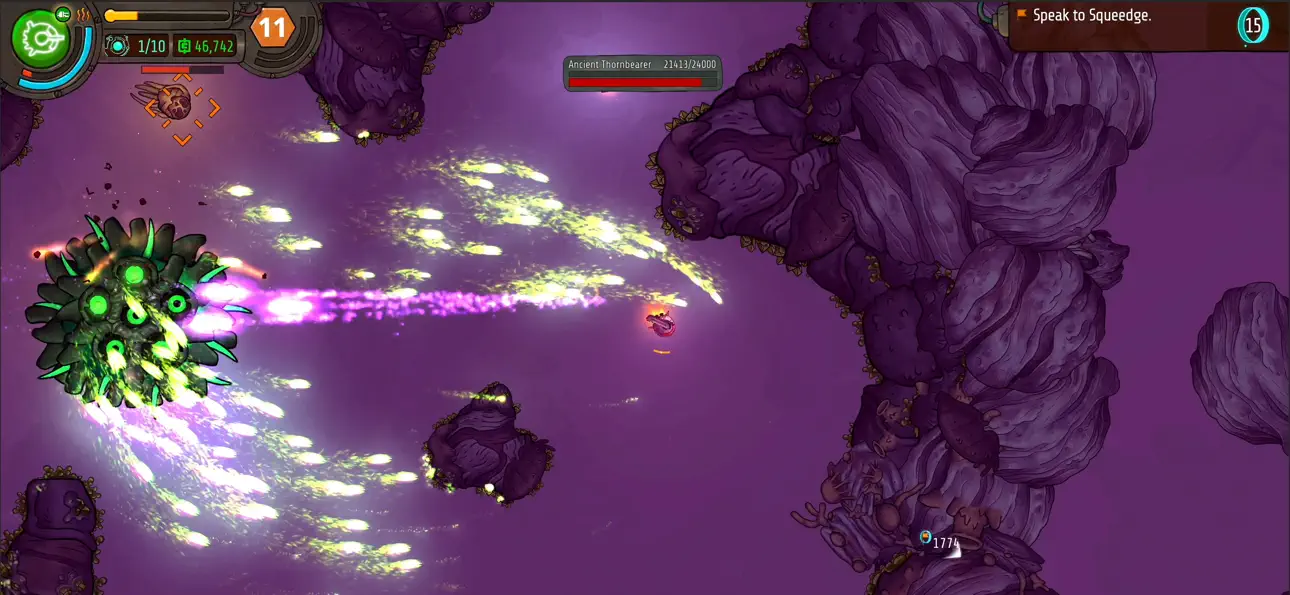
No Way Home is a twin-stick shooter adventure, set in a hostile far flung part of the universe filled with danger at every turn. Outgun enemies in tense skirmishes, take on dangerous mercenary missions, loot bigger and better weapons, and explore a huge starmap in search of answers and a way home.
Gameplay
• Fast-paced twin stick combat in large open environments
• Chaotic and sprawling firefights require tactical use of cover, positioning, and timing
• A regenerating shield allows a buffer to get in the fray, trade hits, and move around the environment strategically
• Loot new weapons and ship components as random drops from encounters, creating your own build and play-style over time
• Procedural world generation with hand-crafted encounters throughout
• No permadeath, classic adventure format with zone respawning
• Quick-loop arcade modes to unlock
From the team that brought you Moving Out 1 & 2, Death Squared, Thumb Drift and One More Line and many others.
Features
• A rich story mode set across a huge universe
• Stunning hand-drawn artwork
• 50+ weapons to loot, craft and upgrade
• Over 100 unique enemies to battle
• Complete missions or explore freely and forge your own path
• Fight huge bosses for rare loot drops (updated for this release)
• Procedural universe creates unique layouts per game
• Outfit your ship with the gear that suits your playstyle
• Full controller support
• Ship skins to unlock via arcade minigames
• Daily Challenge - run and gun for daily glory with a new mega weapon every day
The amazing collaborators we worked with on this game
Art direction & world by Scott Vanden Bosch
Story by Mike Rosenthal
Voiced by Mick Lauer (RicePirate) and Cassie Ewulu
Original music by Brad Gentle
لقطات الشاشة © لأصحابها · App Store


iOSGods ليست تابعة لشركة Apple Inc. أو Google LLC أو مطوّري التطبيقات المدرجة هنا، وليست معتمدة أو مدعومة منهم. Apple وiOS وApp Store علامات تجارية لشركة Apple Inc. وAndroid وGoogle Play علامتان تجاريتان لشركة Google LLC. أما بقية أسماء التطبيقات والأيقونات والصور والعلامات التجارية فهي ملك لأصحابها.

- iPhone أو iPad بجيلبريك أو بدون جيلبريك.
- Sideloadly أو بدائلها.
- كمبيوتر يعمل بنظام Windows/macOS/Linux مع تثبيت iTunes.
الخطوة 1: قم بتنزيل ملف .IPA المعدّل مسبقًا من الرابط أعلاه إلى الكمبيوتر الخاص بك. للتنزيل من تطبيق iOSGods App، اطلع على دليل تنزيل IPA من تطبيق iOSGods App الذي يتضمن مثالًا بالفيديو.
الخطوة 2: قم بتنزيل Sideloadly وتثبيته على جهاز Windows أو Mac.
الخطوة 3: افتح Sideloadly على الكمبيوتر، ووصّل جهاز iOS الخاص بك، وانتظر حتى يظهر اسم جهازك داخل Sideloadly.
الخطوة 4: بمجرد التعرّف على جهاز iDevice الخاص بك، اسحب ملف .IPA المعدّل الذي قمت بتنزيله وأفلِته داخل تطبيق Sideloadly.
الخطوة 5: أدخل البريد الإلكتروني لحساب Apple Account الخاص بك، ثم اضغط على «Start». سيُطلب منك بعد ذلك إدخال كلمة المرور. تابع وأدخل المعلومات المطلوبة.
الخطوة 6: انتظر حتى ينتهي Sideloadly من تحميل/تثبيت ملف IPA المعدّل. في حال واجهت أي مشاكل أثناء التثبيت، يرجى قراءة الملاحظة أدناه.
الخطوة 7: بعد اكتمال التثبيت ورؤية التطبيق على الشاشة الرئيسية، انتقل إلى Settings → General → Profiles / VPN & Device Management. ثم اضغط على البريد الإلكتروني الذي أدخلته في الخطوة 6، ثم اضغط على «الوثوق بـ [email protected]».
الخطوة 8: الآن انتقل إلى الشاشة الرئيسية وافتح التطبيق الذي تم تثبيته للتو وسيعمل كل شيء بشكل صحيح. قد تحتاج إلى اتباع تعليمات إضافية خاصة بكل تطبيق داخل النافذة المنبثقة للتعديل أثناء اللعب.
ملاحظة: بدءًا من iOS/iPadOS 16 وما بعده، يجب تفعيل وضع المطور (Developer Mode). بالنسبة لحسابات Apple Developer المجانية، ستحتاج إلى تكرار هذه العملية كل 7 أيام. إذا كانت لديك أي أسئلة أو مشاكل، يرجى قراءة قسم الأسئلة الشائعة حول Sideloadly في الموضوع.
Game Name iOS Mod IPA is an action adventure game enhanced with powerful gameplay boosts and quality-of-life improvements. Win battles faster, earn rewards quicker, and enjoy uninterrupted play without ads.
- Unlimited Gold - spend freely to unlock premium content
- Damage Multiplier - deal significantly more damage in combat
- Defense Multiplier - take less damage and survive longer
- Reward Multiplier - earn more loot from every battle
- Max Level - instantly reach the highest player rank
- No Ads - play without interruptions or advertisements
This app also comes with iGameGod, giving you access to Auto Touch to automate repetitive tasks, App Speed Manager for adjustable gameplay speed, Memory Engine value editing, and more powerful iOS game tools.
قم بتنزيل Game Name Mod IPA من الروابط أعلاه. اضغط على زر التثبيت واتبع التعليمات لتثبيت هذا التعديل لـ iOS على iPhone أو iPad أو Apple Silicon.
هل تحتاج إلى مزيد من المساعدة؟ راجع الأسئلة الشائعة لتطبيق iOSGods للحصول على إجابات مفصلة ونصائح لاستكشاف الأخطاء.
----------------------------------------------------------
--------------------------------------------------