Потрібен вхід
Увійдіть у свій обліковий запис iOSGods, щоб продовжити.
Увійдіть у свій обліковий запис iOSGods, щоб продовжити.

Битва на вершині небесної колони та штовхання ворогів за край у цьому навичковому арені-бійці, Only One iOS Mod IPA розблоковує преміум-покупки безкоштовно. Оволодійте часом та позиціюванням у цьому модифікованому варіанті, щоб пережити хвилі магічного мечевого бою та залишитися останнім, хто стоїть.
- Безкоштовні IAP (покупки в додатку) → розблокуйте преміум-контент без витрат
Завантажте Only One iOS Mod IPA за посиланнями вище. Натисніть кнопку встановлення та дотримуйтесь інструкцій, щоб встановити цей хак iOS на iPhone, iPad або Apple Silicon.
Потрібна додаткова допомога? Перегляньте наш Поширені запитання про застосунок iOSGods для детальних відповідей та порад з усунення несправностей.
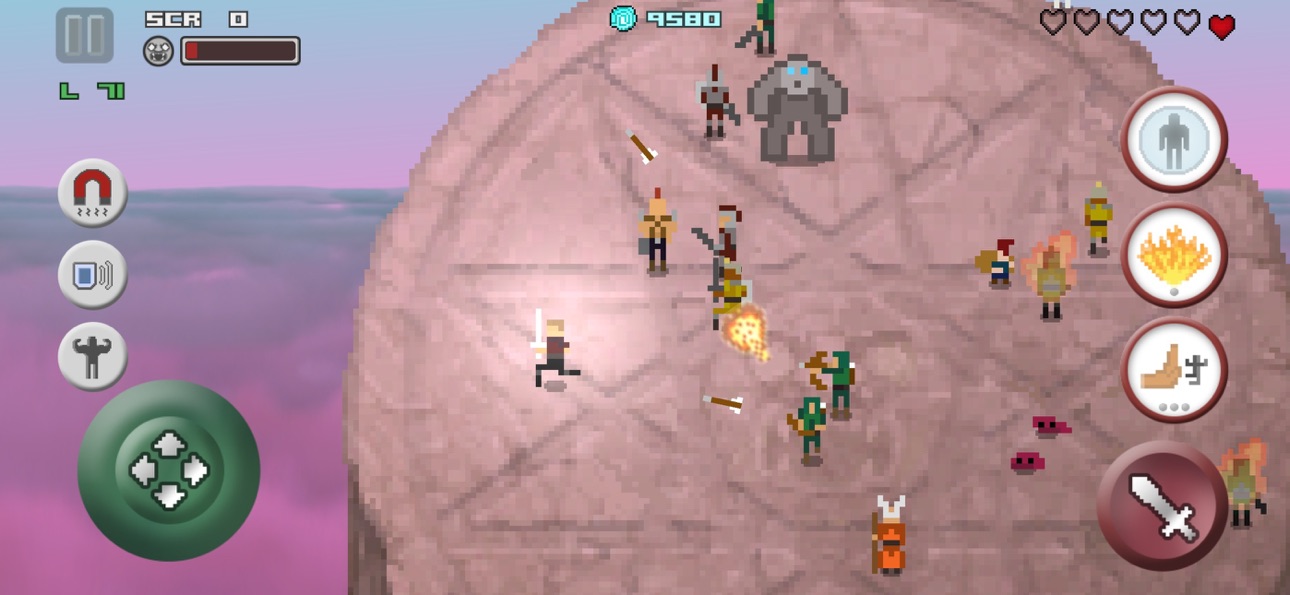
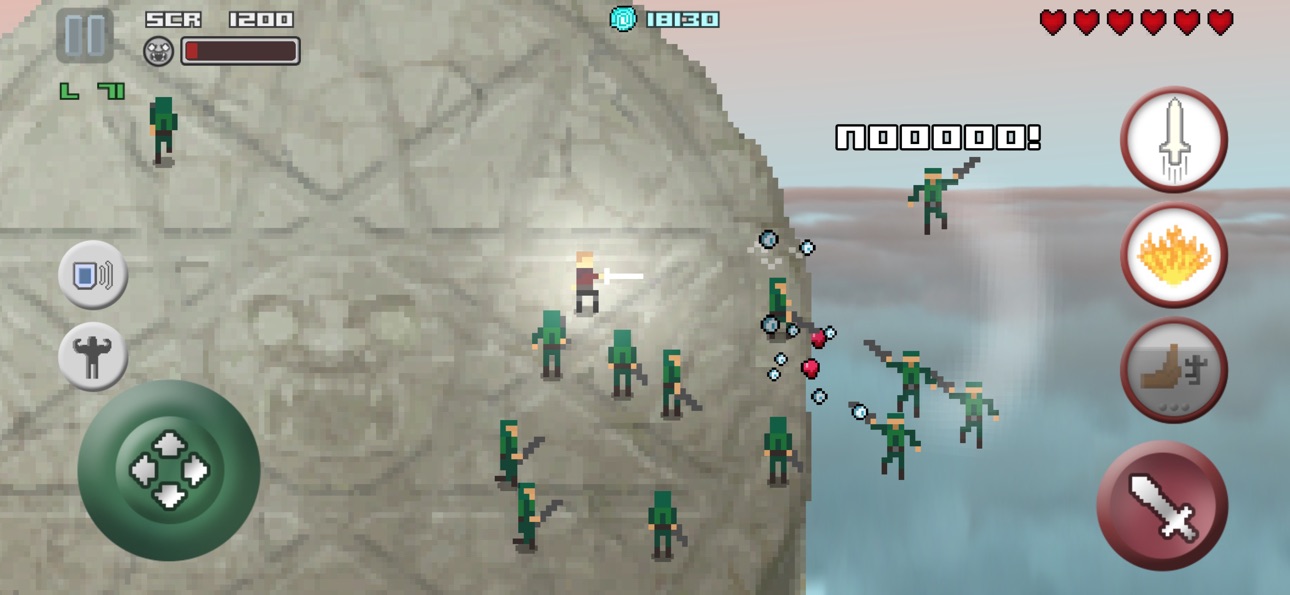
Pick up a magic sword and fight atop the Pillar of Sacrifice.
Master timing and positioning to push enemies off the edge.
How long can you survive to become the only one left standing?
TouchArcade - 4.5/5 "Game with depth well beyond what you would expect"
PocketGamer - 9/10 "A brilliantly paced, sharp-edged brawler "
One of the best hack and slash games on mobile, Only One is an epic arena style sword fighting game where you battle and push waves of enemies off the pillar in the sky with your magical sword. You don't fight for glory, you fight to survive!
Skill Based Melee Combat
- Physics based combat with parry and push mechanics
- Fight swordsmen, archers, slimes, skeletons, bats, berserkers, loot gnomes, wizards and more
- Defeat enemies for their loot or knock them off the pillar for instant kills and extra points
- Collect health to stay alive and shields to block attacks
- Absorb the power of fallen enemies to grow stronger
- 6 active abilities: push, freeze, dart, whirlwind, bubble and inferno
- 8 passive abilities: last stand, might, magnet, cripple, reflektor, bloodlust, regen and backstab
Game Modes
- Quest: Fight through 100 levels with bosses every 10 stages
- Endless: Survive against endless waves as long as you can
- Trials: Take on intense challenges, earn stars, and unlock new trials
Unlock the Full Experience
- The “Ultimate Power” in-app purchase unlocks the complete game
Purchase unique character classes like the barbarian, ninja, valkyrie, dwarf and only one with unique abilities and weaknesses
Retro pixel art graphics and music
GameCentre leaderboards and achievements
Customizable controls: floating or fixed joystick
Full offline support
Gamepad compatible
Знімки екрана © їхніх власників · App Store


iOSGods не пов’язана з Apple Inc., Google LLC або розробниками перелічених тут застосунків, не схвалена та не спонсорується ними. Apple, iOS і App Store — торгові марки Apple Inc. Android і Google Play — торгові марки Google LLC. Усі інші назви застосунків, іконки, зображення й торгові марки належать їхнім власникам.
- iPhone або iPad без джейлбрейку/у заводському стані або з джейлбрейком.
- Sideloadly або альтернативи.
- Комп'ютер під керуванням Windows/macOS/Linux із встановленим iTunes.
КРОК 1: Завантажте попередньо зламаний .IPA-файл за посиланням вище на свій комп'ютер. Щоб завантажити з iOSGods App, перегляньте наш Посібник із завантаження IPA в iOSGods App, який містить відеоприклад.
КРОК 2: Завантажте Sideloadly і встановіть його на своєму Windows або Mac.
КРОК 3: Відкрийте Sideloadly на комп'ютері, підключіть свій iOS-пристрій і зачекайте, поки назва пристрою з'явиться у Sideloadly.
КРОК 4: Коли ваш iDevice буде розпізнано, перетягніть завантажений модифікований .IPA-файл і відпустіть його в застосунок Sideloadly.
КРОК 5: Введіть електронну пошту вашого Apple Account, потім натисніть «Start». Після цього вас попросять ввести пароль. Введіть необхідні дані.
КРОК 6: Зачекайте, доки Sideloadly завершить sideload/встановлення зламаного IPA. Якщо під час встановлення виникнуть проблеми, прочитайте примітку нижче.
КРОК 7: Коли встановлення завершено й ви побачите застосунок на головному екрані, перейдіть до Налаштування → Загальні → Профілі / VPN і керування пристроєм. Там натисніть на електронну пошту, яку ви ввели на кроці 6, а потім натисніть «Довіряти [email protected]».
КРОК 8: Тепер перейдіть на головний екран і відкрийте щойно встановлений застосунок — усе має працювати належним чином. Можливо, доведеться виконати додаткові інструкції для конкретного застосунку в спливаючому вікні хака в грі.
ПРИМІТКА: У iOS/iPadOS 16 і пізніших версіях потрібно увімкнути режим розробника. Для безкоштовних облікових записів Apple Developer цей процес доведеться повторювати кожні 7 днів. Якщо у вас є запитання або проблеми, прочитайте наш розділ FAQ зі Sideloadly у темі.
Game Name iOS Mod IPA is an action adventure game enhanced with powerful gameplay boosts and quality-of-life improvements. Win battles faster, earn rewards quicker, and enjoy uninterrupted play without ads.
- Unlimited Gold - spend freely to unlock premium content
- Damage Multiplier - deal significantly more damage in combat
- Defense Multiplier - take less damage and survive longer
- Reward Multiplier - earn more loot from every battle
- Max Level - instantly reach the highest player rank
- No Ads - play without interruptions or advertisements
This app also comes with iGameGod, giving you access to Auto Touch to automate repetitive tasks, App Speed Manager for adjustable gameplay speed, Memory Engine value editing, and more powerful iOS game tools.
Завантажте Game Name Mod IPA за посиланнями вище. Натисніть кнопку встановлення та дотримуйтесь інструкцій, щоб встановити цей хак iOS на iPhone, iPad або Apple Silicon.
Потрібна додаткова допомога Перегляньте наш Поширені запитання про застосунок iOSGods для детальних відповідей та порад з усунення несправностей.
----------------------------------------------------------
--------------------------------------------------