Giriş Gerekli
Devam etmek için iOSGods hesabınızla giriş yapın.
Devam etmek için iOSGods hesabınızla giriş yapın.
Tap Music 3D Hack'te sınırsız enerji ve ViP abonelik kilidini açarak pop, EDM, rock, trap, hip-hop ve klasik şaheserleri kesintisiz olarak dokunarak, kaydırarak ve yıldız toplayarak tam ritim deneyiminin kilidini açın.
Katalogdaki her şarkıyı reklamsız oynayin ve başından itibaren tüm parçalar kullanılabilir olduğundan global sıralamalarla yarışın, böylece tamamen ritmi yakalamaya ve sıralamada yükselmeye odaklanabilirsiniz.
- ViP abonelik → Premium erişim açıldı
- Sınırsız enerji → Bekleme olmadan sürekli oynayin
- Tüm şarkılar açıldı → Tüm müzik kütüphanesine anında erişin
- Reklam yok → Kesintisiz oynanış
Bu uygulama ayrıca, tekrar eden görevleri otomatikleştirmek için Auto Touch, ayarlanabilir oyun hızı için App Speed Manager, Memory Engine ile değer düzenleme ve daha pek çok güçlü iOS oyun aracına erişim sağlayan iGameGod ile birlikte gelir.
Yukarıdaki bağlantılardan Tap Music 3D Hack modded IPA indirin. Yükle düğmesine dokunup ekrandaki yönergeleri izleyerek bu iOS uygulama hack'ini iPhone, iPad veya Apple Silicon'a yükleyin.
Daha fazla yardıma mı ihtiyacınız var? Ayrıntılı yanıtlar ve sorun giderme ipuçları için iOSGods Uygulaması Sık Sorulan Sorular sayfamıza bakın.
A brand new and more fun music rhythm game.
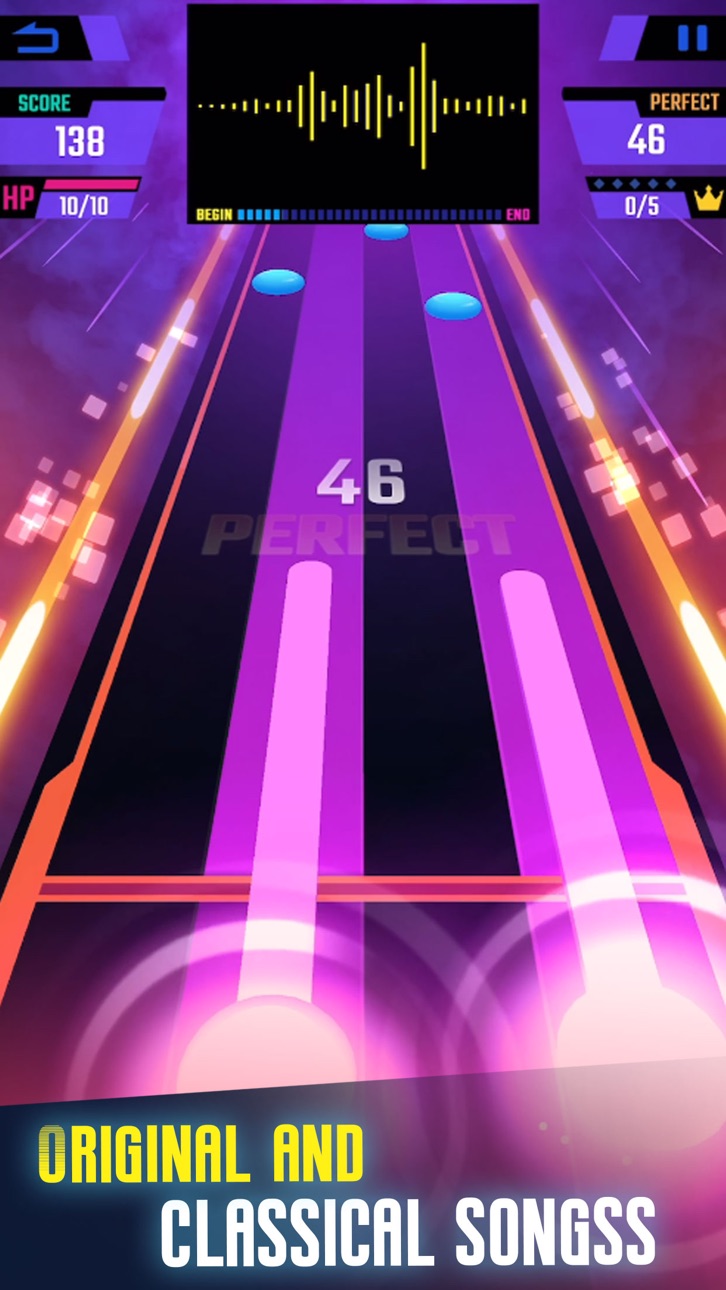
New sliding button and star button ! Slides to follow the rhythm.
Buttons are more diverse and more interesting.
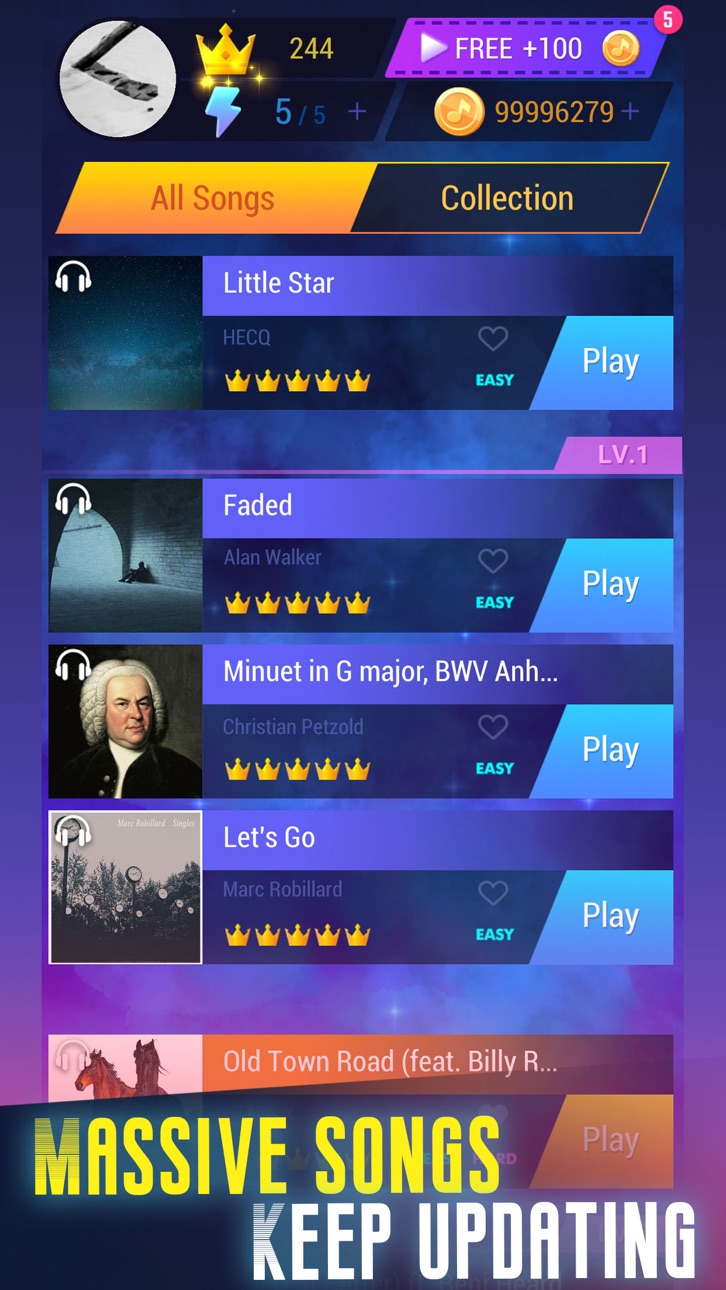
Continuously update popular songs every week. Pop,EDM, Rock, Trap, Hiphop, and more song types.
There are also piano pieces, Ludwig van Beethoven, Robert Alexander Schumann, Johann Sebastian Bach, Frédéric François Chopin, Carl Czerny, Muzio Clementi, Wolfgang Amadeus Mozart, Liszt Ferenc, Stephen Heller, Pyotr Ilyich Tchaikovsky...
Each song has a rank list. You can challenges the best scores with players around the world.
How to play
1. Enjoy the music, tap the balls and sliders when them reach scoring areas.
2.Tap each button with the beat of the song and don't miss.
3.The more accurate the click, the higher score you get.
Game Features
- Original music, songs created by independent music creators.
- Sliding button! Different from most music games.More fun and more difficult.
- Rank list. Each song has a worldwide leaderboard. Challenge the highest score and become the top 1.
Let's get this new music game!
Subscription:
- Upon subscribing, you'll immediately unlock all songs, remove the advertising, get unlimited energy, daily 500 coins and VIP songs available every week.
- You can choose a subscription plan according to the price and duration. The prices are $2.99 per week, $9.99 per month, $29.99 per year, or the same price in other currencies.
- When you confirm your purchase, the payment will be charged to your iTunes account.
- Subscriptions may be managed by the user and auto-renewal may be turned off by going to the user's Account Settings after purchase.
- Please cancel the automatic renewal at least 24 hours prior to the end of the current period, otherwise it will automatically renew and deduct the renewal fee from the account.
- In order to avoid being charged, please be sure to complete it 24 hours before the end of the subscription.
- Any unused portion of a free trial period, if offered, will be forfeited when the user purchases a subscription to that publication, where applicable.
- If you cancel your subscription, you will lose all the privileges described above.
Terms of Use and Privacy Policy: http://www.gogogame.com/privacy-policy.html
Ekran görüntüleri © ilgili sahipleri · App Store



iOSGods; Apple Inc., Google LLC veya burada listelenen uygulamaların geliştiricileriyle bağlantılı değildir, onlar tarafından onaylanmamış ve desteklenmemiştir. Apple, iOS ve App Store, Apple Inc. şirketinin ticari markalarıdır. Android ve Google Play, Google LLC şirketinin ticari markalarıdır. Diğer tüm uygulama adları, simgeler, görseller ve ticari markalar ilgili sahiplerine aittir.
- Jailbreak'siz/normal ya da jailbreak'li iPhone veya iPad.
- Sideloadly veya alternatifleri.
- iTunes yüklü Windows/macOS/Linux çalıştıran bir bilgisayar.
ADIM 1: Yukarıdaki bağlantıdan önceden hacklenmiş .IPA dosyasını bilgisayarınıza indirin. iOSGods App üzerinden indirmek için video örneği de içeren iOSGods App IPA İndirme Kılavuzu bölümümüze göz atın.
ADIM 2: Sideloadly indirin ve Windows veya Mac'inize kurun.
ADIM 3: Bilgisayarınızda Sideloadly'yi açın, iOS cihazınızı bağlayın ve cihaz adınız Sideloadly'de görünene kadar bekleyin.
ADIM 4: iCihazınız tanındıktan sonra, indirdiğiniz modlu .IPA dosyasını sürükleyip Sideloadly uygulamasına bırakın.
ADIM 5: Apple Account e-posta adresinizi girin ve ardından "Start" düğmesine basın. Sonrasında sizden şifreniz istenecektir. Gerekli bilgileri girin.
ADIM 6: Sideloadly'nin hacklenmiş IPA'yı sideload edip yüklemesini bekleyin. Yükleme sırasında bir sorun olursa lütfen aşağıdaki notu okuyun.
ADIM 7: Yükleme tamamlandıktan ve uygulamayı Ana Ekranınızda gördükten sonra Ayarlar → Genel → Profiller / VPN ve Cihaz Yönetimi bölümüne gitmelisiniz. Burada 6. adımda girdiğiniz e-postaya dokunun ve ardından "[email protected]'a Güven" seçeneğine dokunun.
ADIM 8: Şimdi Ana Ekranınıza gidin ve yeni yüklediğiniz uygulamayı açın; her şey sorunsuz çalışmalıdır. Oyun içindeki hack açılır penceresinde uygulamaya özel ek talimatları takip etmeniz gerekebilir.
NOT: iOS/iPadOS 16 ve sonrasında Geliştirici Modu'nu etkinleştirmeniz gerekir. Ücretsiz Apple Developer hesapları için bu işlemi her 7 günde bir tekrarlamanız gerekir. Sorularınız veya sorunlarınız varsa konunun Sideloadly SSS bölümünü okuyun.
Game Name iOS Mod IPA is an action adventure game enhanced with powerful gameplay boosts and quality-of-life improvements. Win battles faster, earn rewards quicker, and enjoy uninterrupted play without ads.
- Unlimited Gold - spend freely to unlock premium content
- Damage Multiplier - deal significantly more damage in combat
- Defense Multiplier - take less damage and survive longer
- Reward Multiplier - earn more loot from every battle
- Max Level - instantly reach the highest player rank
- No Ads - play without interruptions or advertisements
This app also comes with iGameGod, giving you access to Auto Touch to automate repetitive tasks, App Speed Manager for adjustable gameplay speed, Memory Engine value editing, and more powerful iOS game tools.
Yukarıdaki bağlantılardan Game Name Mod IPA indirin. Yükle düğmesine dokunup ekrandaki yönergeleri izleyerek bu iOS uygulama hack'ini iPhone, iPad veya Apple Silicon'a yükleyin.
Daha fazla yardıma mı ihtiyacınız var Ayrıntılı yanıtlar ve sorun giderme ipuçları için iOSGods Uygulaması Sık Sorulan Sorular sayfamıza bakın.
----------------------------------------------------------
--------------------------------------------------