Login necessário
Entre com sua conta iOSGods para continuar.
Entre com sua conta iOSGods para continuar.

- Never Die Este app também vem com iGameGod, oferecendo acesso ao Auto Touch para automatizar tarefas repetitivas, App Speed Manager para ajustar a velocidade do jogo, edição de valores com Memory Engine e outras ferramentas avançadas para jogos iOS.
- Unlimited Consumable
Baixe Zombie Frontier 4 Hack modded IPA dos links acima. Toque no botão de instalação e siga as instruções para instalar este hack iOS no seu iPhone, iPad ou Apple Silicon.
Precisa de mais ajuda? Confira nossas Perguntas frequentes sobre o app iOSGods para respostas detalhadas e dicas de solução de problemas.
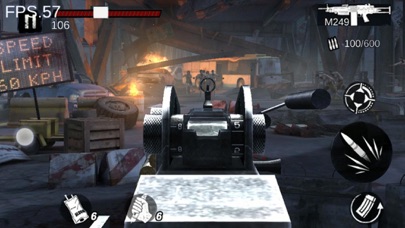
Zombie Frontier4是這個系列的最新正統續作,是一款經典的第一人稱僵屍生存射擊遊戲。玩家可以收集材料圖紙打造強力武器,對抗變異僵屍BOSS,體驗真實緊張的末日氛圍,以及子彈破碎怪物肢體的快感等等。
遊戲特點
【數不勝數的末日挑戰】
你會在遊戲中遇到躲在陰暗處的僵屍,突然奔襲而來的僵屍犬,即便擊碎頭顱還能重新站起來的觸手僵屍,還有舔食者,路障,衝撞者等基因改造僵屍,最後,還有“母蟲”,聚合體,西蒙斯將軍等超級屍王攔在你前進的道路上。
【獨一無二的槍支策略】
一種槍,一種技藝。你可以選擇精通手槍,精准擊中僵屍要害;可以選擇雙持自動步槍,傾瀉子彈展開彈幕壓制;可以選擇享受霰彈槍,裝填一顆發射一顆,近距離聞著子彈的硝煙味,看著敵人的肉塊在面前散開。此外,還可以在特定場合使用手雷,狙擊,重型武器等豐富戰術。
【無與倫比的關卡體驗】
你需要在雪地,沙漠,地穴中殺出重圍,在摩天大樓上用狙擊槍百步穿楊,在大橋中央用格林機槍一夫當關。你還需要在活動關卡中挑戰極限,和其他生存者一較高下。還有經典的醫院,列車,監獄,工廠,海島等等場景需要你經歷。
【以戰養戰的成長系統】
從武器升級,改裝,安裝武器模組,到選擇防具套裝,以及沿途收集購買的急救箱,腎上腺素等消耗品。這些都是你活下來的資本。
【你不孤單,社交互動】
發現更多倖存者,或者互助,或者相互競爭,你不孤單。
- iPhone ou iPad sem jailbreak/jailed ou com jailbreak.
- Sideloadly ou alternativas.
- Computador com Windows/macOS/Linux e iTunes instalado.
PASSO 1: Baixe o arquivo .IPA pré-hackeado do link acima para o seu computador. Para baixar pelo iOSGods App, veja nosso Tutorial de download de IPA do iOSGods App, que inclui um exemplo em vídeo.
PASSO 2: Baixe o Sideloadly e instale-o no seu Windows ou Mac.
PASSO 3: Abra o Sideloadly no seu computador, conecte seu dispositivo iOS e aguarde até que o nome do dispositivo apareça no Sideloadly.
PASSO 4: Assim que seu iDevice for reconhecido, arraste o arquivo .IPA modificado que você baixou e solte-o no aplicativo Sideloadly.
PASSO 5: Digite o e-mail da sua Apple Account e pressione “Start”. Em seguida, será solicitada a sua senha. Prossiga e forneça as informações solicitadas.
PASSO 6: Aguarde o Sideloadly finalizar o sideload/instalação do IPA hackeado. Se houver problemas durante a instalação, leia a observação abaixo.
PASSO 7: Quando a instalação estiver concluída e você vir o app na Tela de Início, será necessário acessar Ajustes → Geral → Perfis / Gerenciamento de VPN e Dispositivo. Lá, toque no e-mail que você inseriu no passo 6 e, em seguida, toque em “Confiar em [email protected]”.
PASSO 8: Agora vá para a Tela de Início e abra o app recém-instalado; tudo deve funcionar normalmente. Você pode precisar seguir instruções adicionais específicas no popup do hack dentro do jogo.
OBSERVAÇÃO: No iOS/iPadOS 16 e versões posteriores, você deve ativar o Modo de Desenvolvedor. Para contas Apple Developer gratuitas, será necessário repetir este processo a cada 7 dias. Se tiver dúvidas ou problemas, leia nossa seção de FAQ do Sideloadly no tópico.







![[Project Springfield] The Simpsons™: Tapped Out](https://is1-ssl.mzstatic.com/image/thumb/Purple211/v4/8e/9d/53/8e9d530e-9421-3ab6-c52e-90d7b786dd30/AppIcon-1x_U007emarketing-0-7-0-85-220-0.png/100x100bb.jpg)






![[ Kyoutou Kotoba RPG: Kotodaman ] コトダマン-共闘ことばRPG Hack](https://is1-ssl.mzstatic.com/image/thumb/Purple126/v4/1a/00/95/1a009543-5a2c-8f8e-8c58-3ac74d754a1e/AppIcon-1x_U007emarketing-0-7-0-85-220.png/100x100bb.jpg)

![[ SAOIF ] ソードアート・オンライン インテグラル・ファクター Hack](https://is1-ssl.mzstatic.com/image/thumb/Purple116/v4/90/1e/5c/901e5cc2-988d-8c41-bb74-494cbd07a495/AppIcon-1x_U007emarketing-0-7-0-85-220.png/100x100bb.jpg)
![[VIP] SwordArtOnline: IntegralFactor SAOIF Hack](https://is1-ssl.mzstatic.com/image/thumb/Purple116/v4/6d/2b/48/6d2b4890-100a-afff-6286-f7af91d94529/AppIcon-1x_U007emarketing-0-7-0-85-220.png/100x100bb.jpg)





![[ Danmachi TW ] 地城邂逅〜記憶憧憬~ Hack](https://is5-ssl.mzstatic.com/image/thumb/Purple116/v4/c1/a8/bf/c1a8bf8c-d7df-8fd3-db2c-fc7041a97d1d/AppIcon-0-0-1x_U007emarketing-0-0-0-8-0-0-sRGB-0-0-0-GLES2_U002c0-512MB-85-220-0-0.png/100x100bb.jpg)
![[VIP] DanMachi - MEMORIA FREESE Hack](https://is5-ssl.mzstatic.com/image/thumb/Purple116/v4/6d/bc/2e/6dbc2ef8-7245-4b95-63e2-90c405b64020/AppIcon-0-0-1x_U007emarketing-0-0-0-8-0-0-sRGB-0-0-0-GLES2_U002c0-512MB-85-220-0-0.png/100x100bb.jpg)
![[ Danmachi KR ] 던만추〜메모리아프레제〜 Hack](https://is1-ssl.mzstatic.com/image/thumb/Purple126/v4/4d/c3/a4/4dc3a47a-a445-9830-cd0c-b65e52918e6f/AppIcon-0-0-1x_U007emarketing-0-0-0-8-0-0-sRGB-0-0-0-GLES2_U002c0-512MB-85-220-0-0.png/100x100bb.jpg)