Anmeldung erforderlich
Melde dich mit deinem iOSGods-Konto an, um fortzufahren.
Melde dich mit deinem iOSGods-Konto an, um fortzufahren.

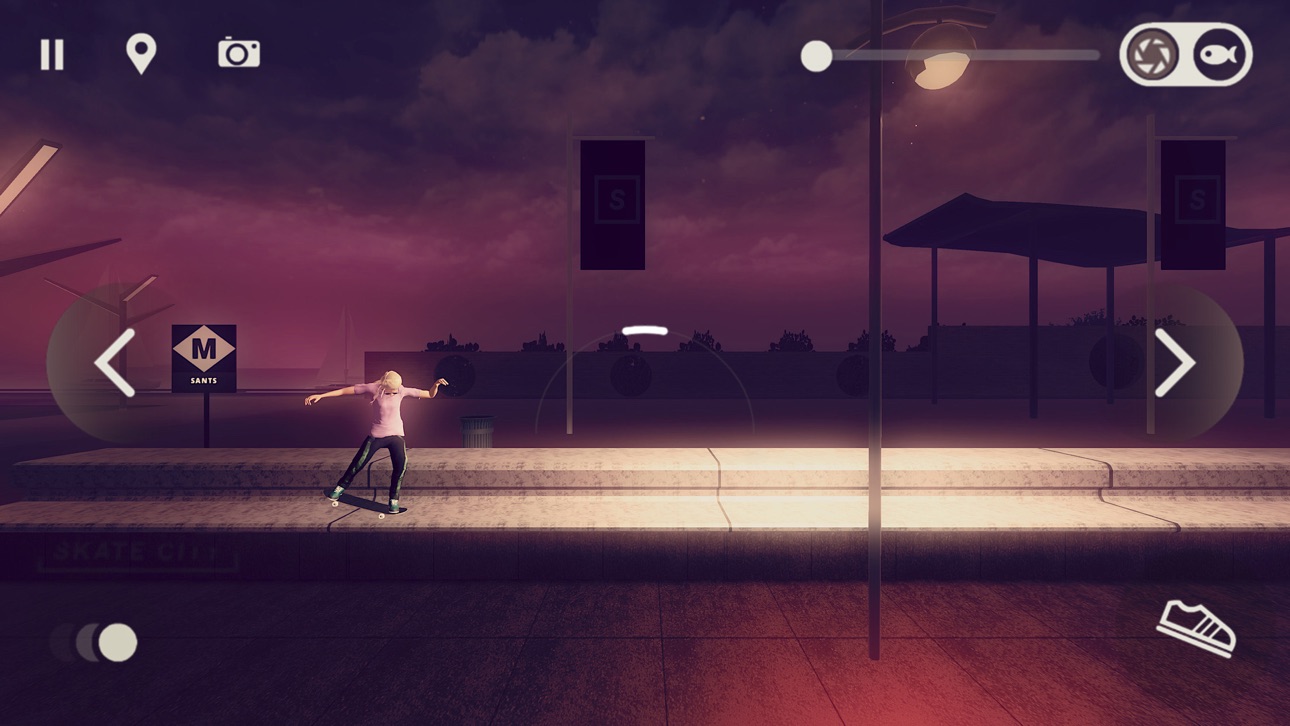
Beherrsche Street-Skating in ikonischen Städten weltweit in Skate City, einem kostenlosen Apple Arcade-Spiel, das jetzt als modifiziertes iOS Hack IPA verfügbar ist. Perfektioniere deinen Flow durch Hunderte von Trick-Kombinationen, während du durch Los Angeles, Oslo, Barcelona, Tokio, Venice Beach und Miami skatest und beobachtest, wie sich die dynamischen Umgebungen vom Morgen bis zur Nacht mit wechselndem Wetter verändern.
Diese App wird zusätzlich mit iGameGod geliefert und bietet dir Zugriff auf Auto Touch zur Automatisierung sich wiederholender Aufgaben, App Speed Manager für eine anpassbare Spielgeschwindigkeit, Memory Engine zur Wertbearbeitung und weitere leistungsstarke iOS-Spielwerkzeuge.
Lade Skate City modded IPA über die obigen Links herunter. Tippe auf den Installations-Button und folge den Anweisungen, um diese iOS-App auf deinem iPhone, iPad oder Apple Silicon zu installieren.
Brauchst du mehr Hilfe? In unseren iOSGods App häufig gestellten Fragen findest du ausführliche Antworten und Tipps zur Fehlerbehebung.
用你自己的风格捕捉街头滑板的灵魂。 掌握动作、提升技能,玩转数百种技巧组合。 沉浸在城市的白天黑夜,感受四轮上的风雨无阻。 嘿,你玩过滑板吗? 现在就出发! 在城市的街道尽情巡游,恣意享受。 钢筋水泥的森林就是属于你的游乐场。 不用护照,尽情畅游。 从落日下的洛杉矶开始你的滑板之旅,然后解锁下一个目的地。 洛杉矶、奥斯陆和巴塞罗那的街道任你探索。 无限尝试,百折不挠。 熟练掌握各式技巧,就算失败也不会受伤。街头滑板本身就是一种创作! 不论你是个中高手,还是从未摸过滑板的菜鸟,想要拿到高分,就要运用智慧和创意。 轻松休闲,奋力挑战。 按照自己的节奏,在无尽模式中像当地人一样在城市中滑行。 或者完成数十个挑战,看看自己有多强! 升级装备,滑出个性。 从肤色和性别,到滑板和支架,这里的一切由你作主。 在定制滑板商店升级技能和装备,再换套更酷的街头服装,你的舞台就要有你的风格。 戴上耳机,感受节奏。 街头滑板,搭配街头风格十足的音乐,尽情感受极致氛围。 完美滑行,与世界分享。 游戏里的录制工具能够留下你的英姿。你玩滑板的样子,值得让全世界看到!
Screenshots © der jeweiligen Inhaber · App Store


iOSGods ist nicht mit Apple Inc., Google LLC oder den Entwicklern der hier aufgeführten Apps verbunden und wird von ihnen weder unterstützt noch gesponsert. Apple, iOS und App Store sind Marken von Apple Inc. Android und Google Play sind Marken von Google LLC. Alle weiteren App-Namen, Symbole, Grafiken und Marken gehören ihren jeweiligen Inhabern.
- Nicht-Jailbroken/Jailed oder Jailbroken iPhone oder iPad.
- Sideloadly oder Alternativen.
- Computer mit Windows/macOS/Linux und installiertem iTunes.
SCHRITT 1: Lade die vorinstallierte .IPA-Datei über den obigen Link auf deinen Computer herunter. Zum Herunterladen aus der iOSGods-App siehe unser iOSGods App IPA Download-Tutorial mit Videobeispiel.
SCHRITT 2: Lade Sideloadly herunter und installiere es auf deinem Windows oder Mac.
SCHRITT 3: Öffne Sideloadly auf deinem Computer, verbinde dein iOS-Gerät und warte, bis dein Gerätename in Sideloadly erscheint.
SCHRITT 4: Sobald dein iDevice erkannt wird, ziehe die heruntergeladene gemoddete .IPA-Datei in die Sideloadly-Anwendung.
SCHRITT 5: Gib deine Apple-Account-E-Mail ein und drücke „Start". Du wirst dann nach deinem Passwort gefragt. Gib die erforderlichen Informationen ein.
SCHRITT 6: Warte, bis Sideloadly das Sideloading/Installieren der gehackten IPA abgeschlossen hat. Bei Problemen während der Installation lies bitte den Hinweis unten.
SCHRITT 7: Sobald die Installation abgeschlossen ist und die App auf deinem Home-Bildschirm angezeigt wird, musst du zu Einstellungen → Allgemein → Profile / VPN & Geräteverwaltung gehen. Tippe dort auf die E-Mail, die du in Schritt 6 eingegeben hast, und dann auf „Trust [email protected]".
SCHRITT 8: Gehe nun zu deinem Home-Bildschirm und öffne die neu installierte App – alles sollte einwandfrei funktionieren. Möglicherweise musst du weitere App-spezifische Anweisungen im Hack-Popup im Spiel befolgen.
HINWEIS: iOS/iPadOS 16 und höher: Du musst den Entwicklermodus aktivieren. Bei kostenlosen Apple Developer-Accounts musst du diesen Vorgang alle 7 Tage wiederholen. Bei Fragen oder Problemen lies bitte unsere Sideloadly-FAQ-Sektion im Thema.
Game Name iOS Mod IPA is an action adventure game enhanced with powerful gameplay boosts and quality-of-life improvements. Win battles faster, earn rewards quicker, and enjoy uninterrupted play without ads.
- Unlimited Gold - spend freely to unlock premium content
- Damage Multiplier - deal significantly more damage in combat
- Defense Multiplier - take less damage and survive longer
- Reward Multiplier - earn more loot from every battle
- Max Level - instantly reach the highest player rank
- No Ads - play without interruptions or advertisements
This app also comes with iGameGod, giving you access to Auto Touch to automate repetitive tasks, App Speed Manager for adjustable gameplay speed, Memory Engine value editing, and more powerful iOS game tools.
Lade Game Name Mod IPA über die obigen Links herunter. Tippe auf den Installations-Button und folge den Anweisungen, um diese iOS-App auf deinem iPhone, iPad oder Apple Silicon zu installieren.
Brauchst du mehr Hilfe In unseren iOSGods App häufig gestellten Fragen findest du ausführliche Antworten und Tipps zur Fehlerbehebung.
----------------------------------------------------------
--------------------------------------------------




![[ SEA ] Honkai Impact 3 iOS Mod IPA](https://is1-ssl.mzstatic.com/image/thumb/Purple221/v4/09/03/0f/09030fe5-0b8c-be31-e059-81e3eb3ed336/AppIcon-1x_U007emarketing-0-10-0-85-220-0.png/100x100bb.jpg)


