Anmeldung erforderlich
Melden Sie sich mit Ihrem iOSGods-Konto an, um fortzufahren.
Melden Sie sich mit Ihrem iOSGods-Konto an, um fortzufahren.

Hack Features:
- x10 Agility
- x10 Speed
- x10 Target Speed
This hack works on the latest x64 or ARM64 iDevices: iPhone 5s, 6, 6 Plus, 6s, 6s Plus, 7, 7 Plus, 8, 8 Plus, X, Xr, Xs, Xs Max, SE, iPod Touch 6G, iPad Air, Air 2, Pro & iPad Mini 2, 3, 4 and later.
Diese App wird zusätzlich mit iGameGod geliefert und bietet Ihnen Zugriff auf Auto Touch zur Automatisierung sich wiederholender Aufgaben, App Speed Manager für eine anpassbare Spielgeschwindigkeit, Memory Engine zur Wertbearbeitung und weitere leistungsstarke iOS-Spielwerkzeuge.
Laden Sie Battle Bay Hack modded IPA über die obigen Links herunter. Tippen Sie auf den Installations-Button und folgen Sie den Anweisungen, um diese iOS-App auf Ihrem iPhone, iPad oder Apple Silicon zu installieren.
Brauchen Sie mehr Hilfe? In unseren iOSGods App häufig gestellten Fragen finden Sie ausführliche Antworten und Tipps zur Fehlerbehebung.
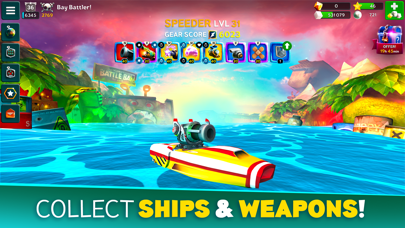
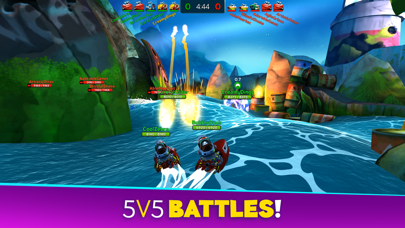
Choose a ship, select your weapons and go to battle against opponents around the world. Use team strategy and firepower to take your fleet to the top - it's sink or win!
– Choose your ship –
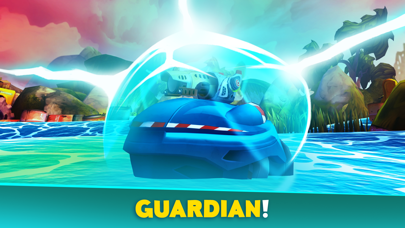
Shooter has a big array of weapons, Speeder is fast and furious, Enforcer is agile and versatile, Defender is a floating tank, and Fixer keeps friendly teammates floating. Level up your ships for more hit points and power!
– Collect weapons –
Collect, upgrade and evolve your weapons to gain more firepower. Choose from a huge selection of destructive, defensive or utility items. Acquire special perks to further enhance the power of your gear. Whatever fits your play style and keeps your team from sinking!
– Host your own battles –
Host a competition with your friends and guild mates in Custom Battles. Create a lobby and invite up to 10 players into 2 teams, plus up to 5 spectators. Play your own 5v5 tournaments or prove your skills in 1v1 duels.
– Join a Guild –
Team up with your friends by joining or creating a guild. Guild leaderboards pit your crew against other bands of blast-happy captains. Who will rise to the top?
– Take on quests and achievements –
Finish quests to earn gold and sugar or go on a guild quest marathon for a chance to earn spectacular loot. Pass achievements to earn pearls and powerful items. Prove your Infamy by competing in ranked two-week tournaments for exclusive rewards!
– VIP Subscription –
Battle Bay offers a VIP subscription service that grants its members exclusive benefits:
+50% Ad-Free bonus to Battle Rewards
+20% faster Crew Training
One free Daily Shop Refresh
Access to VIP Chat Channel
The VIP membership subscription is available as a weekly or monthly purchase at a price of $4.99 / week or $9.99 / month. Payment will be charged to your iTunes Account starting at the initial confirmation of the VIP Subscription purchase. Your VIP subscription will automatically renew 24-hours before the end of the current payment period. Manage subscription auto-renewal in iTunes Account Settings. No cancellation of the current subscription is allowed during the active subscription period. Cancellation will take effect at the start of the next subscription period.
---
Terms of Use: https://www.rovio.com/terms-of-service
Privacy Policy: https://www.rovio.com/privacy
- Nicht-Jailbroken/Jailed oder Jailbroken iPhone oder iPad.
- Sideloadly oder Alternativen.
- Computer mit Windows/macOS/Linux und installiertem iTunes.
SCHRITT 1: Laden Sie die vorinstallierte .IPA-Datei über den obigen Link auf Ihren Computer herunter. Zum Herunterladen aus der iOSGods-App siehe unser iOSGods App IPA Download-Tutorial mit Videobeispiel.
SCHRITT 2: Laden Sie Sideloadly herunter und installieren Sie es auf Ihrem Windows oder Mac.
SCHRITT 3: Öffnen Sie Sideloadly auf Ihrem Computer, verbinden Sie Ihr iOS-Gerät und warten Sie, bis Ihr Gerätename in Sideloadly erscheint.
SCHRITT 4: Sobald Ihr iDevice erkannt wird, ziehen Sie die heruntergeladene gemoddete .IPA-Datei in die Sideloadly-Anwendung.
SCHRITT 5: Geben Sie Ihre Apple-Account-E-Mail ein und drücken Sie „Start". Sie werden dann nach Ihrem Passwort gefragt. Geben Sie die erforderlichen Informationen ein.
SCHRITT 6: Warten Sie, bis Sideloadly das Sideloading/Installieren der gehackten IPA abgeschlossen hat. Bei Problemen während der Installation lesen Sie bitte den Hinweis unten.
SCHRITT 7: Sobald die Installation abgeschlossen ist und die App auf Ihrem Home-Bildschirm angezeigt wird, müssen Sie zu Einstellungen → Allgemein → Profile / VPN & Geräteverwaltung gehen. Tippen Sie dort auf die E-Mail, die Sie in Schritt 6 eingegeben haben, und dann auf „Trust [email protected]".
SCHRITT 8: Gehen Sie nun zu Ihrem Home-Bildschirm und öffnen Sie die neu installierte App – alles sollte einwandfrei funktionieren. Möglicherweise müssen Sie weitere App-spezifische Anweisungen im Hack-Popup im Spiel befolgen.
HINWEIS: iOS/iPadOS 16 und höher: Sie müssen den Entwicklermodus aktivieren. Bei kostenlosen Apple Developer-Accounts müssen Sie diesen Vorgang alle 7 Tage wiederholen. Bei Fragen oder Problemen lesen Sie bitte unsere Sideloadly-FAQ-Sektion im Thema.