Login necessário
Entre com sua conta iOSGods para continuar.
Entre com sua conta iOSGods para continuar.
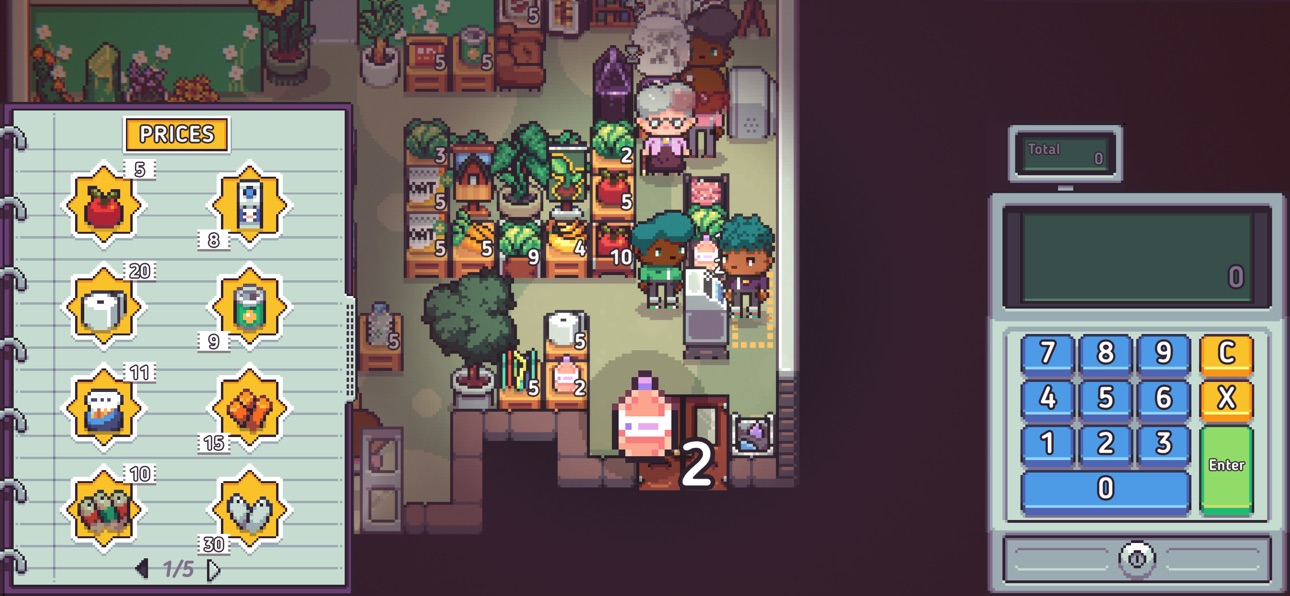
Gerencie seu supermercado de descontos com recursos ilimitados neste Mod IPA gratuito de Discounty: Supermarket Manager iOS Mod IPA, onde dinheiro, madeira, metal e microchips fluem infinitamente para alimentar suas ambições de construção de império.
Pare de fazer grinding por materiais e concentre-se inteiramente na diversão estratégica: projetando layouts de lojas, navegando pelo drama da pequena cidade e expandindo o negócio de sua tia pela peculiar cidade portuária de Blomkest sem o gargalo de recursos.
- Dinheiro Ilimitado → aumentará em vez de diminuir
- Madeira Ilimitada → aumentará em vez de diminuir
- Metal Ilimitado → aumentará em vez de diminuir
- Microchips Ilimitados → aumentarão em vez de diminuir
- Jogo Completo Desbloqueado → acesse a campanha completa de 15-20 horas desde o início
Este app também vem com iGameGod, oferecendo acesso ao Auto Touch para automatizar tarefas repetitivas, App Speed Manager para ajustar a velocidade do jogo, edição de valores com Memory Engine e outras ferramentas avançadas para jogos iOS.
Baixe Discounty: Supermarket Manager iOS Mod IPA dos links acima. Toque no botão de instalação e siga as instruções para instalar este hack iOS no seu iPhone, iPad ou Apple Silicon.
Precisa de mais ajuda? Confira nossas Perguntas frequentes sobre o app iOSGods para respostas detalhadas e dicas de solução de problemas.
Play the first few in-game days for free, then unlock the full game with a one-time purchase!
Discounty is a narrative-driven management sim offering a 15-20 hour single-player campaign.
Manage your own discount supermarket! Get caught up in small-town drama, organise and plan your shop's layout, and strike lucrative trade deals as you expand your secretive aunt's business empire. Selling more frozen fries will surely heal this broken community...right?
Step into the quirky harbour town of Blomkest, where your aunt has entrusted you with managing its only supermarket. Design and organise your shop, manage stock levels, work the checkout, and strike trade deals. Build relationships with the charming locals, and grow your business empire while navigating community dynamics. Use every tool at your disposal to expand your business, but be mindful: rapid growth might ruffle a few feathers in this tight-knit community. Will you pursue endless profits, or find a way to benefit everyone in Blomkest?
A WARM-ISH WELCOME TO BLOMKEST
Your aunt has invited you to manage the local store, 'Discounty', in the run-down harbour town of Blomkest. But beware, not everyone wants you to succeed.
BUILD FRIENDSHIPS OR MAKE LIFELONG ENEMIES
Explore Blomkest after business hours and get to know the townsfolk. Turn them into loyal patrons of Discounty and uncover the town's hidden secrets.
DESIGN & DECORATE YOUR VERY OWN DREAM SHOP!
Create an eye-catching, efficient store by rearranging shelves and products. Design inviting aisles for easy navigation and add decorations to encourage purchases!
STRIKE TRADE DEALS WITH LOCALS!
Blomkestians don't take well to newcomers. Gain manufacturers' trust, make trade deals, and sell local specialty goods to boost Discounty profits!
JUGGLE THE RESPONSIBILITIES OF A SHOPKEEPER!
Keep shelves stocked, floors clean, and the storage room organised. Ring up customers shopping promptly to keep them happy! No one likes waiting around...
EXPAND YOUR SUPERMARKET INTO AN EMPIRE!
As profits soar, reinvest and grow! Expand your shop to stock more goods and advertise it around town!
PERSONALISE YOUR SHOPKEEPER
Choose your appearance, handpick your outfit, and pick a name that reflects your unique style. Your ever-wise Aunt will always recognise you, no matter your chosen guise.
Capturas © respectivos proprietários · App Store


A iOSGods não é afiliada, endossada nem patrocinada pela Apple Inc., pela Google LLC ou pelos desenvolvedores dos apps listados aqui. Apple, iOS e App Store são marcas da Apple Inc. Android e Google Play são marcas da Google LLC. Todos os demais nomes de apps, ícones, imagens e marcas pertencem aos seus respectivos proprietários.

- iPhone ou iPad sem jailbreak/jailed ou com jailbreak.
- Sideloadly ou alternativas.
- Computador com Windows/macOS/Linux e iTunes instalado.
PASSO 1: Baixe o arquivo .IPA pré-hackeado do link acima para o seu computador. Para baixar pelo iOSGods App, veja nosso Tutorial de download de IPA do iOSGods App, que inclui um exemplo em vídeo.
PASSO 2: Baixe o Sideloadly e instale-o no seu Windows ou Mac.
PASSO 3: Abra o Sideloadly no seu computador, conecte seu dispositivo iOS e aguarde até que o nome do dispositivo apareça no Sideloadly.
PASSO 4: Assim que seu iDevice for reconhecido, arraste o arquivo .IPA modificado que você baixou e solte-o no aplicativo Sideloadly.
PASSO 5: Digite o e-mail da sua Apple Account e pressione “Start”. Em seguida, será solicitada a sua senha. Prossiga e forneça as informações solicitadas.
PASSO 6: Aguarde o Sideloadly finalizar o sideload/instalação do IPA hackeado. Se houver problemas durante a instalação, leia a observação abaixo.
PASSO 7: Quando a instalação estiver concluída e você vir o app na Tela de Início, será necessário acessar Ajustes → Geral → Perfis / Gerenciamento de VPN e Dispositivo. Lá, toque no e-mail que você inseriu no passo 6 e, em seguida, toque em “Confiar em [email protected]”.
PASSO 8: Agora vá para a Tela de Início e abra o app recém-instalado; tudo deve funcionar normalmente. Você pode precisar seguir instruções adicionais específicas no popup do hack dentro do jogo.
OBSERVAÇÃO: No iOS/iPadOS 16 e versões posteriores, você deve ativar o Modo de Desenvolvedor. Para contas Apple Developer gratuitas, será necessário repetir este processo a cada 7 dias. Se tiver dúvidas ou problemas, leia nossa seção de FAQ do Sideloadly no tópico.
Game Name iOS Mod IPA is an action adventure game enhanced with powerful gameplay boosts and quality-of-life improvements. Win battles faster, earn rewards quicker, and enjoy uninterrupted play without ads.
- Unlimited Gold - spend freely to unlock premium content
- Damage Multiplier - deal significantly more damage in combat
- Defense Multiplier - take less damage and survive longer
- Reward Multiplier - earn more loot from every battle
- Max Level - instantly reach the highest player rank
- No Ads - play without interruptions or advertisements
This app also comes with iGameGod, giving you access to Auto Touch to automate repetitive tasks, App Speed Manager for adjustable gameplay speed, Memory Engine value editing, and more powerful iOS game tools.
Baixe Game Name Mod IPA dos links acima. Toque no botão de instalação e siga as instruções para instalar este hack iOS no seu iPhone, iPad ou Apple Silicon.
Precisa de mais ajuda Confira nossas Perguntas frequentes sobre o app iOSGods para respostas detalhadas e dicas de solução de problemas.
----------------------------------------------------------
--------------------------------------------------




![Kingdom Merge! iOS Mod IPA [ Debug Menu ]](https://is1-ssl.mzstatic.com/image/thumb/Purple211/v4/a1/9a/0d/a19a0db1-7766-ab0b-79f9-bb8e3d9f5350/AppIcon-1x_U007emarketing-0-7-0-85-220-0.png/100x100bb.jpg)

