ต้องเข้าสู่ระบบ
เข้าสู่ระบบด้วยบัญชี iOSGods เพื่อดำเนินการต่อ
เข้าสู่ระบบด้วยบัญชี iOSGods เพื่อดำเนินการต่อ
นี่คือแฮคสำหรับเกม Left to Survive: Zombie Games Mod IPA ที่ช่วยให้คุณสามารถเล่นได้โดยไม่มีข้อจำกัดด้าน弹药และความล่าช้าในการโหลด ซึ่งช่วยให้คุณมุ่งเน้นไปที่การต่อสู้กับซอมบี้อย่างแท้จริงโดยไม่ต้องจัดการทรัพยากร ไม่ว่าคุณจะเล่นภารกิจแคมเปญเพียงลำพังหรือต่อสู้กับผู้เล่นอื่นในการแข่งขันแบบมัลติเพลเยอร์ เคล็ดลับฟรีจะช่วยให้ปืนของคุณร้อนและการเล็งของคุณแม่นยำ
อัปเกรดเป็นฟีเจอร์ ViP และเกมจะเปลี่ยนไปโดยสิ้นเชิง การฆ่าด้วยการยิงครั้งเดียว ระเบิดและการรักษาแบบไม่จำกัด โหมดเทพสำหรับ PvE และ PvP และเฮลิคอปเตอร์ที่ไม่มีจรวดหมดเชื้อเพลิงจะเปลี่ยนทุกการต่อสู้ให้เป็นจินตนาการแห่งพลัง สร้างค่ายของคุณ ช่วยชีวิตผู้รอดชีวิต และครอบงำฐานศัตรูโดยไม่มีเวลาหยุดระหว่างการโจมตี
- 弹药无限 → ไม่เคยหมดกลางการต่อสู้
- ไม่มีการโหลด → ยิงต่อเนื่องโดยไม่หยุด
- ไม่มีการกระจาย → กระสุนเดินทางไปตรงที่คุณเล็ง
ฟีเจอร์ ViP:
- การฆ่าด้วยการยิงครั้งเดียวในแคมเปญ → กำจัดศัตรูใด ๆ ด้วยการยิงครั้งเดียว
- ระเบิดและชุดปฐมพยาบาลไม่หักออก → ใช้งานโดยไม่ใช้สินค้าคงคลัง
- ไม่มีเวลาหน่วงสำหรับระเบิดและชุดปฐมพยาบาล → ปล่อยทันทีและซ้ำแล้วซ้ำเล่า
- ตัวคูณความเสียหายของระเบิด → การระเบิดสร้างความเสียหายที่เพิ่มขึ้น
- โหมดเทพ PvP/PvE → ไม่รับความเสียหายในการต่อสู้ใด ๆ
- เฮลิคอปเตอร์จรวดไม่จำกัดและไม่มีเวลาหน่วง → ยิงจรวดไม่สิ้นสุดโดยไม่มีความล่าช้า
- การระบายความร้อนปืนไรเฟิลของเฮลิคอปเตอร์ → ปืนไรเฟิลยังคงเย็นสำหรับการยิงต่อเนื่อง
- ปลดล็อกบทต่อไปก่อนกำหนด → ข้ามไปยังเนื้อหาแคมเปญในภายหลัง
- ปลดล็อกปืนเพื่อซื้อ → ปืนทั้งหมดพร้อมสำหรับการซื้อทันที
- ฆ่าหลายตัวเสมอ → ทุกการโจมตีนับเป็นการกำจัดหลายตัว
แอปนี้ยังมาพร้อมกับ iGameGod ซึ่งช่วยให้คุณเข้าถึง Auto Touch สำหรับการทำงานซ้ำ ๆ โดยอัตโนมัติ, App Speed Manager สำหรับปรับความเร็วของเกม, การแก้ไขค่าด้วย Memory Engine และเครื่องมือสำหรับเกม iOS ที่ทรงพลังอื่น ๆ อีกมากมาย
ดาวน์โหลด Left to Survive: Zombie Games iOS Mod IPA จากลิงก์ด้านบน แตะปุ่มติดตั้งและทำตามคำแนะนำบนหน้าจอเพื่อติดตั้งแฮ็กแอป iOS นี้บน iPhone, iPad หรือ Apple Silicon
ต้องการความช่วยเหลือเพิ่มเติม? ดู คำถามที่พบบ่อยของแอป iOSGods สำหรับคำตอบโดยละเอียดและเคล็ดลับการแก้ไขปัญหา
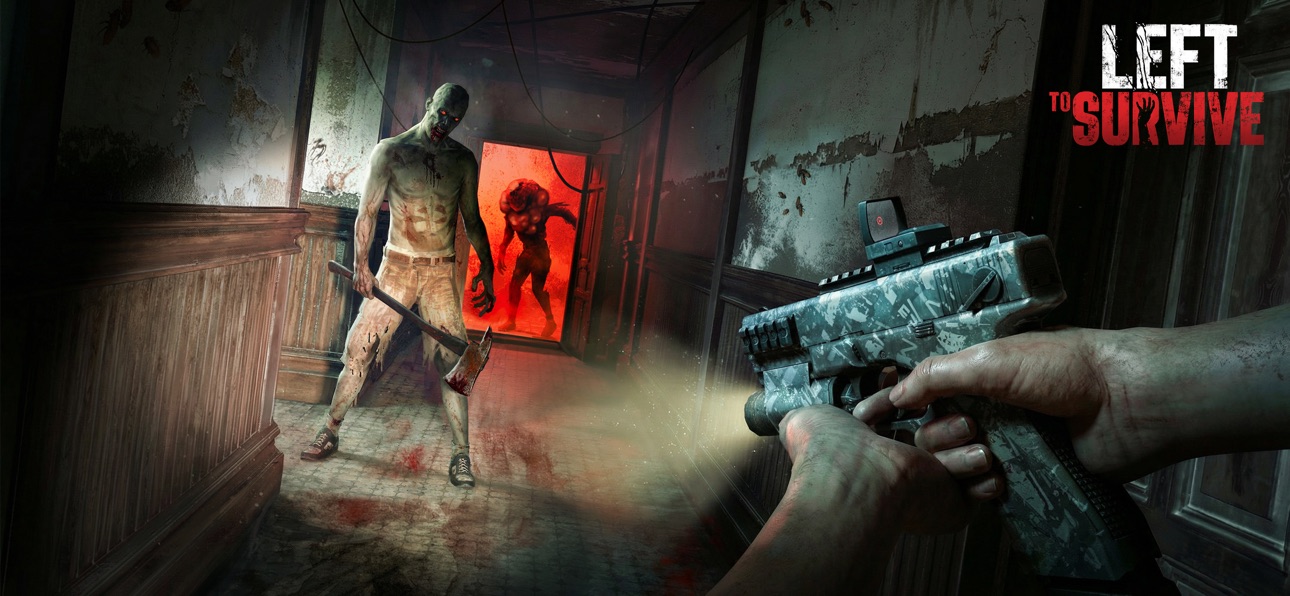
Grab your guns and bring your guts to survive the ultimate action-shooter game, Left to Survive.
Danger lurks everywhere. Survive against zombies using rifles, grenades, shotguns, and anything in your arsenal to secure safe havens and save survivors. Build your encampment to defend yourself against enemy attacks. Get to the chopper and lay waste on enemy bases to steal their resources. Battle other players in solo and team multiplayer tournaments. Band together with other human factions.
Kill Hordes of Zombies
Save stranded survivors and purge zombie-infested areas using a pack of weapons with intense firepower
Destroy Bases from A Helicopter
Get to the chopper and unleash a fiery bullet storm on your opponent’s base to steal their resources
Intense PvP
Think zombies are deadly? Test your survival skills against live players in solo and 2v2 matches
Challenge Zombie Bosses
Defend yourself against zombies that can jump, wear police armor, or explode with toxic gas
Build and Customize Your Base
Build, customize, and defend your encampment from zombies and rival factions. Locate survivors, loot materials and band together to overcome a post-apocalyptic world
FOLLOW US on Facebook: https://www.facebook.com/LeftToSurvive
If you have a problem with this game, please contact us at: https://support.my.games/lts
Please note: Left to Survive is free to download and play, however, some game items can also be purchased for real money. In-App purchases may include random items.
Premium Survival Pass is a monthly subscription service that allows you to build and upgrade two buildings at the same time, increases your mission rewards:
+40% experience
+40% cash
It also provides access to the special Survivors, that can defend your base and significantly boost production:
+50% oil
+40% material
Premium Survival Pass costs 9.99 USD/month (or local equivalent) and will be charged on your iTunes Account after purchase and when the subscription renews monthly.
Payment will be charged to iTunes Account at confirmation of purchase. Subscriptions automatically renew unless auto-renew is turned off at least 24-hours before the end of the current period. Account will be charged for renewal within 24-hours prior to the end of the current period at the rate of your selected plan above.
Subscriptions may be managed by the user and auto-renewal may be turned off by going to the user's Account Settings after purchase. No cancellation of the current subscription is allowed during active subscription period.
- For information about how MY.GAMES collects and uses your data, please read our privacy policy at: https://documentation.my.games/terms/mygames_privacy
- Terms of Use: https://documentation.my.games/terms/mygames_eula
Brought to you by MY.GAMES
ภาพหน้าจอ © เจ้าของแต่ละราย · App Store



iOSGods ไม่มีความเกี่ยวข้อง ไม่ได้รับการรับรอง และไม่ได้รับการสนับสนุนจาก Apple Inc., Google LLC หรือผู้พัฒนาแอปที่แสดงไว้ที่นี่ Apple, iOS และ App Store เป็นเครื่องหมายการค้าของ Apple Inc. Android และ Google Play เป็นเครื่องหมายการค้าของ Google LLC ชื่อแอป ไอคอน ภาพ และเครื่องหมายการค้าอื่นทั้งหมดเป็นทรัพย์สินของเจ้าของแต่ละราย

- iPhone หรือ iPad ที่ไม่ได้เจลเบรก/ไม่ได้เจลเบรก หรือเจลเบรกแล้ว
- Sideloadly หรือทางเลือกอื่น
- คอมพิวเตอร์ที่ใช้ Windows/macOS/Linux และติดตั้ง iTunes ไว้
ขั้นตอนที่ 1: ดาวน์โหลดไฟล์ .IPA ที่แฮกไว้ล่วงหน้าจากลิงก์ด้านบนลงในคอมพิวเตอร์ของคุณ หากต้องการดาวน์โหลดจากแอป iOSGods โปรดดู วิธีดาวน์โหลด IPA ในแอป iOSGods ซึ่งมีตัวอย่างวิดีโอประกอบ
ขั้นตอนที่ 2: ดาวน์โหลด Sideloadly แล้วติดตั้งบน Windows หรือ Mac ของคุณ
ขั้นตอนที่ 3: เปิด Sideloadly บนคอมพิวเตอร์ เชื่อมต่ออุปกรณ์ iOS แล้วรอจนกว่าชื่ออุปกรณ์ของคุณจะปรากฏใน Sideloadly
ขั้นตอนที่ 4: เมื่อ iDevice ของคุณถูกตรวจพบแล้ว ให้ลากไฟล์ .IPA ที่ม็อดมาวางลงในโปรแกรม Sideloadly
ขั้นตอนที่ 5: กรอกอีเมล Apple Account ของคุณ จากนั้นกด "Start" ระบบจะถามรหัสผ่าน กรอกข้อมูลที่จำเป็นให้เรียบร้อย
ขั้นตอนที่ 6: รอจนกว่า Sideloadly จะ sideload/ติดตั้งไฟล์ IPA ที่แฮกเสร็จ หากเกิดปัญหาระหว่างติดตั้ง โปรดอ่านหมายเหตุด้านล่าง
ขั้นตอนที่ 7: เมื่อการติดตั้งเสร็จสิ้นและเห็นแอปบนหน้าจอหลักแล้ว ให้ไปที่ การตั้งค่า → ทั่วไป → โปรไฟล์ / VPN และการจัดการอุปกรณ์ จากนั้นแตะที่อีเมลที่คุณกรอกในขั้นตอนที่ 6 แล้วแตะ "เชื่อถือ [email protected]"
ขั้นตอนที่ 8: จากนั้นไปที่หน้าจอหลักและเปิดแอปที่ติดตั้งใหม่ ทุกอย่างควรทำงานได้ปกติ คุณอาจต้องทำตามคำแนะนำเพิ่มเติมเฉพาะแอปในป๊อปอัปของม็อดในเกม
หมายเหตุ: สำหรับ iOS/iPadOS 16 ขึ้นไป คุณต้อง เปิดโหมดนักพัฒนา (Developer Mode) สำหรับบัญชี Apple Developer แบบฟรี คุณต้องทำขั้นตอนนี้ซ้ำทุก 7 วัน หากมีคำถามหรือพบปัญหา โปรดอ่าน หัวข้อ FAQ ของ Sideloadly ในกระทู้
Game Name iOS Mod IPA is an action adventure game enhanced with powerful gameplay boosts and quality-of-life improvements. Win battles faster, earn rewards quicker, and enjoy uninterrupted play without ads.
- Unlimited Gold - spend freely to unlock premium content
- Damage Multiplier - deal significantly more damage in combat
- Defense Multiplier - take less damage and survive longer
- Reward Multiplier - earn more loot from every battle
- Max Level - instantly reach the highest player rank
- No Ads - play without interruptions or advertisements
This app also comes with iGameGod, giving you access to Auto Touch to automate repetitive tasks, App Speed Manager for adjustable gameplay speed, Memory Engine value editing, and more powerful iOS game tools.
ดาวน์โหลด Game Name Mod IPA จากลิงก์ด้านบน แตะปุ่มติดตั้งและทำตามคำแนะนำบนหน้าจอเพื่อติดตั้งแฮ็กแอป iOS นี้บน iPhone, iPad หรือ Apple Silicon
ต้องการความช่วยเหลือเพิ่มเติม ดู คำถามที่พบบ่อยของแอป iOSGods สำหรับคำตอบโดยละเอียดและเคล็ดลับการแก้ไขปัญหา
----------------------------------------------------------
--------------------------------------------------


![[Seven Deadly Sins] 七つの大罪 光と闇の交戦 : グラクロ iOS Mod IPA](https://is1-ssl.mzstatic.com/image/thumb/Purple211/v4/c1/0c/13/c10c13c6-a86b-682c-e39d-636365caf3de/AppIcon-1x_U007emarketing-0-8-0-85-220-0.png/100x100bb.jpg)


