ต้องเข้าสู่ระบบ
เข้าสู่ระบบด้วยบัญชี iOSGods เพื่อดำเนินการต่อ
เข้าสู่ระบบด้วยบัญชี iOSGods เพื่อดำเนินการต่อ
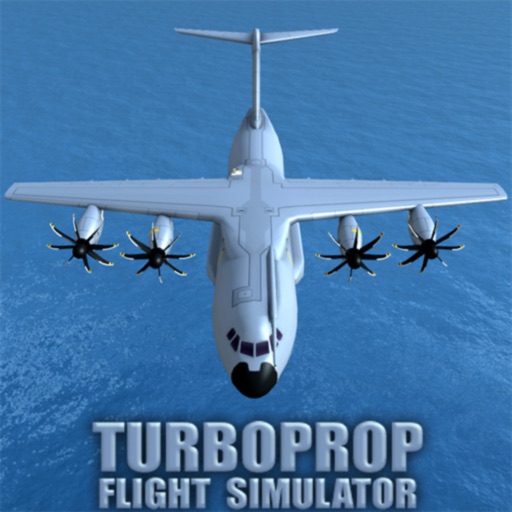
บินด้วย ATR-72 พร้อมสกินแบบกำหนดเองของ Vietjet Air ในเกม flight simulator hack นี้ ซึ่งให้ลักษณ์ที่ปรับแต่งแล้วสำหรับเครื่องบินโดยสารระดับภูมิภาค Turboprop Flight Simulator ทำให้คุณสามารถควบคุมเครื่องบินทหาร เครื่องบินโดยสารผู้โดยสาร และเครื่องบิน VTOL แนวคิดต่างๆ ในภารกิจและสถานการณ์ที่หลากหลาย
- สกิน ATR-72 ปรับแต่งแล้ว Vietjet AiR (Bia sai gon) → ลิเวอรี่แบบกำหนดเองสำหรับเครื่องบินโดยสารระดับภูมิภาค
สร้างโดย ThanhDark1909
แอปนี้ยังมาพร้อมกับ iGameGod ซึ่งช่วยให้คุณเข้าถึง Auto Touch สำหรับการทำงานซ้ำ ๆ โดยอัตโนมัติ, App Speed Manager สำหรับปรับความเร็วของเกม, การแก้ไขค่าด้วย Memory Engine และเครื่องมือสำหรับเกม iOS ที่ทรงพลังอื่น ๆ อีกมากมาย
ดาวน์โหลด Turboprop Flight Simulator Hack modded IPA จากลิงก์ด้านบน แตะปุ่มติดตั้งและทำตามคำแนะนำบนหน้าจอเพื่อติดตั้งแฮ็กแอป iOS นี้บน iPhone, iPad หรือ Apple Silicon
ต้องการความช่วยเหลือเพิ่มเติม? ดู คำถามที่พบบ่อยของแอป iOSGods สำหรับคำตอบโดยละเอียดและเคล็ดลับการแก้ไขปัญหา
FLY MILITARY AIRCRAFT AND PASSENGER AIRLINERS:
"Turboprop Flight Simulator" is a 3D airplane simulator game, in which you pilot various types of modern turboprop aircraft, and also drive ground vehicles.
THE AIRCRAFT:
* C-400 tactical airlifter - inspired from the real-world Airbus A400M.
* HC-400 coastguard search and rescue - variant of C-400.
* MC-400 special operations - variant of C-400.
* RL-42 regional airliner - inspired from the real-world ATR-42.
* RL-72 regional airliner - inspired from the real-world ATR-72.
* E-42 military early warning aircraft - derived from RL-42.
* XV-40 concept tilt-wing VTOL cargo.
* PV-40 private luxury VTOL - variant of XV-40.
* MV-40 special operations VTOL - variant of XV-40.
* PS-26 concept private seaplane.
* MS-26 special operations seaplane - variant of PS-26.
* C-130 military cargo - inspired from the legendary Lockheed C-130 Hercules.
* HC-130 coastguard search and rescue - variant of C-130.
* MC-130 special operations - variant of C-130.
HAVE FUN:
* Learn to fly with training missions (teaching the basics of flying, taxiing, takeoff and landing).
* Complete various missions.
* Explore the plane's interior in first-person (in most levels, and free-flight).
* Interact with various items (doors, cargo ramp, strobes, main lights).
* Drive ground vehicles.
* Load, unload, and airdrop supplies and vehicles with the cargo planes.
* Takeoff and land on improvised runways (and airports, for sure).
* Fly without restrictions in free-flight mode, or create flight routes on the map.
* Perform refueling on ground and mid-air refueling.
* Use JATO/L (Jet Assisted Take-Off and Landing).
* Fly in varied time-of-day, fog and wind conditions.
OTHER FEATURES:
* FREE airplane simulator game updated in 2025!
* NO MANDATORY ADS! Only optional, rewarded ones in-between flights.
* Good 3D graphics (with detailed cockpits for all the airplanes).
* Realistic physics for flight simulation.
* Complete pilot controls (including rudder, flaps, spoilers, thrust reversers, auto-brakes, and landing gear).
* Multiple control options (including mixed tilt sensor & stick / yoke).
* Multiple cameras (including cockpit cameras with captain and copilot positions).
* Close to realistic engines' sounds (turbines and propellers noises recorded from real airplanes).
* Partial and total aircraft destruction (clipping wing tips, full wings separation, tail separation, and main fuselage breakage).
* Several islands with many airports.
* Selection of measurement units for air speed, flying altitude, and distance (metric, aviation standard, and imperial).
ภาพหน้าจอ © เจ้าของแต่ละราย · App Store


iOSGods ไม่มีความเกี่ยวข้อง ไม่ได้รับการรับรอง และไม่ได้รับการสนับสนุนจาก Apple Inc., Google LLC หรือผู้พัฒนาแอปที่แสดงไว้ที่นี่ Apple, iOS และ App Store เป็นเครื่องหมายการค้าของ Apple Inc. Android และ Google Play เป็นเครื่องหมายการค้าของ Google LLC ชื่อแอป ไอคอน ภาพ และเครื่องหมายการค้าอื่นทั้งหมดเป็นทรัพย์สินของเจ้าของแต่ละราย
- iPhone หรือ iPad ที่ไม่ได้เจลเบรก/ไม่ได้เจลเบรก หรือเจลเบรกแล้ว
- Sideloadly หรือทางเลือกอื่น
- คอมพิวเตอร์ที่ใช้ Windows/macOS/Linux และติดตั้ง iTunes ไว้
ขั้นตอนที่ 1: ดาวน์โหลดไฟล์ .IPA ที่แฮกไว้ล่วงหน้าจากลิงก์ด้านบนลงในคอมพิวเตอร์ของคุณ หากต้องการดาวน์โหลดจากแอป iOSGods โปรดดู วิธีดาวน์โหลด IPA ในแอป iOSGods ซึ่งมีตัวอย่างวิดีโอประกอบ
ขั้นตอนที่ 2: ดาวน์โหลด Sideloadly แล้วติดตั้งบน Windows หรือ Mac ของคุณ
ขั้นตอนที่ 3: เปิด Sideloadly บนคอมพิวเตอร์ เชื่อมต่ออุปกรณ์ iOS แล้วรอจนกว่าชื่ออุปกรณ์ของคุณจะปรากฏใน Sideloadly
ขั้นตอนที่ 4: เมื่อ iDevice ของคุณถูกตรวจพบแล้ว ให้ลากไฟล์ .IPA ที่ม็อดมาวางลงในโปรแกรม Sideloadly
ขั้นตอนที่ 5: กรอกอีเมล Apple Account ของคุณ จากนั้นกด "Start" ระบบจะถามรหัสผ่าน กรอกข้อมูลที่จำเป็นให้เรียบร้อย
ขั้นตอนที่ 6: รอจนกว่า Sideloadly จะ sideload/ติดตั้งไฟล์ IPA ที่แฮกเสร็จ หากเกิดปัญหาระหว่างติดตั้ง โปรดอ่านหมายเหตุด้านล่าง
ขั้นตอนที่ 7: เมื่อการติดตั้งเสร็จสิ้นและเห็นแอปบนหน้าจอหลักแล้ว ให้ไปที่ การตั้งค่า → ทั่วไป → โปรไฟล์ / VPN และการจัดการอุปกรณ์ จากนั้นแตะที่อีเมลที่คุณกรอกในขั้นตอนที่ 6 แล้วแตะ "เชื่อถือ [email protected]"
ขั้นตอนที่ 8: จากนั้นไปที่หน้าจอหลักและเปิดแอปที่ติดตั้งใหม่ ทุกอย่างควรทำงานได้ปกติ คุณอาจต้องทำตามคำแนะนำเพิ่มเติมเฉพาะแอปในป๊อปอัปของม็อดในเกม
หมายเหตุ: สำหรับ iOS/iPadOS 16 ขึ้นไป คุณต้อง เปิดโหมดนักพัฒนา (Developer Mode) สำหรับบัญชี Apple Developer แบบฟรี คุณต้องทำขั้นตอนนี้ซ้ำทุก 7 วัน หากมีคำถามหรือพบปัญหา โปรดอ่าน หัวข้อ FAQ ของ Sideloadly ในกระทู้
Game Name iOS Mod IPA is an action adventure game enhanced with powerful gameplay boosts and quality-of-life improvements. Win battles faster, earn rewards quicker, and enjoy uninterrupted play without ads.
- Unlimited Gold - spend freely to unlock premium content
- Damage Multiplier - deal significantly more damage in combat
- Defense Multiplier - take less damage and survive longer
- Reward Multiplier - earn more loot from every battle
- Max Level - instantly reach the highest player rank
- No Ads - play without interruptions or advertisements
This app also comes with iGameGod, giving you access to Auto Touch to automate repetitive tasks, App Speed Manager for adjustable gameplay speed, Memory Engine value editing, and more powerful iOS game tools.
ดาวน์โหลด Game Name Mod IPA จากลิงก์ด้านบน แตะปุ่มติดตั้งและทำตามคำแนะนำบนหน้าจอเพื่อติดตั้งแฮ็กแอป iOS นี้บน iPhone, iPad หรือ Apple Silicon
ต้องการความช่วยเหลือเพิ่มเติม ดู คำถามที่พบบ่อยของแอป iOSGods สำหรับคำตอบโดยละเอียดและเคล็ดลับการแก้ไขปัญหา
----------------------------------------------------------
--------------------------------------------------