تسجيل الدخول مطلوب
سجّل الدخول بحساب iOSGods للمتابعة.

Hack Features:
- PRO
Purchase then Cancel.
يأتي هذا التطبيق مع iGameGod، مما يتيح لك الوصول إلى Auto Touch لأتمتة المهام المتكررة، وApp Speed Manager لضبط سرعة اللعب، وتعديل القيم عبر Memory Engine، والمزيد من أدوات ألعاب iOS القوية.
قم بتنزيل NodeVideo-PowerYourCreativity Hack modded IPA من الروابط أعلاه. اضغط على زر التثبيت واتبع التعليمات لتثبيت هذا التعديل لـ iOS على iPhone أو iPad أو Apple Silicon.
هل تحتاج إلى مزيد من المساعدة؟ راجع الأسئلة الشائعة لتطبيق iOSGods للحصول على إجابات مفصلة ونصائح لاستكشاف الأخطاء.
Must-Have video editing app for Pro Editors.
Please stay tuned for updates and more powerful features!
•Extremely powerful and flexible.
Limitless Layers & Groups.
Precise Video Editing & Rich Possibilities.
Super Fast Rendering.
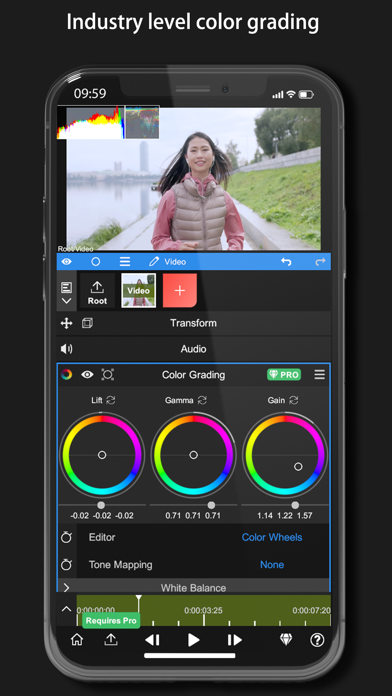
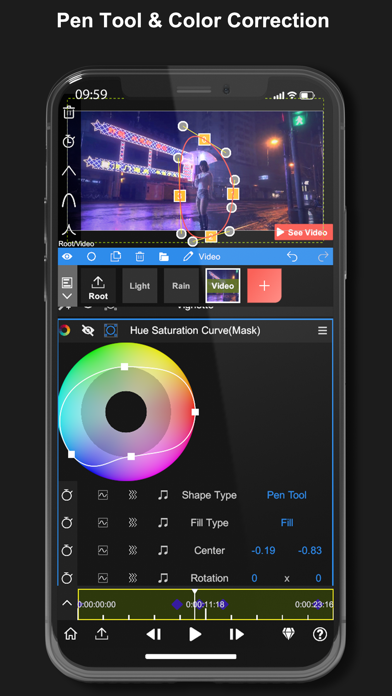
Various Editing Tools are available: Motion Tracker, Pen Tool, Timeline, Keyframe animation, Curve Editor, Masking, Color Correction, Frame Blend, Puppet Pin, etc.
•Revolutionary Audio Reactor.
Visualize your audio to anything. Every parameter of every effect&property is controllable by the audio spectrum.
•AI Powered Features.
Automatically separating Human&Background in real time!
More Features Coming Soon!
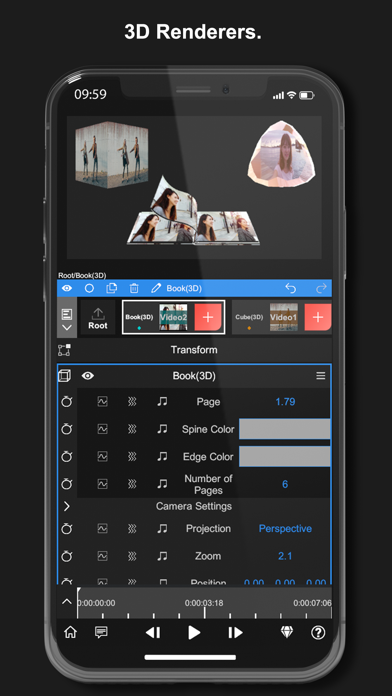
•3D Renderers.
Mapping your videos & images to 3D models.
•Professional Effects and Presets.
Get new effects and presets regularly.
•Currently included Effects/Properties
-Blend Mode
-Layer Styles
-Motion Blur
-Luma Fade
-Lens Flare
-Perspective Transform
-Fractal Noise
-Time Remap
-Basic Color Correction(Exposure, Contrast, White Balance, etc.)
-Emboss
-4 Color Gradient
-Shift Channels
-Invert
-Camera Lens Blur
-Gaussian Blur
-Cross Blur
-Directional Blur
-Radial Blur
-Glow
-Motion Tile
-Mosaic
-Find Edges
-Vignette
-Displacement Map
-Mirror
-Lens Distortion
-Polar Coordinates
-Clipping Mask
-Human Matting
-Shape Mask
-RGB Curve
-HSL Curve
-Color Wheel
-Sketch
-Old Movie
-Manga
-Cartoon
-Chroma Key
-Particles: Snow, Rain,Embers
---------
Pro Subscription
- You can subscribe for unlimited access to all features and content offered for purchase within Node Video.
- Subscriptions are billed monthly or annually at the rate selected depending on the subscription plan.
- Subscriptions auto-renew at the cost of the chosen package, unless cancelled 24-hours in advance prior to the end of the current period. The subscription fee is charged to your iTunes account at confirmation of purchase. You may manage your subscription and turn off auto-renewal by going to your Account Settings after purchase. Per Apple policy, no cancellation of the current subscription is allowed during active subscription period. Once purchased, refunds will not be provided for any unused portion of the term.
- Any unused portion of the free trial period will be forfeited when you purchase a subscription.
- Price may vary by location.
- Terms of use: http://www.nodevideo.com/terms_of_use.html
- Privacy Policy: http://www.nodevideo.com/privacy_policy.html
* Don't hesitate to contact us on - [email protected]
- iPhone أو iPad بجيلبريك أو بدون جيلبريك.
- Sideloadly أو بدائلها.
- كمبيوتر يعمل بنظام Windows/macOS/Linux مع تثبيت iTunes.
الخطوة 1: قم بتنزيل ملف .IPA المعدّل مسبقًا من الرابط أعلاه إلى الكمبيوتر الخاص بك. للتنزيل من تطبيق iOSGods App، اطلع على دليل تنزيل IPA من تطبيق iOSGods App الذي يتضمن مثالًا بالفيديو.
الخطوة 2: قم بتنزيل Sideloadly وتثبيته على جهاز Windows أو Mac.
الخطوة 3: افتح Sideloadly على الكمبيوتر، ووصّل جهاز iOS الخاص بك، وانتظر حتى يظهر اسم جهازك داخل Sideloadly.
الخطوة 4: بمجرد التعرّف على جهاز iDevice الخاص بك، اسحب ملف .IPA المعدّل الذي قمت بتنزيله وأفلِته داخل تطبيق Sideloadly.
الخطوة 5: أدخل البريد الإلكتروني لحساب Apple Account الخاص بك، ثم اضغط على «Start». سيُطلب منك بعد ذلك إدخال كلمة المرور. تابع وأدخل المعلومات المطلوبة.
الخطوة 6: انتظر حتى ينتهي Sideloadly من تحميل/تثبيت ملف IPA المعدّل. في حال واجهت أي مشاكل أثناء التثبيت، يرجى قراءة الملاحظة أدناه.
الخطوة 7: بعد اكتمال التثبيت ورؤية التطبيق على الشاشة الرئيسية، انتقل إلى Settings → General → Profiles / VPN & Device Management. ثم اضغط على البريد الإلكتروني الذي أدخلته في الخطوة 6، ثم اضغط على «الوثوق بـ [email protected]».
الخطوة 8: الآن انتقل إلى الشاشة الرئيسية وافتح التطبيق الذي تم تثبيته للتو وسيعمل كل شيء بشكل صحيح. قد تحتاج إلى اتباع تعليمات إضافية خاصة بكل تطبيق داخل النافذة المنبثقة للتعديل أثناء اللعب.
ملاحظة: بدءًا من iOS/iPadOS 16 وما بعده، يجب تفعيل وضع المطور (Developer Mode). بالنسبة لحسابات Apple Developer المجانية، ستحتاج إلى تكرار هذه العملية كل 7 أيام. إذا كانت لديك أي أسئلة أو مشاكل، يرجى قراءة قسم الأسئلة الشائعة حول Sideloadly في الموضوع.