Connexion requise
Connectez-vous avec votre compte iOSGods pour continuer.
Connectez-vous avec votre compte iOSGods pour continuer.
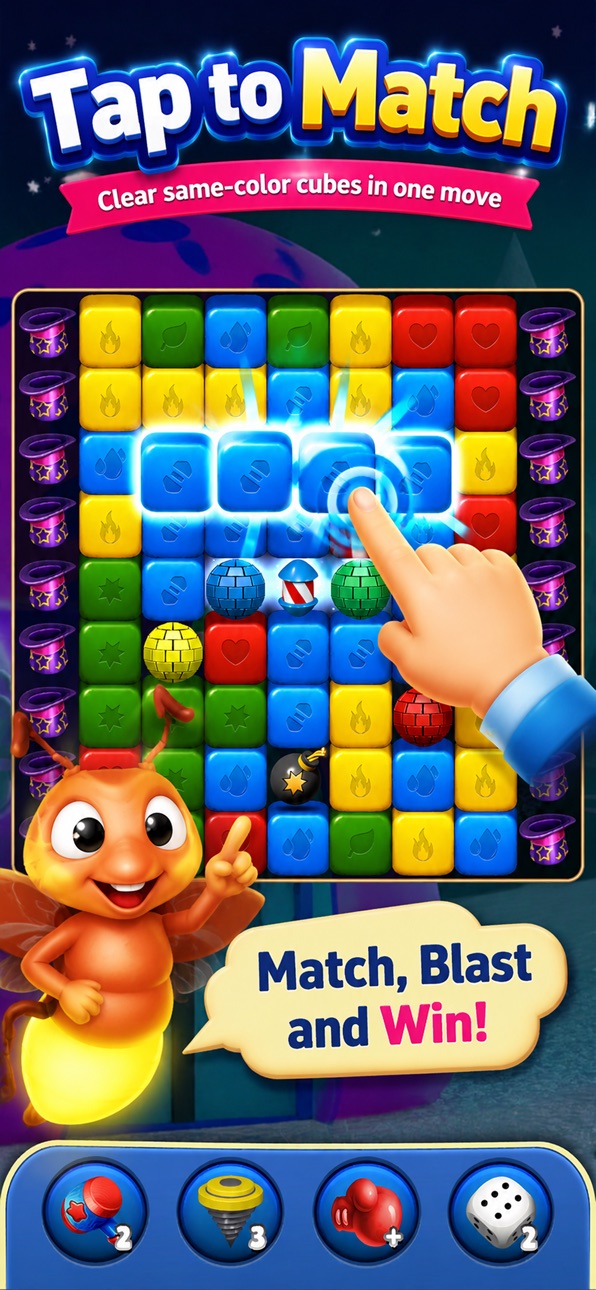
Associez des cubes colorés et déclenchez des explosions satisfaisantes à travers plus de 10 000 niveaux dans Betty Blast, un jeu de puzzle gratuit désormais amélioré avec ce Mod IPA qui supprime les corvées et déverrouille la puissance premium.
Avec des pièces illimitées, des vies, des boosters et des coups à votre portée, vous pouvez vous concentrer uniquement sur la résolution des énigmes et la découverte de nouveaux obstacles sans attendre ni rejouer les niveaux. Que vous soyez un joueur occasionnel qui veut une gratification instantanée ou un perfectionniste à la recherche de chaque niveau, ce Hack transforme l'expérience en pur plaisir de puzzle.
- Victoire automatique → complétez les niveaux instantanément
- Pièces illimitées → dépensez librement en boosters et améliorations
- Vies illimitées → jouez sans restrictions d'énergie
- Booster illimité → utilisez des fusées, des bombes et des boules disco sans limite
- Coups illimités → ne manquez jamais de tours sur un niveau
- Gel des coups → mettez en pause les compteurs de coups pendant le jeu
Cette app est également livrée avec iGameGod, qui vous donne accès à Auto Touch pour automatiser les tâches répétitives, App Speed Manager pour ajuster la vitesse de jeu, à l'édition de valeurs avec Memory Engine, et à d'autres outils puissants pour les jeux iOS.
Téléchargez Tap Blast Game iOS Mod IPA depuis les liens ci-dessus. Appuyez sur le bouton d'installation et suivez les instructions pour installer ce hack iOS sur votre iPhone, iPad ou Apple Silicon.
Besoin de plus d'aide ? Consultez notre FAQ de l'app iOSGods pour des réponses détaillées et des conseils de dépannage.
Welcome to Tap Blast! - the addictive block puzzle game that millions love to play. If you enjoy satisfying puzzles, brain teasers, and the classic block blast gameplay, you have found your new favorite game.
HOW TO PLAY
Tap the color cubes on the board to blast them away. Match cubes of the same color to create massive combos and clear the entire grid. Combine, pop and blast your way through hundreds of carefully designed levels that get more challenging as you progress. The rules are simple to learn but tricky to master - a no stress puzzle game you can play anywhere, anytime.
GAME FEATURES
- FREE to play block puzzle game with no paywall blocking your progress
- Hundreds of levels with increasing difficulty and new mechanics
- Play offline - no wifi or internet connection needed
- Relaxing sounds, smooth animations and a clean, modern design
- Daily challenges and bonuses to keep you coming back
- Satisfying combo system that rewards smart moves
- Designed for the whole family - kids, parents and grandparents alike
- Lightweight app that runs smoothly on any device
WHY YOU WILL LOVE IT
- Beat boredom anywhere: on the bus, in a line, or relaxing at home
- Train your brain and improve your logic and concentration
- A calming, zen-like experience that helps you unwind after a long day
- No timers, no pressure, no stress - play at your own pace
- New levels and challenges added regularly
Tap Blast is more than just a matching game - it is the perfect blend of a classic block puzzle and modern casual gaming. Whether you are a puzzle expert or a complete beginner, you will find endless fun clearing rows, blasting blocks and chasing high scores.
Download Tap Blast! today and start your block-blasting adventure. Play free, relax your mind, and show the world your high score. We hope you enjoy the game - leave us a rating if you do!
Captures © leurs propriétaires respectifs · App Store


iOSGods n'est ni affilié à Apple Inc., Google LLC ou aux développeurs des applications listées ici, ni approuvé ou sponsorisé par eux. Apple, iOS et App Store sont des marques d'Apple Inc. Android et Google Play sont des marques de Google LLC. Tous les autres noms d'applications, icônes, visuels et marques appartiennent à leurs propriétaires respectifs.

- iPhone ou iPad avec ou sans Jailbreak.
- Sideloadly ou alternatives.
- Ordinateur sous Windows/macOS/Linux avec iTunes installé.
ÉTAPE 1: Téléchargez le fichier .IPA pré-modifié depuis le lien ci-dessus sur votre ordinateur. Pour le télécharger depuis l'iOSGods App, consultez notre Tutoriel de téléchargement de l'IPA depuis l'iOSGods App qui comprend un exemple en vidéo.
ÉTAPE 2: Téléchargez Sideloadly et installez-le sur votre Windows ou Mac.
ÉTAPE 3: Ouvrez Sideloadly sur votre ordinateur, connectez votre appareil iOS et attendez que le nom de votre appareil apparaisse dans Sideloadly.
ÉTAPE 4: Une fois votre iDevice reconnu, glissez le fichier .IPA modifié que vous avez téléchargé et déposez-le dans l'application Sideloadly.
ÉTAPE 5: Saisissez l'adresse e-mail de votre Apple Account, puis appuyez sur « Start ». Il vous sera ensuite demandé d'entrer votre mot de passe. Fournissez les informations requises.
ÉTAPE 6: Attendez que Sideloadly termine le sideloading/l'installation de l'IPA modifié. En cas de problème durant l'installation, veuillez lire la remarque ci-dessous.
ÉTAPE 7: Une fois l'installation terminée et l'app visible sur votre écran d'accueil, vous devez aller dans Réglages → Général → Profils / VPN et gestion de l'appareil. Là, appuyez sur l'adresse e-mail saisie à l'étape 6, puis appuyez sur « Faire confiance à [email protected] ».
ÉTAPE 8: Allez maintenant sur votre écran d'accueil et ouvrez l'app nouvellement installée ; tout devrait fonctionner correctement. Vous devrez peut-être suivre des instructions supplémentaires propres à chaque app, dans la fenêtre du hack en jeu.
REMARQUE : À partir d'iOS/iPadOS 16, vous devez activer le mode Développeur. Pour les comptes Apple Developer gratuits, vous devrez répéter ce processus tous les 7 jours. Pour toute question ou problème, lisez notre section FAQ Sideloadly du sujet.
Game Name iOS Mod IPA is an action adventure game enhanced with powerful gameplay boosts and quality-of-life improvements. Win battles faster, earn rewards quicker, and enjoy uninterrupted play without ads.
- Unlimited Gold - spend freely to unlock premium content
- Damage Multiplier - deal significantly more damage in combat
- Defense Multiplier - take less damage and survive longer
- Reward Multiplier - earn more loot from every battle
- Max Level - instantly reach the highest player rank
- No Ads - play without interruptions or advertisements
This app also comes with iGameGod, giving you access to Auto Touch to automate repetitive tasks, App Speed Manager for adjustable gameplay speed, Memory Engine value editing, and more powerful iOS game tools.
Téléchargez Game Name Mod IPA depuis les liens ci-dessus. Appuyez sur le bouton d'installation et suivez les instructions pour installer ce hack iOS sur votre iPhone, iPad ou Apple Silicon.
Besoin de plus d'aide Consultez notre FAQ de l'app iOSGods pour des réponses détaillées et des conseils de dépannage.
----------------------------------------------------------
--------------------------------------------------