Cần đăng nhập
Đăng nhập bằng tài khoản iOSGods để tiếp tục.
Đăng nhập bằng tài khoản iOSGods để tiếp tục.

Các kỹ năng luôn hoạt động và trạng thái Omega ViP mở khóa những lợi thế phòng thủ tháp cao cấp trong Mod APK này, giúp bạn có lợi thế trong các trận chiến chiến lược dựa trên hợp nhất của Omega Royale. Điều khiển các tháp của bạn mà không có hạn chế thời gian chờ và tận hưởng các đặc quyền ViP độc quyền khi bạn leo lên bảng xếp hạng chống lại các đối thủ thực.
- Luôn Có Thể Sử Dụng Kỹ Năng → triển khai các khả năng mà không có hạn chế thời gian chờ
- Bật Omega Vip → mở khóa trạng thái tài khoản cao cấp và các lợi ích độc quyền
Tải Omega Royale - Tower Defense Mod APK từ nút ở trên. Sau khi nhấn tải, chỉ cần làm theo hướng dẫn để cài APK đã mod lên thiết bị Android hoặc trình giả lập.
Cần trợ giúp? Hãy xem Câu hỏi thường gặp Android để có câu trả lời chi tiết và mẹo khắc phục sự cố.
🔥 OMEGA ROYALE – THE ULTIMATE MERGE TOWER DEFENSE STRATEGY GAME! 🔥
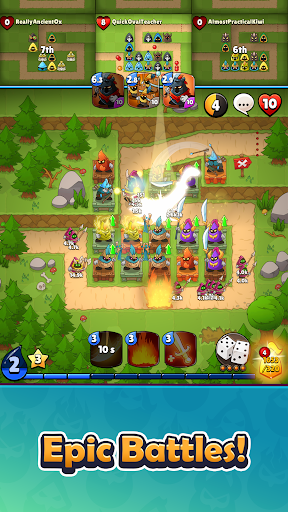
Are you ready to command the battlefield and defend your kingdom like never before? Omega Royale brings an exciting twist to tower defense games, combining merge mechanics, real-time strategy, and PvP battles in a fast-paced, action-packed TD showdown!
Merge towers, outthink your opponents, and become the ultimate tower defense champion! Build a powerful defense, unlock legendary towers, and climb the leaderboards in the most competitive strategy game on mobile!
🏰 TOWER DEFENSE EVOLVED – MERGE, UPGRADE, CONQUER!
Classic tower defense meets modern strategy in this innovative TD game where every decision matters! Defend against waves of enemies, compete against rival strategists, and merge towers to unlock incredible new abilities.
✔️ Merge & Upgrade Towers – Build and evolve your defenses to create an unstoppable fortress.
✔️ Real-Time Strategy Battles – Outsmart your rivals in intense, head-to-head TD matches.
✔️ PvP & PvE Challenges – Compete in leagues or test your skills in epic solo battles.
✔️ Unlock & Customize Towers – Discover a variety of unique tower abilities to dominate the battlefield.
✔️ Wave Defense & Base Building – Strengthen your base, survive endless waves, and become the ultimate tactician.
⚔️ STRATEGIC BATTLES WITH REAL-TIME COMPETITION!
Omega Royale isn’t just another idle tower defense game—it’s a high-stakes battle arena where only the best strategist can survive!
🔥 Compete Against 10 Players – Battle in a fast-paced, last-man-standing format where strategy is king.
🏆 Climb the Leaderboards – Rise through the ranks and prove you’re the best tower defense commander.
💥 Unleash Devastating Spells – Turn the tide of battle with powerful abilities.
🌎 Global Matches & Clan Battles – Team up with allies or take on the world in multiplayer tower defense warfare!
🎯 A GAME FOR EVERY STRATEGIST – BEGINNER OR PRO!
Whether you're a casual player looking for fun TD games or a hardcore strategist aiming for PvP dominance, Omega Royale offers a deep, rewarding gameplay experience that keeps evolving.
💡 Easy to Learn, Hard to Master – Perfect for both newcomers and veteran tower defense fans!
🏰 Varied Battle Environments – Defend forests, castles, and war zones in beautifully crafted arenas.
🎮 Play Your Way – Whether you prefer PvP, PvE, co-op, or competitive leagues, Omega Royale has something for you!
🎁 DAILY REWARDS, EVENTS & ENDLESS FUN!
💎 Earn free rewards every day!
📅 Join limited-time events and special challenges.
🛡 Customize your battle strategy and unlock exclusive towers.
⚡ ARE YOU READY TO BECOME A TOWER DEFENSE LEGEND?
Omega Royale is more than just a game—it’s a test of strategy, skill, and survival! Build, merge, defend, and conquer in the most addictive TD game ever.
💾 Download Omega Royale now and start your journey to tower defense glory!