Inloggen vereist
Log in met je iOSGods-account om door te gaan.
Log in met je iOSGods-account om door te gaan.

Bouw en vlieg onbeperkt aangepaste vliegtuigen met deze gratis game Mod IPA voor SimplePlanes, waarbij je volledige creatieve vrijheid krijgt om vleugelgedeelten te ontwerpen, motoren aan te brengen en realistische vliegfysica in de cockpit te testen. Klik onderdelen samen om je droomvliegtuig te construeren, stijg dan op in de lucht om te zien hoe je ontwerp presteert, of verken meer dan 250.000 door de gemeenschap gemaakte vliegtuigen die je kunt downloaden.
Deze app bevat ook iGameGod, waarmee je toegang krijgt tot Auto Touch om repetitieve taken te automatiseren, App Speed Manager voor een aanpasbare spelsnelheid, het bewerken van waarden met Memory Engine en andere krachtige iOS-gametools.
Download SimplePlanes modded IPA via de bovenstaande links. Tik op de installatieknop en volg de instructies om deze iOS-app-hack op je iPhone, iPad of Apple Silicon te installeren.
Meer hulp nodig? Bekijk onze Veelgestelde vragen over de iOSGods-app voor uitgebreide antwoorden en probleemoplossingstips.
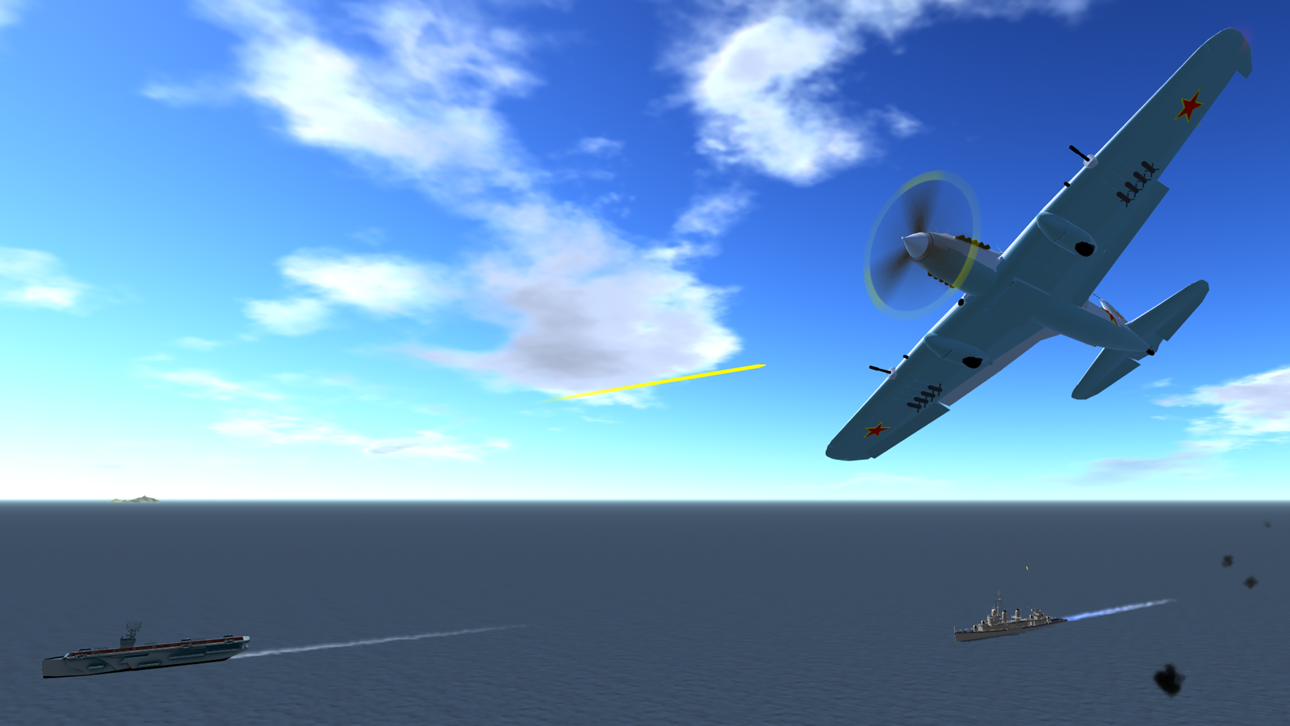
Build airplanes by snapping parts together, designing wing sections, and attaching engines. At any time, you can strap yourself into the cockpit and see how it flies with realistic physics. If you're not in the mood for building, over 250,000 airplanes are available to download for free.
BUILD AIRPLANES
You have the tools you'll need to bring any airplane to life. Snap parts together to build your airplane's body. Place engines to add thrust. Design and attach wings and then strap yourself into the cockpit and see how it flies.
DOWNLOAD AIRPLANES
Over 250,000 airplanes are available to download for free from SimplePlanes.com. Find anything from old WW2 bombers to next-generation fighters to sci-fi spacecraft. You can upload your own airplanes and rise through the ranks from a bronze builder to a gold level builder.
DYNAMIC FLIGHT MODEL
Flight simulation at its finest. Every little change you make in the designer impacts how the airplane flies. Weight distribution, thrust, lift, and drag are all calculated continuously while flying. Parts can break off in spectacular fashion while flying due to over-stress or by hitting something. The fun won't stop there though. You can keep on flying even with a missing wing if you've got the skills.
SANDBOX MODE
Use all available parts to build airplanes with no restrictions. The sky is the limit. Literally.
CHALLENGES
Climb into the cockpit of one of your custom aircraft and see how it does in the challenges. Land on aircraft carriers, dodge surface-to-air missiles, race through courses, and so much more.
EDUCATIONAL
Tutorials will help players learn the basics of real airplane design and the considerations that need to be taken when airplanes are made.
Screenshots © respectieve eigenaren · App Store


iOSGods is niet verbonden aan, onderschreven door of gesponsord door Apple Inc., Google LLC of de ontwikkelaars van de hier vermelde apps. Apple, iOS en App Store zijn handelsmerken van Apple Inc. Android en Google Play zijn handelsmerken van Google LLC. Alle overige app-namen, iconen, afbeeldingen en handelsmerken behoren toe aan hun respectieve eigenaren.
- Niet-jailbroken/jailed of jailbroken iPhone of iPad.
- Sideloadly of alternatieven.
- Computer met Windows/macOS/Linux en iTunes geïnstalleerd.
STAP 1: Download het vooraf gehackte .IPA-bestand via de link hierboven naar uw computer. Om het te downloaden vanuit de iOSGods App, bekijk onze iOSGods App IPA-downloadhandleiding met een videovoorbeeld.
STAP 2: Download Sideloadly en installeer het op uw Windows of Mac.
STAP 3: Open Sideloadly op uw computer, sluit uw iOS-apparaat aan en wacht tot de naam van uw apparaat in Sideloadly verschijnt.
STAP 4: Zodra uw iDevice is herkend, sleept u het gedownloade gemodde .IPA-bestand naar de Sideloadly-applicatie.
STAP 5: Voer het e-mailadres van uw Apple Account in en druk op “Start”. U wordt vervolgens gevraagd om uw wachtwoord in te voeren. Geef de gevraagde informatie op.
STAP 6: Wacht tot Sideloadly het sideloaden/installeren van de gehackte IPA heeft voltooid. Als er problemen zijn tijdens de installatie, lees dan onderstaande opmerking.
STAP 7: Zodra de installatie is voltooid en u de app op uw beginscherm ziet, gaat u naar Instellingen → Algemeen → Profielen / VPN- en apparaatbeheer. Tik daar op het e-mailadres dat u in stap 6 hebt ingevoerd en tik vervolgens op “Vertrouw [email protected]”.
STAP 8: Ga nu naar uw beginscherm en open de zojuist geïnstalleerde app; alles zou correct moeten werken. Mogelijk moet u verdere app-specifieke instructies volgen in de hack-popup in het spel.
OPMERKING: Op iOS/iPadOS 16 en later moet u Ontwikkelaarsmodus inschakelen. Voor gratis Apple Developer-accounts moet u dit proces elke 7 dagen herhalen. Als u vragen of problemen hebt, lees dan onze Sideloadly FAQ-sectie van het onderwerp.
Game Name iOS Mod IPA is an action adventure game enhanced with powerful gameplay boosts and quality-of-life improvements. Win battles faster, earn rewards quicker, and enjoy uninterrupted play without ads.
- Unlimited Gold - spend freely to unlock premium content
- Damage Multiplier - deal significantly more damage in combat
- Defense Multiplier - take less damage and survive longer
- Reward Multiplier - earn more loot from every battle
- Max Level - instantly reach the highest player rank
- No Ads - play without interruptions or advertisements
This app also comes with iGameGod, giving you access to Auto Touch to automate repetitive tasks, App Speed Manager for adjustable gameplay speed, Memory Engine value editing, and more powerful iOS game tools.
Download Game Name Mod IPA via de bovenstaande links. Tik op de installatieknop en volg de instructies om deze iOS-app-hack op je iPhone, iPad of Apple Silicon te installeren.
Meer hulp nodig Bekijk onze Veelgestelde vragen over de iOSGods-app voor uitgebreide antwoorden en probleemoplossingstips.
----------------------------------------------------------
--------------------------------------------------