Login necessário
Entre com sua conta iOSGods para continuar.
Entre com sua conta iOSGods para continuar.

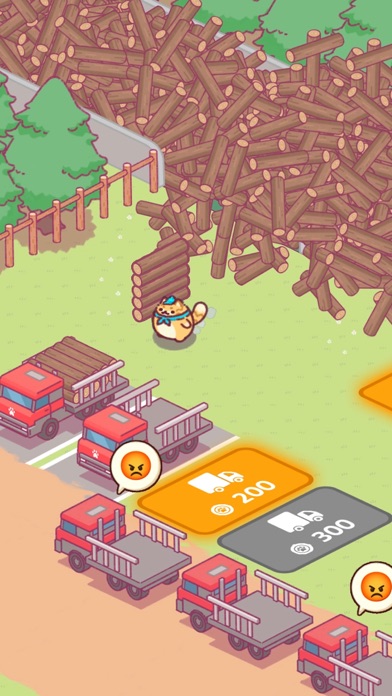
Construa e expanda seu império florestal com adoráveis gatos lenhadores em Idle Lumbercat - Wood Games Hack, um tycoon aconchegante onde felinos fofos cortam madeira e criam produtos mágicos. Este jogo iOS modificado remove a repetição com moedas ilimitadas, permitindo que você se concentre na jogabilidade relaxante e sem estresse e nos visuais encantadores que tornam o corte de madeira uma aventura curativa.
- Moedas ilimitadas → gaste livremente sem limites
Este app também vem com iGameGod, oferecendo acesso ao Auto Touch para automatizar tarefas repetitivas, App Speed Manager para ajustar a velocidade do jogo, edição de valores com Memory Engine e outras ferramentas avançadas para jogos iOS.
Baixe Idle Lumbercat - Wood Games Hack modded IPA dos links acima. Toque no botão de instalação e siga as instruções para instalar este hack iOS no seu iPhone, iPad ou Apple Silicon.
Precisa de mais ajuda? Confira nossas Perguntas frequentes sobre o app iOSGods para respostas detalhadas e dicas de solução de problemas.
Healing Adventure with Trees! "Cat Lumberjack: Cute Tycoon Game"
Enjoy your forest healing time!
In the place illuminated by morning sunlight, the world of "Cat Lumberjack" awaits you.
Here, cute cat lumberjacks chop wood and turn logs into magical products.
The skill of our cat friends in handling wood is admirable and cute!
Life with Cat Lumberjack
Our cat lumberjacks, as cozy as warm cocoa, have exceptional talent for creating beautiful homes.
Watch their skilled hands transform wood into cozy nests.
Stress-free Gameplay
Filled with warm graphics and comfortable sounds, this game is perfect for anywhere.
Enjoy healing time with cats at home, office, or café.
The sounds of cutting and trimming wood are like ASMR
Easy yet Deep Management
Managing the wood business is simpler than expected.
Cat lumberjacks efficiently handle everything. Click, click!
However, strategic choices are needed. Invest in new machines and hire more cat managers.
Idle Tycoon for Everyone
Highly recommended for all ages and cat lovers. It's very easy to play.
It's fine to step away; cute cat lumberjacks will carefully manage the factory.
Upon return, find more achievements waiting.
This game is perfect for:
- Cat owners!
- Those who love games about cats and trees!
- Those interested in wood management and nature!
- Enthusiasts of tycoon games for children!
- Fans of healing, idle, and management simulation games!
- Those preferring offline games without internet needs!
- Single player and free game enthusiasts!
Looking for a game with cute cats? Download "Cat Lumberjack: Cute Tycoon Game" and experience healing!
- iPhone ou iPad sem jailbreak/jailed ou com jailbreak.
- Sideloadly ou alternativas.
- Computador com Windows/macOS/Linux e iTunes instalado.
PASSO 1: Baixe o arquivo .IPA pré-hackeado do link acima para o seu computador. Para baixar pelo iOSGods App, veja nosso Tutorial de download de IPA do iOSGods App, que inclui um exemplo em vídeo.
PASSO 2: Baixe o Sideloadly e instale-o no seu Windows ou Mac.
PASSO 3: Abra o Sideloadly no seu computador, conecte seu dispositivo iOS e aguarde até que o nome do dispositivo apareça no Sideloadly.
PASSO 4: Assim que seu iDevice for reconhecido, arraste o arquivo .IPA modificado que você baixou e solte-o no aplicativo Sideloadly.
PASSO 5: Digite o e-mail da sua Apple Account e pressione “Start”. Em seguida, será solicitada a sua senha. Prossiga e forneça as informações solicitadas.
PASSO 6: Aguarde o Sideloadly finalizar o sideload/instalação do IPA hackeado. Se houver problemas durante a instalação, leia a observação abaixo.
PASSO 7: Quando a instalação estiver concluída e você vir o app na Tela de Início, será necessário acessar Ajustes → Geral → Perfis / Gerenciamento de VPN e Dispositivo. Lá, toque no e-mail que você inseriu no passo 6 e, em seguida, toque em “Confiar em [email protected]”.
PASSO 8: Agora vá para a Tela de Início e abra o app recém-instalado; tudo deve funcionar normalmente. Você pode precisar seguir instruções adicionais específicas no popup do hack dentro do jogo.
OBSERVAÇÃO: No iOS/iPadOS 16 e versões posteriores, você deve ativar o Modo de Desenvolvedor. Para contas Apple Developer gratuitas, será necessário repetir este processo a cada 7 dias. Se tiver dúvidas ou problemas, leia nossa seção de FAQ do Sideloadly no tópico.