Inicio de sesión requerido
Inicia sesión con tu cuenta de iOSGods para continuar.
Inicia sesión con tu cuenta de iOSGods para continuar.

Domina cada carrera en este hack gratuito de Rebel Racing iOS Mod IPA con nitro ilimitado, oponentes congelados e IA que no tendrá oportunidad. Experimenta la emoción de las carreras de alta velocidad en iOS con trucos que te permiten avanzar fácilmente por cada pista y dejar la competencia atrás.
- Nitro Ilimitado → impulsa indefinidamente en cada carrera
- Congelar IA → bloquea a los oponentes en su lugar
- IA Tonta → reduce la inteligencia del oponente
Esta app también incluye iGameGod, que te ofrece acceso a Auto Touch para automatizar tareas repetitivas, App Speed Manager para ajustar la velocidad del juego, edición de valores con Memory Engine y más potentes herramientas para juegos de iOS.
Descarga Rebel Racing iOS Mod IPA desde los enlaces de arriba. Toca el botón de instalación y sigue las instrucciones para instalar este hack iOS en tu iPhone, iPad o Mac con Apple Silicon.
¿Necesitas más ayuda? Consulta nuestras Preguntas frecuentes de la app iOSGods para respuestas detalladas y consejos de solución de problemas.
Existe una delgada línea entre ser rápido y ser primero...
¡Únete al evento de carreras más exclusivo de América, y compite contra los conductores élite del mundo en competencias cara a cara de alto octanaje!
Con físicas de conducción realistas, añadidos y turbos de alta velocidad, adelantamientos épicos e impresionantes ubicaciones de la costa oeste, Rebel Racing ofrece una bocanada de aire fresco a la categoría de carreras en móviles.
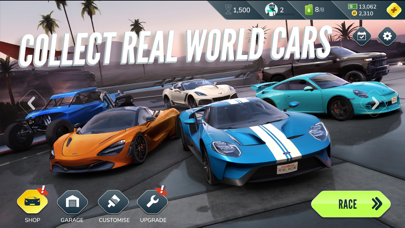
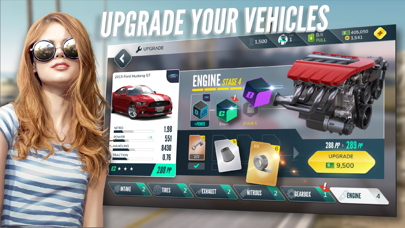
¡Recolecta, personaliza y mejora una flota de clásicos del mundo real e increíbles súper autos, y luego compite para llegar hasta la cima del torneo de Rebel Racing!
- Súper autos propios y clásicos personalizados
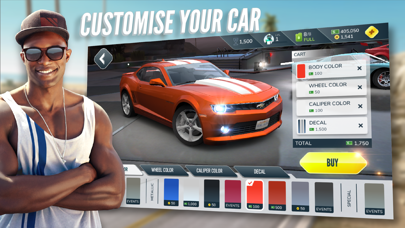
- Crea autos de ensueño totalmente personalizados
- Compite contra los mejores conductores del mundo, cara a cara
- Gráficos y efectos especiales líderes en el mercado
- Compite con autos con licencia del mundo real
- Experimenta momentos épicos
¡Escapa de los arrancones!
Rebel Racing es gratuito, pero ofrece algunos objetos opcionales en el juego que puedes comprar con dinero real. Rebel Racing incluye cajas de botín que entregan los objetos disponibles en orden aleatorio. Para obtener información sobre las frecuencias de aparición, selecciona una caja y toca el botón "i" junto a "Frecuencias de aparición detalladas". Puedes comprar cajas usando el dinero del juego (llaves), que puedes comprar en la aplicación u obtener como premio mientras juegas.
- iPhone o iPad con o sin Jailbreak.
- Sideloadly u otras alternativas.
- Ordenador con Windows/macOS/Linux e iTunes instalado.
PASO 1: Descargue el archivo .IPA pre-modificado desde el enlace de arriba a su ordenador. Para descargarlo desde la iOSGods App, consulte nuestro Tutorial de descarga del IPA desde la iOSGods App, que incluye un ejemplo en vídeo.
PASO 2: Descargue Sideloadly e instálelo en su Windows o Mac.
PASO 3: Abra Sideloadly en su ordenador, conecte su dispositivo iOS y espere hasta que el nombre del dispositivo aparezca en Sideloadly.
PASO 4: Una vez que su iDevice sea reconocido, arrastre el archivo .IPA modificado que descargó y suéltelo en la aplicación Sideloadly.
PASO 5: Introduzca el correo electrónico de su Apple Account y, a continuación, pulse «Start». Le pedirá que introduzca su contraseña. Proporcione la información solicitada.
PASO 6: Espere a que Sideloadly termine de hacer sideload/instalar el IPA modificado. Si surgen problemas durante la instalación, por favor lea la nota a continuación.
PASO 7: Una vez completada la instalación y al ver la app en la pantalla de inicio, deberá ir a Ajustes → General → Perfiles / VPN y Gestión de Dispositivos. Una vez allí, toque el correo electrónico que introdujo en el paso 6 y, después, toque en «Confiar en [email protected]».
PASO 8: Ahora vaya a la pantalla de inicio y abra la app recién instalada; todo debería funcionar correctamente. Es posible que tenga que seguir instrucciones adicionales específicas de cada app dentro del popup del hack en el juego.
NOTA: En iOS/iPadOS 16 y posteriores, debe activar el Modo Desarrollador. Para cuentas gratuitas de Apple Developer, deberá repetir este proceso cada 7 días. Si tiene alguna pregunta o problema, lea nuestra sección de Preguntas Frecuentes de Sideloadly del tema.