تسجيل الدخول مطلوب
سجّل الدخول بحساب iOSGods للمتابعة.
Hack Features:
- Inf Coins (Get)
- Inf Gems (Get)
قم بتنزيل Hills of Steel Hack modded IPA من الروابط أعلاه. اضغط على زر التثبيت واتبع التعليمات لتثبيت هذا التعديل لـ iOS على iPhone أو iPad أو Apple Silicon.
هل تحتاج إلى مزيد من المساعدة؟ راجع الأسئلة الشائعة لتطبيق iOSGods للحصول على إجابات مفصلة ونصائح لاستكشاف الأخطاء.

Hills of Steel is probably the most addictive physics based tank action game ever made! And it’s free!
Race your way through the hills and crush your enemies with steel. Collect loot from your fallen enemies and boost your vehicles with the best upgrades and special weapons you can find. Unlock new customizable tanks and brawl your way heroically from one battlefield to another all the way to the futuristic Moon. Earn your stripes by winning one tank battle at a time and climb up the ranks to become the greatest war marshal the world has ever seen!
If you love driving with heavy armored vehicles and shooting waves of relentless enemies, this is your game!
Features:
- Destroy! - Shoot physics based weapon projectiles!
- Unlock! - Try out all of the tanks and special abilities!
- Upgrade! - Move faster, do more damage & armor up!
- Adventure! - Roll out your tank and collect war loot!
- Arcade! - Survive the onslaught of the Classic endless mode!
- Rank up! - Do you have what it takes to become a General?
ROLL OUT YOUR TANK NOW AND PLAY!
Hills of Steel is a fun and free-to-play war game, but there are optional in-app purchases available for players who want to take the fight even deeper into hostile territory.
FOLLOW US:
Facebook: https://facebook.com/superplusgames
Twitter: https://twitter.com/superplusgames
Web: http://www.superplusgames.com
We have developed Hills of Steel for you to enjoy and therefore we’d appreciate all possible feedback, so we know how to make the game even better for you: [email protected].
VIP Subscription:
Monthly recurring subscription service.
Payment will be charged to your iTunes Account at confirmation of purchase.
The subscription renews automatically unless auto-renew is turned off at least 24-hours before the end of the current period.
Your account will be charged monthly for renewal within 24-hours prior to the end of the current period.
You can manage your subscriptions and turn off auto-renewal by going to your Account Settings after purchase.
Terms of Service: http://superplusgames.com/tos/hos1.html
Privacy Policy: http://superplusgames.com/hos_privacy_policy/
---
TOP SECRET LIST OF EXCLUSIVE IN-GAME TANKS
- COBRA - Fearless Frontline Fangs
- JOKER - Ridiculously Fast & Equally Furious
- TITAN - Giant Among Tanks
- PHOENIX - Fiery Flamethrower Fighter Tank
- REAPER - Badass to the Bone
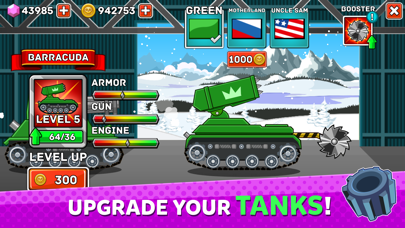
- BARRACUDA - Rocket Launcher That Tank Packs a Lethal Bite
Thanks to the amazing power of science, new futuristic additions to your garage's growing tank armada include:
- ATLAS - Stealth Missile Mech
- TESLA - Supercharged Electric Executor
- MAMMOTH - The Mightiest of All Tanks
- ARACHNO - Deadly Neighborhood Spider Tank
- SCORPION - Legendary Venomous Stinger
---
- iPhone أو iPad بجيلبريك أو بدون جيلبريك.
- Sideloadly أو بدائلها.
- كمبيوتر يعمل بنظام Windows/macOS/Linux مع تثبيت iTunes.
الخطوة 1: قم بتنزيل ملف .IPA المعدّل مسبقًا من الرابط أعلاه إلى الكمبيوتر الخاص بك. للتنزيل من تطبيق iOSGods App، اطلع على دليل تنزيل IPA من تطبيق iOSGods App الذي يتضمن مثالًا بالفيديو.
الخطوة 2: قم بتنزيل Sideloadly وتثبيته على جهاز Windows أو Mac.
الخطوة 3: افتح Sideloadly على الكمبيوتر، ووصّل جهاز iOS الخاص بك، وانتظر حتى يظهر اسم جهازك داخل Sideloadly.
الخطوة 4: بمجرد التعرّف على جهاز iDevice الخاص بك، اسحب ملف .IPA المعدّل الذي قمت بتنزيله وأفلِته داخل تطبيق Sideloadly.
الخطوة 5: أدخل البريد الإلكتروني لحساب Apple Account الخاص بك، ثم اضغط على «Start». سيُطلب منك بعد ذلك إدخال كلمة المرور. تابع وأدخل المعلومات المطلوبة.
الخطوة 6: انتظر حتى ينتهي Sideloadly من تحميل/تثبيت ملف IPA المعدّل. في حال واجهت أي مشاكل أثناء التثبيت، يرجى قراءة الملاحظة أدناه.
الخطوة 7: بعد اكتمال التثبيت ورؤية التطبيق على الشاشة الرئيسية، انتقل إلى Settings → General → Profiles / VPN & Device Management. ثم اضغط على البريد الإلكتروني الذي أدخلته في الخطوة 6، ثم اضغط على «الوثوق بـ [email protected]».
الخطوة 8: الآن انتقل إلى الشاشة الرئيسية وافتح التطبيق الذي تم تثبيته للتو وسيعمل كل شيء بشكل صحيح. قد تحتاج إلى اتباع تعليمات إضافية خاصة بكل تطبيق داخل النافذة المنبثقة للتعديل أثناء اللعب.
ملاحظة: بدءًا من iOS/iPadOS 16 وما بعده، يجب تفعيل وضع المطور (Developer Mode). بالنسبة لحسابات Apple Developer المجانية، ستحتاج إلى تكرار هذه العملية كل 7 أيام. إذا كانت لديك أي أسئلة أو مشاكل، يرجى قراءة قسم الأسئلة الشائعة حول Sideloadly في الموضوع.