Cần đăng nhập
Đăng nhập bằng tài khoản iOSGods để tiếp tục.
Đăng nhập bằng tài khoản iOSGods để tiếp tục.
Nhận các vật phẩm và tiền tệ miễn phí không giới hạn trong Family Guy The Quest for Stuff với Mod IPA hack miễn phí này loại bỏ tất cả chi phí trong trò chơi. Tận hưởng trải nghiệm mở khóa hoàn toàn với quyền truy cập cửa hàng miễn phí, hành động nhân vật tức thì và bỏ qua bộ đếm thời gian để bạn có thể xây dựng Quahog mơ ước của mình mà không cần chi tiêu tiền thật.
- Cửa hàng miễn phí → mua vật phẩm mà không tốn chi phí
- Tăng tốc độ miễn phí cho hành động nhân vật → hoàn thành hành động ngay lập tức
- Bỏ qua tiền thuê miễn phí → bỏ qua bộ đếm thời gian tiền thuê
- Bỏ qua xóa đất miễn phí → bỏ qua bộ đếm thời gian xóa đất
- Mọi thứ miễn phí → tất cả các giao dịch trong trò chơi đều miễn phí
Hack Coins & Clams: https://iosgods.com/topic/96602-service-family-guy-the-quest-for-stuff-hack-unlimited-currency/
Ứng dụng này cũng đi kèm với iGameGod, cho phép bạn truy cập Auto Touch để tự động hóa các thao tác lặp lại, App Speed Manager để điều chỉnh tốc độ chơi game, chỉnh sửa giá trị bằng Memory Engine, và nhiều công cụ mạnh mẽ khác cho game iOS.
Tải Family Guy The Quest for Stuff iOS Mod IPA từ các liên kết ở trên. Nhấn nút cài đặt và làm theo hướng dẫn để cài bản hack iOS lên iPhone, iPad hoặc Apple Silicon.
Cần thêm trợ giúp? Hãy xem Câu hỏi thường gặp ứng dụng iOSGods để có câu trả lời chi tiết và mẹo khắc phục sự cố.
¡Después de otra épica batalla con un pollo gigante, Peter Griffin accidentalmente destruyó Quahog! Juega GRATIS y reúne a tus personajes favoritos de Padre de Familia (incluso Meg) para salvar a la ciudad en una divertidísima nueva aventura de los escritores de Padre de Familia. ¡O no lo hagas, y te arrepentirás por siempre!
CONTENIDO EXCLUSIVO ÚNICAMENTE EN LA APP STORE: Juega al desafío "Oro del tonto" para ayudar a Peter a cumplir su sueño de volverse asquerosamente rico. ¡ÚNICAMENTE disponible para jugadores en dispositivos táctiles iPhone, iPad y iPod!
Características del juego:
• ¡Es gratis! ¿En serio es gratis? ¡Qué genial!
• Dale vida a un Quahog que entra fácilmente en tu pantalón.
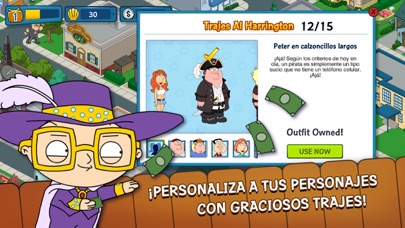
• Desbloquea trajes divertidísimos para tus personajes, como Peter sirena, Quagmire en bikini y Lois Rambo.
• Haz que tus personajes realicen desafíos ridículos. - Mantén a Quahog a salvo de piratas, pollos diabólicos y otros invasores.
• Peteriza tu ciudad con decoraciones como, El Petercóptero, El Peterodáctilo y El Hindenpeter.
• Desbloquea cientos de animaciones completamente nuevas y clásicas.
P. D.: ¡Puedes jugar este juego en francés, italiano, alemán, español, ruso y portugués brasilero!
Nota: Este juego ofrece compras dentro de la aplicación que pueden deshabilitarse en las configuraciones de tu dispositivo. Consulta http://support.apple.com/kb/HT4213 para obtener más información

- iPhone hoặc iPad chưa jailbreak/đã đóng hoặc đã jailbreak.
- Sideloadly hoặc các lựa chọn thay thế.
- Máy tính chạy Windows/macOS/Linux đã cài iTunes.
BƯỚC 1: Tải tệp .IPA đã được hack sẵn từ liên kết phía trên về máy tính của bạn. Để tải từ iOSGods App, hãy xem Hướng dẫn tải IPA bằng iOSGods App của chúng tôi, có kèm ví dụ bằng video.
BƯỚC 2: Tải Sideloadly và cài đặt trên Windows hoặc Mac của bạn.
BƯỚC 3: Mở Sideloadly trên máy tính, kết nối thiết bị iOS của bạn và chờ cho đến khi tên thiết bị hiển thị trong Sideloadly.
BƯỚC 4: Khi thiết bị iOS của bạn đã được nhận diện, hãy kéo tệp .IPA đã chỉnh sửa mà bạn tải về và thả vào ứng dụng Sideloadly.
BƯỚC 5: Nhập email Apple Account của bạn, sau đó nhấn "Start." Bạn sẽ được yêu cầu nhập mật khẩu. Hãy cung cấp các thông tin cần thiết.
BƯỚC 6: Chờ Sideloadly hoàn tất quá trình sideload/cài đặt tệp IPA đã hack. Nếu gặp sự cố trong quá trình cài đặt, vui lòng đọc lưu ý bên dưới.
BƯỚC 7: Khi cài đặt hoàn tất và bạn thấy ứng dụng trên Màn hình chính, bạn cần truy cập Cài đặt → Cài đặt chung → Hồ sơ / VPN & Quản lý thiết bị. Tại đó, nhấn vào email bạn đã nhập ở bước 6, rồi nhấn "Tin cậy [email protected]".
BƯỚC 8: Bây giờ hãy về Màn hình chính và mở ứng dụng vừa cài đặt, mọi thứ sẽ hoạt động bình thường. Bạn có thể cần làm theo hướng dẫn riêng của từng ứng dụng trong cửa sổ popup của bản hack trong game.
LƯU Ý: Trên iOS/iPadOS 16 trở lên, bạn phải bật Chế độ nhà phát triển. Với tài khoản Apple Developer miễn phí, bạn sẽ cần lặp lại quy trình này mỗi 7 ngày. Nếu bạn có thắc mắc hoặc gặp sự cố, hãy đọc mục FAQ về Sideloadly trong chủ đề của chúng tôi.







![[Puzzle & Dragons JP] パズル&ドラゴンズ Hack](https://is1-ssl.mzstatic.com/image/thumb/Purple211/v4/ca/88/05/ca880549-d75e-5b3d-321e-b111dbb2fcda/AppIcon-0-0-1x_U007emarketing-0-8-0-85-220.png/100x100bb.jpg)


