需要登入
請使用您的 iOSGods 帳戶登入以繼續。
Hack Features:
- Unlimited Karma (Spend some/ Get some)
NOTE: Works for both ARMv7 and ARM64 devices
This app also includes iGameGod. Use Auto Touch to automate repetitive tasks, the App Speed Manager to play at your own pace, the Memory Engine for value edits, and more powerful in-game tools.
從上方連結下載 Samurai 2: Vengeance Hack modded IPA。點選安裝按鈕並依照畫面指示在 iPhone、iPad 或 Apple Silicon 上安裝此 iOS 應用程式修改版。
需要更多協助?請查看我們的 iOSGods 應用程式常見問題 以獲得詳細解答與疑難排解。

-== Featured in the Gorgeous Games by Apple !!! ==-
-== "Samurai II is a very entertaining title with solid gameplay and stunning graphics." MacWorld.com ==-
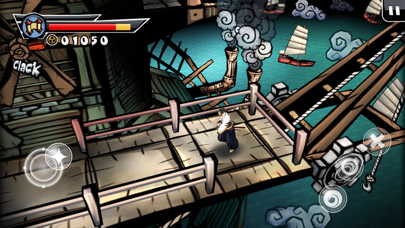
The long-awaited sequel to Samurai: Way of the Warrior! While the original got rave reviews for its stylized manga graphics and quick, bloody gameplay, Samurai II delivers even more action and an intuitive new control scheme.
SlideToPlay.com - 4/4
Ipadarena.com - 10/10
AppSpy.com - 5/5
MacWorld.com - 4.5/5
AppAdvice.com - 4.5/5
Gamezebo.com - 4.5/5
Touchreviews.net - 4.5/5
Nineoverten.com - 4.5/5
ifanzine 4.5/5
Gamerstemple.com - 90/100
Pixeljumpers.com - 9/10
PocketGamer.co.uk 8/10
Samurai: Way of the Warrior was featured in Best Games of 2009 by Apple – Samurai II is a true successor, aided by over a year of focused development. Overall production values and vicious action put Samurai II on par with console 3D brawlers. Screenshots don’t do Samurai II justice – the fluid action has to be seen running at 60 frames per second on the Retina display or popping off the iPad screen.
But looks alone won’t carry a game – the developers listened to fan feedback and improved gameplay throughout. With a new virtual d-pad, dynamic camera, environmental puzzles, traps, and vicious new enemies, Samurai II is brand new experience for hack ‘n’ slash gamers on the go.
Samurai II sends Daisuke on a quest for revenge across the war-scorched countryside. From a seafaring village to a flying fortress to the legendary Isle of the Dead, the samurai will stop at nothing to hunt down his arch-enemy Orochi. Will he get his Vengeance?
FEATURES:
* Intuitive virtual joystick ensures you’re slicing up baddies, not swiping the screen.
* Dynamic camera finds the best perspective for each encounter, adding variety while keeping focused on the action.
* Tense, quick and gory battle sequences!
- Battle hordes of on-screen enemies wielding new weapons and sporting unique abilities.
- Stay nimble and plan your attacks – roll out of harm’s way and eliminate ranged enemies like the Samurai Archer before they can strike.
* Improved gameplay includes new features.
- Solve environmental puzzles, avoid dangerous traps, and discover useful items.
- The fight is on - not to worry, the combat never takes a back seat to platforming or fetch-quests.
* RPG elements reward skilled players – upgrade the Samurai’s health, buy new attack combos and upgrade them to devastating levels.
* Between levels, gorgeous anime-style comic panels tell the samurai’s tale with original hand-drawn artwork.
* New survival mode pits the samurai against waves of enemies, giving hardcore players a score-attack mode to hone their skills. Two games in one!
* Advanced AI system on par with console games. Goal Oriented Action Planning architecture is used in many PC and console games.
* Apple Game Center support, including Leaderboards and Achievements.
*Support iCloud to transfer save between various devices
*Support MFI Controllers (Gamepads)
* Original soundtrack – in classic samurai movie style, soft music builds with the heat of battle.
Special Thanks To : ImNoSuperMan, PureSkill, Squarezero, Rocco, eggzbacon, Prab
- 未越獄/受限或已越獄的 iPhone 或 iPad。
- Sideloadly 或替代方案。
- 執行 Windows/macOS/Linux 且已安裝 iTunes 的電腦。
步驟 1: 透過上方連結將已破解的 .IPA 檔案下載到您的電腦。若要從 iOSGods App 下載,請參閱我們的 iOSGods App IPA 下載教學,其中包含影片範例。
步驟 2: 下載 Sideloadly 並將其安裝在您的 Windows 或 Mac 上。
步驟 3: 在電腦上開啟 Sideloadly,連接您的 iOS 裝置,並等待裝置名稱出現在 Sideloadly 中。
步驟 4: 當 Sideloadly 辨識到您的 iOS 裝置後,將下載好的修改版 .IPA 檔案拖曳並放到 Sideloadly 應用程式中。
步驟 5: 輸入您的 Apple Account 電子郵件,然後按下「Start」。系統會要求您輸入密碼,請依指示提供所需資訊。
步驟 6: 等待 Sideloadly 完成已破解 IPA 的旁載/安裝。如果安裝過程中發生問題,請閱讀下方的注意事項。
步驟 7: 安裝完成並在主畫面上看到該應用程式後,您需要前往 設定 → 一般 → 描述檔 / VPN 與裝置管理。進入後,點選您在步驟 6 中輸入的電子郵件,然後點選「信任 [email protected]」。
步驟 8: 現在回到主畫面並開啟新安裝的應用程式,一切應該都能正常運作。您可能需要依照遊戲內破解彈出視窗中的進一步指示操作。
注意: 在 iOS/iPadOS 16 及更新版本上,您必須 啟用開發者模式。若使用免費的 Apple Developer 帳號,您將需要每 7 天重複此程序。如有任何疑問或問題,請閱讀我們的 主題中的 Sideloadly 常見問題區段。