Accesso richiesto
Accedi con il tuo account iOSGods per continuare.
Accedi con il tuo account iOSGods per continuare.
Massimizza istantaneamente i tuoi HP e il danno con questo Crazy Gunner: Pixel Survivor Mod IPA, trasformando ogni run roguelike in una devastazione inarrestabile attraverso orde di pixel. Sopravvivi più a lungo, colpisci più forte e domina l'inferno di proiettili senza fare grinding per gli upgrade.
Che tu stia inseguendo i punteggi più alti o sperimentando build di abilità selvagge, questo hack elimina il grinding e ti permette di concentrarti sulla pura azione, perfetto per i giocatori che vogliono sperimentare tutta la profondità strategica del gioco senza la pressione della sopravvivenza.
- Forziere d'Oro 2500 Acquista GRATIS → sblocca la valuta premium istantaneamente
- HP Max / Controlla Statistiche Eroe → massimizza la salute e rivedi gli attributi del personaggio
- DMG Max / Controlla Statistiche Arma → massimizza l'output di danno e rivedi gli attributi dell'arma
- Velocità Movimento → migliora la velocità di movimento
Questa app include anche iGameGod, che ti offre accesso ad Auto Touch per automatizzare attività ripetitive, App Speed Manager per regolare la velocità di gioco, modifica dei valori con Memory Engine e altri potenti strumenti per giochi iOS.
Scarica Crazy Gunner: Pixel Survivor iOS Mod IPA dai link sopra. Tocca il pulsante di installazione e segui le istruzioni per installare questo hack iOS sul tuo iPhone, iPad o Mac con Apple Silicon.
Hai bisogno di altro aiuto? Consulta le nostre Domande frequenti sull'app iOSGods per risposte dettagliate e consigli per la risoluzione dei problemi.
5분으로 끝나는 극한 서바이벌.
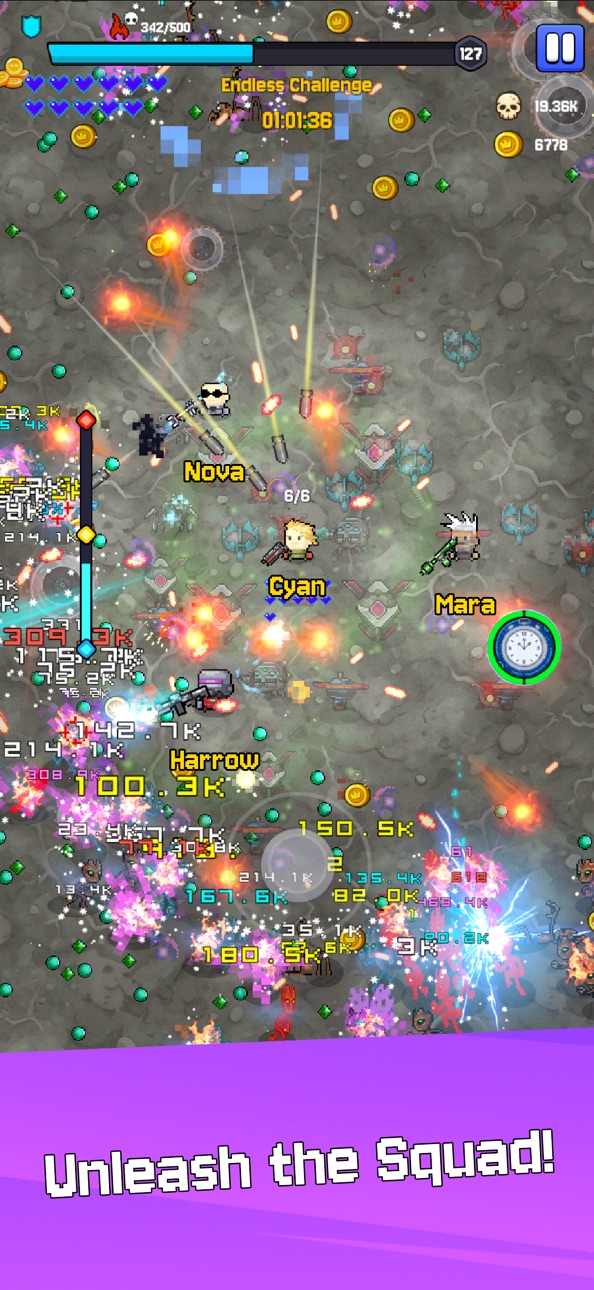
Crazy Gunner는 5분 만에 끝나는 고속 템포 2D 픽셀 로그라이크 슈팅 게임입니다.
자동 사격, 끝없이 몰려오는 적, 매번 달라지는 빌드로 화면을 가득 채우는爽快 전투를 체험하세요.
■ 전략적 빌드 시스템
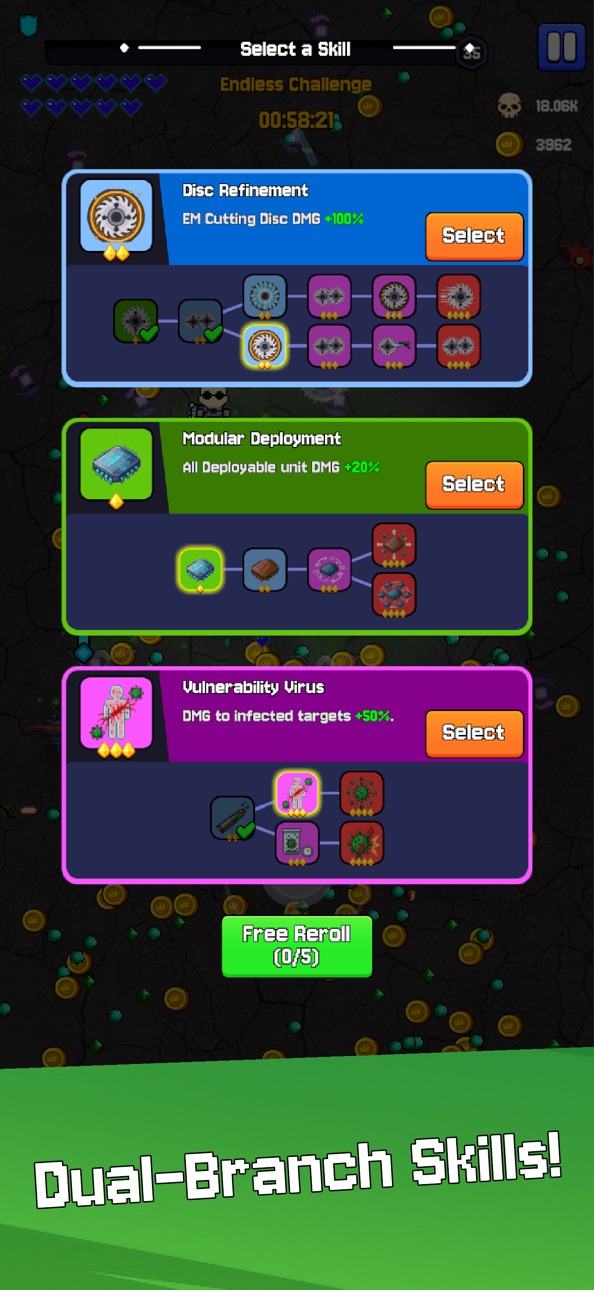
독창적인 듀얼 분기 스킬 시스템 탑재.
각 스킬은 2개의 진화 루트를 가지며, 광역 공격을 선택할지 고속 전술을 선택할지 결정하세요.
매번 다른 로그라이크 플레이에서 새로운 빌드와 시너지 탐험 가능.
■ 멀티 히어로 스쿼드
다양한 히어로와 미래형 총기 해제 가능.
엔드리스 서바이벌 모드에서는 하나의 캐릭터에 제한되지 않고, 여러 히어로를 동시에 출격시킬 수 있습니다.
각 캐릭터는 독립적으로 레벨업하며 최강 스쿼드를 구성하세요.
■ 고속 서바이벌
바쁜 플레이어에게도 최적화된 5분 완결형 플레이.
화면 가득한 적을 한 번에 섬멸하는爽快감으로 스트레스 해소.
슈팅 마니아부터 캐주얼 유저까지 즐길 수 있는 체험 제공.
■ 게임 특징
・1000마리 이상의 적을 섬멸하는爽快 픽셀 배틀
・듀얼 분기 스킬로 무한 빌드 가능
・멀티 히어로 스쿼드 시스템
・한 손 조작 가능, 깊이 있는 전략성
・레트로 감성 고품질 픽셀 아트
광기의 서바이벌을 생존하라.
지금 Crazy Gunner를 다운로드!
Screenshot © rispettivi proprietari · App Store


iOSGods non è affiliata, approvata né sponsorizzata da Apple Inc., Google LLC o dagli sviluppatori delle app elencate qui. Apple, iOS e App Store sono marchi di Apple Inc. Android e Google Play sono marchi di Google LLC. Tutti gli altri nomi delle app, icone, immagini e marchi appartengono ai rispettivi proprietari.

- iPhone o iPad non jailbroken/jailed oppure jailbroken.
- Sideloadly o alternative.
- Computer con Windows/macOS/Linux con iTunes installato.
PASSO 1: Scarica il file .IPA pre-modificato dal link sopra sul tuo computer. Per scaricarlo dall'iOSGods App, consulta il nostro Tutorial download IPA dell'iOSGods App, che include un esempio video.
PASSO 2: Scarica Sideloadly e installalo sul tuo Windows o Mac.
PASSO 3: Apri Sideloadly sul tuo computer, collega il tuo dispositivo iOS e attendi finché il nome del dispositivo non appare in Sideloadly.
PASSO 4: Una volta riconosciuto il tuo iDevice, trascina il file .IPA moddato che hai scaricato e rilascialo nell'applicazione Sideloadly.
PASSO 5: Inserisci l'email del tuo Apple Account, poi premi “Start”. Ti verrà quindi chiesto di inserire la password. Procedi e fornisci le informazioni richieste.
PASSO 6: Attendi che Sideloadly completi il sideload/installazione dell'IPA modificata. Se ci sono problemi durante l'installazione, leggi la nota qui sotto.
PASSO 7: Una volta completata l'installazione e vista l'app sulla schermata Home, dovrai andare in Impostazioni → Generali → Profili / Gestione VPN e dispositivi. Una volta lì, tocca l'email inserita al passo 6 e poi tocca “Autorizza [email protected]”.
PASSO 8: Ora vai sulla schermata Home e apri l'app appena installata: tutto dovrebbe funzionare correttamente. Potrebbe essere necessario seguire ulteriori istruzioni specifiche all'interno del popup dell'hack nel gioco.
NOTA: Per iOS/iPadOS 16 e versioni successive, devi attivare la Modalità sviluppatore. Per gli account Apple Developer gratuiti, dovrai ripetere questa procedura ogni 7 giorni. Se hai domande o problemi, leggi la nostra sezione FAQ Sideloadly del topic.
Game Name iOS Mod IPA is an action adventure game enhanced with powerful gameplay boosts and quality-of-life improvements. Win battles faster, earn rewards quicker, and enjoy uninterrupted play without ads.
- Unlimited Gold - spend freely to unlock premium content
- Damage Multiplier - deal significantly more damage in combat
- Defense Multiplier - take less damage and survive longer
- Reward Multiplier - earn more loot from every battle
- Max Level - instantly reach the highest player rank
- No Ads - play without interruptions or advertisements
This app also comes with iGameGod, giving you access to Auto Touch to automate repetitive tasks, App Speed Manager for adjustable gameplay speed, Memory Engine value editing, and more powerful iOS game tools.
Scarica Game Name Mod IPA dai link sopra. Tocca il pulsante di installazione e segui le istruzioni per installare questo hack iOS sul tuo iPhone, iPad o Mac con Apple Silicon.
Hai bisogno di altro aiuto Consulta le nostre Domande frequenti sull'app iOSGods per risposte dettagliate e consigli per la risoluzione dei problemi.
----------------------------------------------------------
--------------------------------------------------