ログインが必要
iOSGodsアカウントでサインインして続けてください。
iOSGodsアカウントでサインインして続けてください。

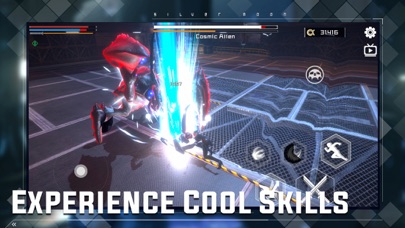
未来的なアクションRPGで戦士ミヤとしてプレイし、優れた打撃感とブロックカウンターシステムを備えたスリリングな戦闘に挑みましょう。このiOS向けMod IPAハックはあなたのリソースを凍結し、リソース制限なくファッションアイテムの収集と興奮に満ちた戦闘メカニクスの習得に集中できます。
- リソース凍結 → 現在のリソース数を維持
このアプリにはiGameGodも搭載されており、繰り返し作業を自動化するAuto Touch、ゲーム速度を調整できるApp Speed Manager、Memory Engineによる値の編集など、強力なiOSゲーム用ツールをご利用いただけます。
Miya- EndlessBlade Hack modded IPAを上のリンクからダウンロードします。インストールボタンをタップし、画面の指示に従ってiPhone、iPad、Apple SiliconにこのiOSアプリハックをインストールします。
さらにヘルプが必要ですか? 詳しい回答とトラブルシューティングはiOSGodsアプリ よくある質問をご覧ください。
尊敬的指挥官
欢迎来到《Miya》,一个充满未来科技和绚丽战斗的全新动作游戏!在这个充满惊喜与挑战的游戏世界里,作为指挥官,你将指挥美少女战士 Miya,展开一场充满刺激的冒险,与各种敌人展开激战,体验爽快的动作设计、优秀的打击感和格挡反击系统。同时,你还可以通过收集时装,让 Miya 打造出独一无二的造型,成为未来战场的焦点。
动作设计与打击感
《Miya》的动作设计丰富多样,不仅有华丽的近战攻击,还有强大的远程武器和酷炫的技能。游戏中的打击感也经过精心打磨,让每一次攻击都令人血脉喷张。与此同时,游戏还引入了格挡反击系统,使战斗更具策略性和挑战性。在快节奏的战斗中,你需要观察敌人的动作,精准地进行格挡和反击,才能顺利取得胜利。
时装收集
在《Miya》的游戏世界中,这些时装设计独具匠心,既有未来科技感,又具备动漫美少女的风格。通过收集不同的时装,你可以为 Miya 打造出独特的造型,让她在战斗中闪耀出惊艳的光芒。
- 脱獄/Jailed済みまたは脱獄済みのiPhoneまたはiPad。
- Sideloadlyまたは代替手段。
- iTunesがインストールされているWindows/macOS/Linuxを実行しているコンピュータ。
ステップ1: 上のリンクから事前にハックされた.IPAファイルをコンピュータにダウンロードします。iOSGodsアプリからダウンロードする方法は、ビデオ例付きのiOSGodsアプリIPAダウンロードチュートリアルをご覧ください。
ステップ2: SideloadlyをダウンロードしてWindowsまたはMacにインストールします。
ステップ3: コンピュータでSideloadlyを開き、iOSデバイスを接続して、デバイス名がSideloadlyに表示されるまで待ちます。
ステップ4: iDeviceが認識されたら、ダウンロードしたModされた.IPAファイルをSideloadlyアプリにドラッグ&ドロップします。
ステップ5: Apple Accountのメールアドレスを入力し、「Start」を押します。次にパスワードの入力を求められます。必要な情報を入力してください。
ステップ6: Sideloadlyがハックされたipaのサイドロード/インストールを完了するのを待ちます。インストール中に問題が発生した場合は、以下の注意事項をお読みください。
ステップ7: インストールが完了し、ホーム画面にアプリが表示されたら、設定 → 一般 → プロファイル / VPNとデバイス管理に移動する必要があります。そこで、ステップ6で入力したメールをタップし、「Trust [email protected]」をタップします。
ステップ8: ホーム画面に戻り、新しくインストールされたアプリを開けば、すべて正常に動作するはずです。ゲーム内のハックのポップアップで、アプリごとの追加指示に従う必要がある場合があります。
注意: iOS/iPadOS 16以降では、デベロッパモードを有効にするが必要です。無料のApple Developerアカウントの場合、このプロセスを7日ごとに繰り返す必要があります。質問や問題がある場合は、トピックのSideloadly FAQセクションをお読みください。