Cần đăng nhập
Đăng nhập bằng tài khoản iOSGods để tiếp tục.
Mod Features
- Infinite Currencies
- No Ads
Tải Triple Tile: Match Puzzle Game Mod APK từ nút ở trên. Sau khi nhấn tải, chỉ cần làm theo hướng dẫn để cài APK đã mod lên thiết bị Android hoặc trình giả lập.
Cần trợ giúp? Hãy xem Câu hỏi thường gặp Android để có câu trả lời chi tiết và mẹo khắc phục sự cố.
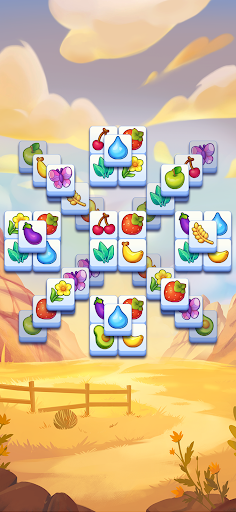
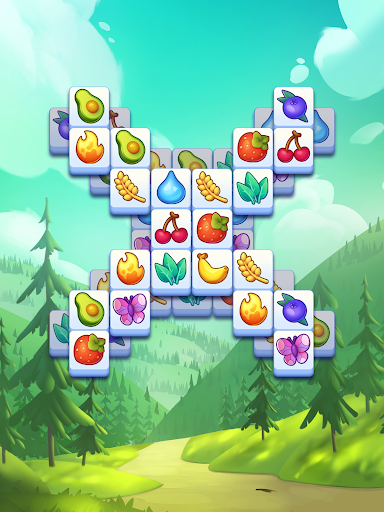
Discover Triple Tile – your new favorite tile match puzzle game!
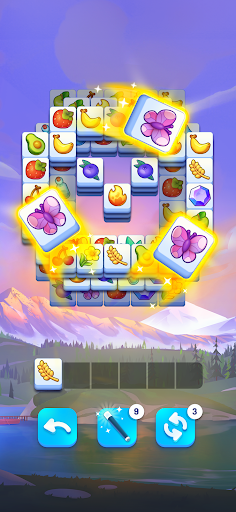
Step into the relaxing yet exciting world of puzzle games with Triple Tile, the ultimate tile match challenge. The goal is simple: find a triple match to clear the board. Whether you’re a casual gamer or a seasoned match 3 expert, this beautifully designed match game will keep you coming back
With easy-to-learn mechanics and endless possibilities, Triple Tile delivers the perfect blend of relaxation and brain-teasing fun. If you love matching games, you’ll be right at home.
Why You’ll Love Triple Tile
FIND YOUR ZEN – Tap, match, and relax with calming puzzle games that delight both the eyes and the mind. With our stunning visuals, every match game feels like a work of art.
TRAIN YOUR BRAIN – Every level is a clever tile match puzzle designed to challenge. Sharpen your skills as you rise to triple match mastery.
EXPLORE BEAUTIFUL WORLDS – Track your tile game progress on a vibrant map and unlock stunning new destinations. From tranquil beaches to lush forests, every chapter brings a fresh backdrop to your matching games journey.
NEVER RUN OUT OF TILE GAME FUN – With thousands of match 3 levels and regular updates, Triple Tile keeps your tile match skills sharp with new puzzles every week.
How to Play
Clear the board by completing a triple match – just find and combine three identical tiles. Sounds simple? Wait until you see the clever twists, layered challenges, and surprising layouts that make this one of the most addictive puzzle games out there.
Triple Tile is the perfect tile game to enjoy anytime, anywhere – even without an internet connection. Play offline and keep the fun going whether you’re traveling, commuting, or just relaxing at home with your favorite tile game.
Triple Tile is perfect to unwind, sharpen your mind, and immerse yourself in a satisfying match game experience. Triple Tile offers a tile game experience that’s easy to pick up yet endlessly rewarding. Every tile game level will keep you challenged, engaged, and coming back for more
Download Triple Tile today and see why so many tile match puzzle fans can’t put it down. It’s time to tap, match, and master your way to the top
- iPhone hoặc iPad chưa jailbreak/đã đóng hoặc đã jailbreak.
- Sideloadly hoặc các lựa chọn thay thế.
- Máy tính chạy Windows/macOS/Linux đã cài iTunes.
BƯỚC 1: Tải tệp .IPA đã được hack sẵn từ liên kết phía trên về máy tính của bạn. Để tải từ iOSGods App, hãy xem Hướng dẫn tải IPA bằng iOSGods App của chúng tôi, có kèm ví dụ bằng video.
BƯỚC 2: Tải Sideloadly và cài đặt trên Windows hoặc Mac của bạn.
BƯỚC 3: Mở Sideloadly trên máy tính, kết nối thiết bị iOS của bạn và chờ cho đến khi tên thiết bị hiển thị trong Sideloadly.
BƯỚC 4: Khi thiết bị iOS của bạn đã được nhận diện, hãy kéo tệp .IPA đã chỉnh sửa mà bạn tải về và thả vào ứng dụng Sideloadly.
BƯỚC 5: Nhập email Apple Account của bạn, sau đó nhấn "Start." Bạn sẽ được yêu cầu nhập mật khẩu. Hãy cung cấp các thông tin cần thiết.
BƯỚC 6: Chờ Sideloadly hoàn tất quá trình sideload/cài đặt tệp IPA đã hack. Nếu gặp sự cố trong quá trình cài đặt, vui lòng đọc lưu ý bên dưới.
BƯỚC 7: Khi cài đặt hoàn tất và bạn thấy ứng dụng trên Màn hình chính, bạn cần truy cập Cài đặt → Cài đặt chung → Hồ sơ / VPN & Quản lý thiết bị. Tại đó, nhấn vào email bạn đã nhập ở bước 6, rồi nhấn "Tin cậy [email protected]".
BƯỚC 8: Bây giờ hãy về Màn hình chính và mở ứng dụng vừa cài đặt, mọi thứ sẽ hoạt động bình thường. Bạn có thể cần làm theo hướng dẫn riêng của từng ứng dụng trong cửa sổ popup của bản hack trong game.
LƯU Ý: Trên iOS/iPadOS 16 trở lên, bạn phải bật Chế độ nhà phát triển. Với tài khoản Apple Developer miễn phí, bạn sẽ cần lặp lại quy trình này mỗi 7 ngày. Nếu bạn có thắc mắc hoặc gặp sự cố, hãy đọc mục FAQ về Sideloadly trong chủ đề của chúng tôi.