ต้องเข้าสู่ระบบ
เข้าสู่ระบบด้วยบัญชี iOSGods เพื่อดำเนินการต่อ
เข้าสู่ระบบด้วยบัญชี iOSGods เพื่อดำเนินการต่อ

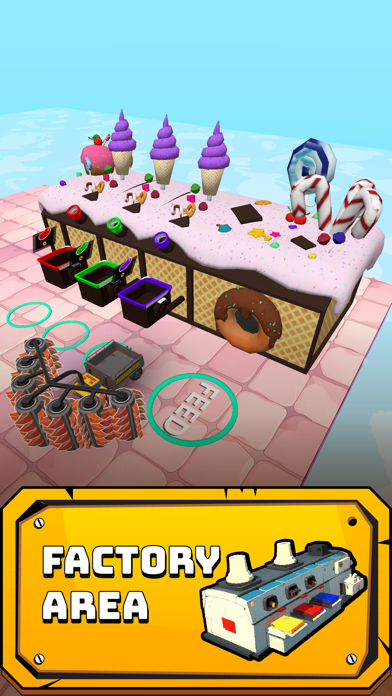
Roll Machine ท้าให้คุณออกแบบเมืองขนาดใหญ่และเอาชนะคู่แข่งในเกมจำลองเต็มไปด้วยกลยุทธ์ Mod IPA นี้ลบโฆษณาออกและให้สกุลเงินไม่จำกัดเมื่อคุณขาย สร้างเมืองหลวงในฝันของคุณ จัดการทรัพยากร และเชี่ยวชาญปริศนาสร้างสรรค์โดยไม่มีการรบกวนหรือข้อจำกัดทางการเงิน
- ไม่มีโฆษณา (เปิดใช้งานโดยค่าเริ่มต้น) → เล่นเกมโดยไม่มีการรบกวน
- สกุลเงินไม่จำกัดเมื่อเราขาย → เงินทุนไม่จำกัดจากการขาย
แอปนี้ยังมาพร้อมกับ iGameGod ซึ่งช่วยให้คุณเข้าถึง Auto Touch สำหรับการทำงานซ้ำ ๆ โดยอัตโนมัติ, App Speed Manager สำหรับปรับความเร็วของเกม, การแก้ไขค่าด้วย Memory Engine และเครื่องมือสำหรับเกม iOS ที่ทรงพลังอื่น ๆ อีกมากมาย
ดาวน์โหลด Roll Machine iOS Mod IPA จากลิงก์ด้านบน แตะปุ่มติดตั้งและทำตามคำแนะนำบนหน้าจอเพื่อติดตั้งแฮ็กแอป iOS นี้บน iPhone, iPad หรือ Apple Silicon
ต้องการความช่วยเหลือเพิ่มเติม? ดู คำถามที่พบบ่อยของแอป iOSGods สำหรับคำตอบโดยละเอียดและเคล็ดลับการแก้ไขปัญหา
Build cities, crush rivals, and conquer creative challenges in Roll Machine—where strategy meets explosive fun!
Roll Machine redefines mobile gaming by blending city-building strategy, intense rival battles, and a diverse array of puzzles into one thrilling experience. Roll Machine challenges you to think bigger: construct sprawling cities, outsmart opponents, and master levels that reward creativity over repetitive mining.
Key Features:
City-Building Mastery
Design and expand your dream metropolis from the ground up. Manage resources, construct infrastructure, and create a thriving urban hub that stands as a testament to your strategic vision.
Ruthless Rival Battles
Compete against players worldwide in real-time battles. Climb the leaderboard by defeating opponents, sabotaging their progress, and proving your dominance in a dynamic PvP environment.
Factory Optimization
Upgrade factories to boost production efficiency, unlock advanced technologies, and control supply chains. Balance speed and quality to outproduce competitors and fuel your city’s growth.
PowerUp Card System
Collect and upgrade strategic PowerUp cards to gain battlefield advantages. Customize your deck to counter opponents’ tactics, enhance resource output, or accelerate city development.
Diverse Level Challenges
Minecraft-Inspired Puzzles (Level 4): Solve block-based challenges that test your spatial reasoning.
Candy-Smashing Chaos (Level 7): Crush candies in fast-paced, color-matching mayhem.
Techno-Explosions (Level 15): Trigger chain reactions by detonating tech-themed objects.
Brain-Teasing Riddles (Level 20): Crack intricate puzzles to unlock rare rewards.
Customizable Skins
Personalize your character and city with unique skins, ranging from futuristic armor to whimsical costumes. Stand out in battles and showcase your style.
Why Choose Roll Machine?
While games like Stone Grass Stone Miner focus on monotonous resource extraction, Roll Machine offers a richer, goal-driven experience. Build a legacy through strategic decisions, not just mindless digging. Battle real players in a constantly evolving meta, and tackle levels that reward ingenuity—whether you’re engineering explosions in a tech lab or rebuilding a cityscape block by block.
Regular updates introduce new levels, skins, and gameplay modes, ensuring endless replayability. Join millions of players worldwide and redefine what a mobile strategy game can be.
Download Roll Machine today—where every decision shapes your empire, and every victory proves your brilliance.
- iPhone หรือ iPad ที่ไม่ได้เจลเบรก/ไม่ได้เจลเบรก หรือเจลเบรกแล้ว
- Sideloadly หรือทางเลือกอื่น
- คอมพิวเตอร์ที่ใช้ Windows/macOS/Linux และติดตั้ง iTunes ไว้
ขั้นตอนที่ 1: ดาวน์โหลดไฟล์ .IPA ที่แฮกไว้ล่วงหน้าจากลิงก์ด้านบนลงในคอมพิวเตอร์ของคุณ หากต้องการดาวน์โหลดจากแอป iOSGods โปรดดู วิธีดาวน์โหลด IPA ในแอป iOSGods ซึ่งมีตัวอย่างวิดีโอประกอบ
ขั้นตอนที่ 2: ดาวน์โหลด Sideloadly แล้วติดตั้งบน Windows หรือ Mac ของคุณ
ขั้นตอนที่ 3: เปิด Sideloadly บนคอมพิวเตอร์ เชื่อมต่ออุปกรณ์ iOS แล้วรอจนกว่าชื่ออุปกรณ์ของคุณจะปรากฏใน Sideloadly
ขั้นตอนที่ 4: เมื่อ iDevice ของคุณถูกตรวจพบแล้ว ให้ลากไฟล์ .IPA ที่ม็อดมาวางลงในโปรแกรม Sideloadly
ขั้นตอนที่ 5: กรอกอีเมล Apple Account ของคุณ จากนั้นกด "Start" ระบบจะถามรหัสผ่าน กรอกข้อมูลที่จำเป็นให้เรียบร้อย
ขั้นตอนที่ 6: รอจนกว่า Sideloadly จะ sideload/ติดตั้งไฟล์ IPA ที่แฮกเสร็จ หากเกิดปัญหาระหว่างติดตั้ง โปรดอ่านหมายเหตุด้านล่าง
ขั้นตอนที่ 7: เมื่อการติดตั้งเสร็จสิ้นและเห็นแอปบนหน้าจอหลักแล้ว ให้ไปที่ การตั้งค่า → ทั่วไป → โปรไฟล์ / VPN และการจัดการอุปกรณ์ จากนั้นแตะที่อีเมลที่คุณกรอกในขั้นตอนที่ 6 แล้วแตะ "เชื่อถือ [email protected]"
ขั้นตอนที่ 8: จากนั้นไปที่หน้าจอหลักและเปิดแอปที่ติดตั้งใหม่ ทุกอย่างควรทำงานได้ปกติ คุณอาจต้องทำตามคำแนะนำเพิ่มเติมเฉพาะแอปในป๊อปอัปของม็อดในเกม
หมายเหตุ: สำหรับ iOS/iPadOS 16 ขึ้นไป คุณต้อง เปิดโหมดนักพัฒนา (Developer Mode) สำหรับบัญชี Apple Developer แบบฟรี คุณต้องทำขั้นตอนนี้ซ้ำทุก 7 วัน หากมีคำถามหรือพบปัญหา โปรดอ่าน หัวข้อ FAQ ของ Sideloadly ในกระทู้