تسجيل الدخول مطلوب
سجّل الدخول بحساب iOSGods للمتابعة.
سجّل الدخول بحساب iOSGods للمتابعة.
Hack Features
- God Mode
- Damage Multiplier
-- All DLC Unlocked
يأتي هذا التطبيق أيضًا مع iGameGod، مما يتيح لك الوصول إلى Auto Touch لأتمتة المهام المتكررة، وApp Speed Manager لضبط سرعة اللعب، وتعديل القيم عبر Memory Engine، والمزيد من أدوات ألعاب iOS القوية.
قم بتنزيل Powerlust - Action RPG Offline iOS Mod IPA من الروابط أعلاه. اضغط على زر التثبيت واتبع التعليمات لتثبيت هذا التعديل لـ iOS على iPhone أو iPad أو Apple Silicon.
هل تحتاج إلى مزيد من المساعدة؟ راجع الأسئلة الشائعة لتطبيق iOSGods للحصول على إجابات مفصلة ونصائح لاستكشاف الأخطاء.
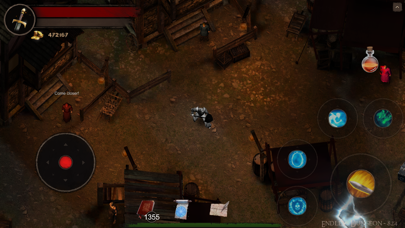
Old school action RPG roguelike with manual combat.
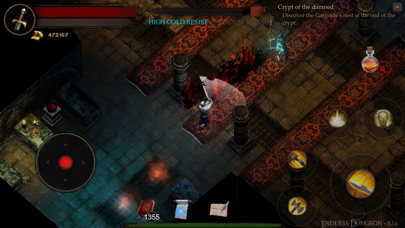
Powerlust is an old school action RPG roguelike with manual combat and a dark atmosphere.
Completely free, no forced ads, no p2w.
Micro transactions are just donations with some cool cosmetic rewards like different camera perspectives (top down, TPP, FPP), camera filters, character customization and the bloodbath mode. There are also some quality of life features like a faster character specialization unlock and a shared item stash.
Made by one guy.
Hobby project made by one guy (me). I spent quite a few years on it already. No huge corporations involved :)
No rigid classes.
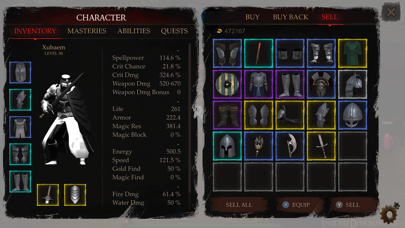
You can create your own class, nothing is locked, feel free to play as a fire mage wielding a two handed sword or a necro archer.
Tons of masteries and skills.
There is a vast number of options to choose from when it comes to spells, weapons, abilities and masteries. You can create a ton of builds and constantly find new ways of crushing your enemies!
Still in development
This game is under ACTIVE DEVELOPMENT, I have many updates planned for it. I'd appreciate any feedback, it will be a really huge help in further development. Check out my twitter for constant updates and share your thoughts via email at [email protected]
Features:
- skill based gameplay
- open world story mode
- no auto fight mechanics
- hardcore permadeath mode for roguelike fans
- procedurally generated dungeons
- gamepad support

- iPhone أو iPad بجيلبريك أو بدون جيلبريك.
- Sideloadly أو بدائلها.
- كمبيوتر يعمل بنظام Windows/macOS/Linux مع تثبيت iTunes.
الخطوة 1: قم بتنزيل ملف .IPA المعدّل مسبقًا من الرابط أعلاه إلى الكمبيوتر الخاص بك. للتنزيل من تطبيق iOSGods App، اطلع على دليل تنزيل IPA من تطبيق iOSGods App الذي يتضمن مثالًا بالفيديو.
الخطوة 2: قم بتنزيل Sideloadly وتثبيته على جهاز Windows أو Mac.
الخطوة 3: افتح Sideloadly على الكمبيوتر، ووصّل جهاز iOS الخاص بك، وانتظر حتى يظهر اسم جهازك داخل Sideloadly.
الخطوة 4: بمجرد التعرّف على جهاز iDevice الخاص بك، اسحب ملف .IPA المعدّل الذي قمت بتنزيله وأفلِته داخل تطبيق Sideloadly.
الخطوة 5: أدخل البريد الإلكتروني لحساب Apple Account الخاص بك، ثم اضغط على «Start». سيُطلب منك بعد ذلك إدخال كلمة المرور. تابع وأدخل المعلومات المطلوبة.
الخطوة 6: انتظر حتى ينتهي Sideloadly من تحميل/تثبيت ملف IPA المعدّل. في حال واجهت أي مشاكل أثناء التثبيت، يرجى قراءة الملاحظة أدناه.
الخطوة 7: بعد اكتمال التثبيت ورؤية التطبيق على الشاشة الرئيسية، انتقل إلى Settings → General → Profiles / VPN & Device Management. ثم اضغط على البريد الإلكتروني الذي أدخلته في الخطوة 6، ثم اضغط على «الوثوق بـ [email protected]».
الخطوة 8: الآن انتقل إلى الشاشة الرئيسية وافتح التطبيق الذي تم تثبيته للتو وسيعمل كل شيء بشكل صحيح. قد تحتاج إلى اتباع تعليمات إضافية خاصة بكل تطبيق داخل النافذة المنبثقة للتعديل أثناء اللعب.
ملاحظة: بدءًا من iOS/iPadOS 16 وما بعده، يجب تفعيل وضع المطور (Developer Mode). بالنسبة لحسابات Apple Developer المجانية، ستحتاج إلى تكرار هذه العملية كل 7 أيام. إذا كانت لديك أي أسئلة أو مشاكل، يرجى قراءة قسم الأسئلة الشائعة حول Sideloadly في الموضوع.


![Among Us! iOS Mod IPA [ ESP Boxes, Lines ]](https://is1-ssl.mzstatic.com/image/thumb/Purple211/v4/57/dc/f8/57dcf861-9c14-e964-6f5b-09f8c4fff8d2/AppIcon-0-0-1x_U007emarketing-0-8-0-85-220.png/100x100bb.jpg)


![Rapid Reload Hack [ Debug Menu ]](https://is1-ssl.mzstatic.com/image/thumb/Purple221/v4/9b/e1/1b/9be11b47-e269-56e3-4c2f-f15e2fd6fea2/AppIcon-0-0-1x_U007emarketing-0-8-0-85-220.png/100x100bb.jpg)


