تسجيل الدخول مطلوب
سجّل الدخول بحساب iOSGods للمتابعة.
سجّل الدخول بحساب iOSGods للمتابعة.
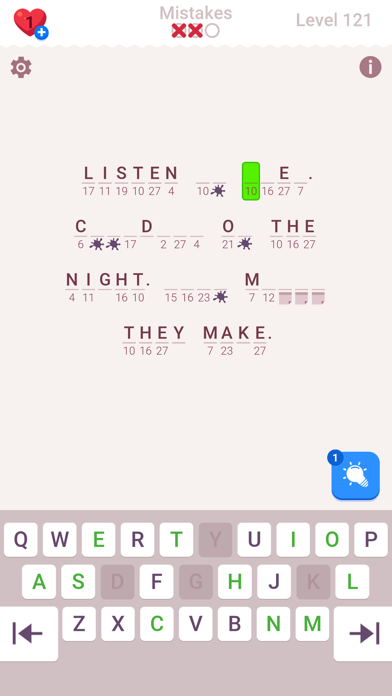
Cryptogram: Word Brain Puzzle هي لعبة فك الأكواز حيث تقوم بحل الأشفار والألغاز المشفرة لتمرين عقلك، وهذا تهكير Mod IPA المجاني يزيل الملل حتى تتمكن من التركيز بشكل كامل على التحدي العقلي.
مع غش مثل الأرواح غير المحدودة والتلميحات القصوى واختصارات الفوز التلقائي، أنت حر في تجربة الحلول بالسرعة التي تناسبك دون القلق بشأن نفاد المحاولات أو مشاهدة الإعلانات بين الجولات.
- الأرواح → محاولات غير محدودة لحل الألغاز
- التلميحات القصوى → الحد الأقصى من التلميحات المتاحة متى احتجت إليها
- الفوز التلقائي [أدخل أي كلمة] → أكمل الألغاز على الفور بإدخال أي كلمة
- بدون إعلانات → لعب بدون انقطاع وبدون إعلانات
يأتي هذا التطبيق أيضًا مع iGameGod، مما يتيح لك الوصول إلى Auto Touch لأتمتة المهام المتكررة، وApp Speed Manager لضبط سرعة اللعب، وتعديل القيم عبر Memory Engine، والمزيد من أدوات ألعاب iOS القوية.
قم بتنزيل Cryptogram: Word Brain Puzzle Hack modded IPA من الروابط أعلاه. اضغط على زر التثبيت واتبع التعليمات لتثبيت هذا التعديل لـ iOS على iPhone أو iPad أو Apple Silicon.
هل تحتاج إلى مزيد من المساعدة؟ راجع الأسئلة الشائعة لتطبيق iOSGods للحصول على إجابات مفصلة ونصائح لاستكشاف الأخطاء.
Cryptogram: Number & Word Puzzles — Decode, Deduce, Conquer!
Are you ready to challenge your mind and have fun at the same time? Welcome to Cryptogram, the perfect game for anyone who enjoys mental exercises and brainteasers. Get ready for an exciting journey into the world of codes, ciphers, and intricate puzzles!
Cryptogram isn’t just a game; it’s a fun way to exercise your brain. Whether you love logic puzzles, word games, or cryptic crosswords, this app has a wide variety of challenges that will push your thinking skills.
In Cryptogram, you’ll play as a codebreaker, working to decode secret messages hidden in sequences of symbols and letters. As you move through the game, you’ll unlock new puzzles and levels that get harder and more exciting. You’ll uncover famous quotes, solve word scrambles, and tackle a range of puzzles that will keep you coming back for more.
Here’s what to expect from this unique game:
Interesting Puzzles: Each puzzle is designed to be fun and engaging, whether you’re deciphering historical quotes or cracking modern-day cryptograms.
Endless Variety: With puzzles ranging from word scrambles to logic challenges, you’ll always find something new to try. Each puzzle type tests different thinking skills, offering a full brain workout.
Enjoyable Gameplay: The game is designed to make brain exercises fun and rewarding, keeping you hooked on each new puzzle.
Increasing Difficulty: As you play, the puzzles get tougher, providing a continuous challenge that keeps you on your toes.
Simple, Clean Design: The app has an easy-to-use interface that helps you focus on solving puzzles without any distractions.
Cryptogram is more than just about solving puzzles; it’s about the excitement of discovering something new and the satisfaction of figuring out what seemed impossible. Each puzzle you solve is a small victory, and each level you conquer brings a new sense of achievement and pride.
Whether you’re a seasoned puzzle enthusiast or just looking for a fun way to challenge your brain, Cryptogram offers something for everyone. The game is perfect for anyone who loves to engage their mind and sharpen their logical skills.
So, if you’re ready to embark on a journey filled with mystery, intrigue, and mind-bending puzzles, download Cryptogram today. Get ready to decode, deduce, and conquer in this thrilling and mentally stimulating adventure!

- iPhone أو iPad بجيلبريك أو بدون جيلبريك.
- Sideloadly أو بدائلها.
- كمبيوتر يعمل بنظام Windows/macOS/Linux مع تثبيت iTunes.
الخطوة 1: قم بتنزيل ملف .IPA المعدّل مسبقًا من الرابط أعلاه إلى الكمبيوتر الخاص بك. للتنزيل من تطبيق iOSGods App، اطلع على دليل تنزيل IPA من تطبيق iOSGods App الذي يتضمن مثالًا بالفيديو.
الخطوة 2: قم بتنزيل Sideloadly وتثبيته على جهاز Windows أو Mac.
الخطوة 3: افتح Sideloadly على الكمبيوتر، ووصّل جهاز iOS الخاص بك، وانتظر حتى يظهر اسم جهازك داخل Sideloadly.
الخطوة 4: بمجرد التعرّف على جهاز iDevice الخاص بك، اسحب ملف .IPA المعدّل الذي قمت بتنزيله وأفلِته داخل تطبيق Sideloadly.
الخطوة 5: أدخل البريد الإلكتروني لحساب Apple Account الخاص بك، ثم اضغط على «Start». سيُطلب منك بعد ذلك إدخال كلمة المرور. تابع وأدخل المعلومات المطلوبة.
الخطوة 6: انتظر حتى ينتهي Sideloadly من تحميل/تثبيت ملف IPA المعدّل. في حال واجهت أي مشاكل أثناء التثبيت، يرجى قراءة الملاحظة أدناه.
الخطوة 7: بعد اكتمال التثبيت ورؤية التطبيق على الشاشة الرئيسية، انتقل إلى Settings → General → Profiles / VPN & Device Management. ثم اضغط على البريد الإلكتروني الذي أدخلته في الخطوة 6، ثم اضغط على «الوثوق بـ [email protected]».
الخطوة 8: الآن انتقل إلى الشاشة الرئيسية وافتح التطبيق الذي تم تثبيته للتو وسيعمل كل شيء بشكل صحيح. قد تحتاج إلى اتباع تعليمات إضافية خاصة بكل تطبيق داخل النافذة المنبثقة للتعديل أثناء اللعب.
ملاحظة: بدءًا من iOS/iPadOS 16 وما بعده، يجب تفعيل وضع المطور (Developer Mode). بالنسبة لحسابات Apple Developer المجانية، ستحتاج إلى تكرار هذه العملية كل 7 أيام. إذا كانت لديك أي أسئلة أو مشاكل، يرجى قراءة قسم الأسئلة الشائعة حول Sideloadly في الموضوع.