Inloggning krävs
Logga in med ditt iOSGods-konto för att fortsätta.
Logga in med ditt iOSGods-konto för att fortsätta.

Denna racing game-fusk för FX Racer låser upp obegränsade krediter så att du kan uppgradera din bil och tävla på alla 20 världsmästerskapsbanor utan att behöva slita. Konfigurera din bils motor, växellåda, aerodynamik och fjädring för att dominera varje bana, välj sedan din däckstrategi för varje race och boxstopp för att maximera grepp och hastighet.
- Obegränsade krediter → spendera fritt på biluppgraderingar och anpassning
Den här appen levereras även med iGameGod, vilket ger dig tillgång till Auto Touch för att automatisera repetitiva uppgifter, App Speed Manager för justerbar spelhastighet, värdesredigering med Memory Engine och fler kraftfulla verktyg för iOS-spel.
Ladda ner FX Racer Hack modded IPA från länkarna ovan. Tryck på installationsknappen och följ instruktionerna för att installera denna iOS-apphack på iPhone, iPad eller Apple Silicon.
Behöver du mer hjälp? Se våra iOSGods-appens vanliga frågor för detaljerade svar och felsökningstips.
Compete in the world championship along 20 circuits.
► RACE OPTIONS
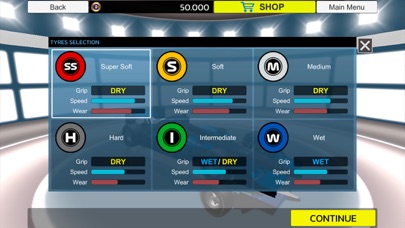
Select your strategy for each race. You can select the type of tire you want to mount at the start of each race and when performing the PitStop (Super soft, soft, medium, hard, Intermediate and Extreme rain)
Each tire has particular characteristics in terms of grip, maximum speed and wear.
► CONFIGURE YOUR CAR
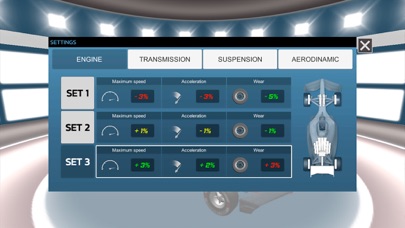
Full configuration of car settings. Engine power adjustments, transmission adjustments, aerodynamics, and suspension adjustments.
These adjustments affect the behavior of the vehicle. Both in acceleration at top speed and in tire wear.
Try all kinds of settings to find the most suitable for each race.
► CAR IMPROVEMENTS
Earn credits by racing in the championship or sprint races to make up to 50 upgrades on each of the cars and increase your race performance.
► CHANGES IN THE WEATHER
The weather will change during the race and we will have to adapt the strategy to the circumstances that occur during the race. From sunny weather to heavy rain.
► QUALIFYING RACE
We will be able to run the qualifying race before the championship races to establish our place on the starting grid.
We can also run without qualifying. In this case our position will be random.
►TRAINING RACE
We will have the option of training in each circuit of the championship. Where you can try different configurations in our car.
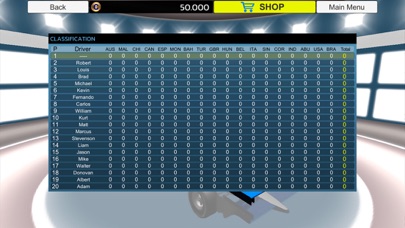
At the end we will have a table of results where we can compare the results of each lap and configuration.
► QUICK RACE MODE
Apart from the championship. In this mode we can race on the desired circuit and quickly get credits to use them to make improvements to the cars or acquire new cars.
- iPhone eller iPad utan jailbreak/jailad eller med jailbreak.
- Sideloadly eller alternativ.
- Dator med Windows/macOS/Linux och iTunes installerat.
STEG 1: Ladda ner den förhackade .IPA-filen från länken ovan till din dator. För att ladda ner från iOSGods App, se vår Guide för att ladda ner IPA i iOSGods App som även innehåller ett videoexempel.
STEG 2: Ladda ner Sideloadly och installera det på din Windows eller Mac.
STEG 3: Öppna Sideloadly på din dator, anslut din iOS-enhet och vänta tills enhetens namn visas i Sideloadly.
STEG 4: När din iEnhet känns igen drar du den moddade .IPA-filen du laddat ner och släpper den i Sideloadly-programmet.
STEG 5: Ange e-postadressen till ditt Apple Account och tryck sedan på ”Start”. Du ombeds sedan ange ditt lösenord. Fyll i de uppgifter som krävs.
STEG 6: Vänta tills Sideloadly är klar med att sideloada/installera den hackade IPA-filen. Om problem uppstår under installationen, läs noten nedan.
STEG 7: När installationen är klar och du ser appen på din hemskärm behöver du gå till Inställningar → Allmänt → Profiler / VPN & enhetshantering. Tryck där på e-postadressen du angav i steg 6 och tryck sedan på ”Lita på [email protected]”.
STEG 8: Gå nu till din hemskärm och öppna den nyligen installerade appen — allt ska fungera som det ska. Du kan behöva följa ytterligare app-specifika instruktioner i hackets popup inne i spelet.
OBS: På iOS/iPadOS 16 och senare måste du aktivera Utvecklarläge. För gratis Apple Developer-konton behöver du upprepa processen var sjunde dag. Om du har frågor eller problem, läs vår Sideloadly FAQ-avsnitt i tråden.