تسجيل الدخول مطلوب
سجّل الدخول بحساب iOSGods للمتابعة.
سجّل الدخول بحساب iOSGods للمتابعة.
تحمل موجات من الزومبي والمتحورين والعصابات في Let's Survive - Survival games Hack، لعبة إطلاق نار قاسية بلا إنترنت حيث يعني الحرف اليدوي والبناء وإدارة الموارد الفرق بين الحياة والموت، والآن مع Mod IPA معدل يزيل عقوبات الطحن في البقاء.
باستخدام هذا التعديل، يمكنك التركيز على القتال والاستكشاف دون الاستنزاف المستمر للجوع والعطش، والحرف اليدوي والترقية بحرية، وتعزيز تقدمك على الفور حتى تقضي وقتًا أطول في القتال وتحصين ملجأك بدلاً من انتظار المؤقتات.
- تجميد عناصر الحرف اليدوي → إيقاف مؤقت لمؤقتات الحرف اليدوي
- تعزيز مجاني → تعزيزات التقدم الفورية
- يمكن الحرف اليدوي → حرف يدوي غير محدود
- يمكن البناء → بناء غير محدود
- يمكن الترقية → ترقيات مجانية
- لا جوع → إزالة آلية الجوع
- لا عطش → إزالة آلية العطش
يأتي هذا التطبيق أيضًا مع iGameGod، مما يتيح لك الوصول إلى Auto Touch لأتمتة المهام المتكررة، وApp Speed Manager لضبط سرعة اللعب، وتعديل القيم عبر Memory Engine، والمزيد من أدوات ألعاب iOS القوية.
قم بتنزيل Let’s Survive - Survival games Hack modded IPA من الروابط أعلاه. اضغط على زر التثبيت واتبع التعليمات لتثبيت هذا التعديل لـ iOS على iPhone أو iPad أو Apple Silicon.
هل تحتاج إلى مزيد من المساعدة؟ راجع الأسئلة الشائعة لتطبيق iOSGods للحصول على إجابات مفصلة ونصائح لاستكشاف الأخطاء.
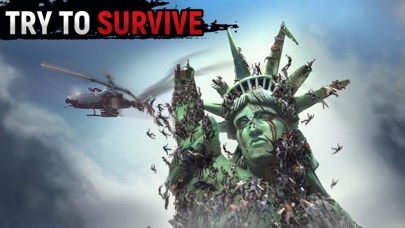
Let's Survive is an apocalypse world where you are to fight with inner fear to survive on a land full of bloodthirsty zombies, mutants, and thugs. Play new best offline survival game and dive into the shooter, crafting, and action atmosphere. Only the strongest and fittest person will survive in this hell!
You stayed all alone during the invasion of hordes of zombies. No time to lose your nerve! Your objective is to do everything possible to stay alive along with always hungry corpses. Find other survivors, search for resources and items, create different weapons. Fortify your refuge and repeal bosses' attacks. Watch your health, thirst, and hunger. Complete quests and join survival fractions.
Features of Let's Survive, an RPG survival game:
~ Ready or not, zombies are coming ~
Life is not easy after the zombie apocalypse. RPG survival simulator is a constant search and collection of items and resources, as well as regular monitoring of the character's life indicators (hunger, thirst, health, radiation level). Remember, it is dangerous to starve or get sick for a long time!
~ Craft and headquarters building ~
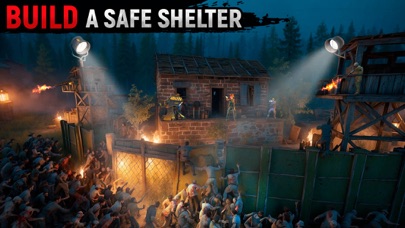
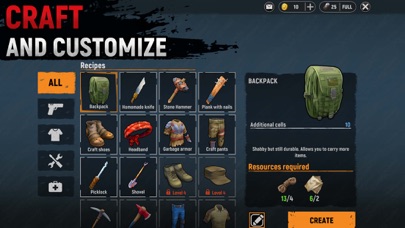
At the dawn of the zombie apocalypse, each survivor must have their base with strong walls. Build and surround your headquarters with ranged and melee weapons, and craft sturdy armor to keep the zombie out. Create a secure safe area, cook food over a campfire, and build bunkers, barricades, and fortifications. No mutant will breakthrough!
~ Complete adventure quests and go through the storyline ~
In the process of passing Let's Survive, you will be able to go through the storyline and complete quests that will bring you additional resources. Talk to characters, take tasks, fight enemies and solve riddles. Find answers to all questions and find the missing survivors.
~ Chat with other survivors ~
What is a fraction-free zombie story game? Our new zombie simulator has a whole system of different leagues that you can join and receive bonuses. Away loneliness! Try to survive the zombie apocalypse together with other players.
~ Fight ferocious bosses ~
You were able to deal with zombies and mutants. What about furious bosses ready to grind you to dust at any second? Destroy them if you want to get rare loot. Watch out, fighter! The zombies are already attacking! Get ready for adventure and pain in Let's Survive.
SUBSCRIPTION
Enjoy the game and get bonuses:
1. 2 times more experience and access to VIP tasks;
2. The consumption of hunger, thirst, and psyche is reduced by 50%;
3. 50 coins every day as a bonus;
4. 2 times more production stations;
5. -50% by production time.
I am the last survivor! This is my city. And I will fight for it in Let's Survive!
Make your life easier with just a couple of premium coins:
- Check out its benefits by getting a free 3-day trial period. After 3 days, the trial period will automatically switch to a weekly paid subscription.
- The paid subscription is divided into the 2 types: weekly and annual.
- The cost of a weekly paid subscription is $ 8.99. Annual - $ 24.99.
- The amount will be debited from your Apple ID account upon confirmation of purchase.
- You can cancel your subscription or trial period at any time, but no later than 24 hours before the end of the current period. OTHERWISE, it will be automatically renewed.
- Your account will be charged for renewal within 24 hours before the end of the current period.
- After payment, you can manage your subscription and turn off auto-renewal in your account settings.
- Any unused portion of the free period will be canceled after purchasing the subscription.
- Read our privacy policy https://survivalgamesstudio.com/privacy.html .
And the EULA (End User License Agreement) https://survivalgamesstudio.com/eula.html .

- iPhone أو iPad بجيلبريك أو بدون جيلبريك.
- Sideloadly أو بدائلها.
- كمبيوتر يعمل بنظام Windows/macOS/Linux مع تثبيت iTunes.
الخطوة 1: قم بتنزيل ملف .IPA المعدّل مسبقًا من الرابط أعلاه إلى الكمبيوتر الخاص بك. للتنزيل من تطبيق iOSGods App، اطلع على دليل تنزيل IPA من تطبيق iOSGods App الذي يتضمن مثالًا بالفيديو.
الخطوة 2: قم بتنزيل Sideloadly وتثبيته على جهاز Windows أو Mac.
الخطوة 3: افتح Sideloadly على الكمبيوتر، ووصّل جهاز iOS الخاص بك، وانتظر حتى يظهر اسم جهازك داخل Sideloadly.
الخطوة 4: بمجرد التعرّف على جهاز iDevice الخاص بك، اسحب ملف .IPA المعدّل الذي قمت بتنزيله وأفلِته داخل تطبيق Sideloadly.
الخطوة 5: أدخل البريد الإلكتروني لحساب Apple Account الخاص بك، ثم اضغط على «Start». سيُطلب منك بعد ذلك إدخال كلمة المرور. تابع وأدخل المعلومات المطلوبة.
الخطوة 6: انتظر حتى ينتهي Sideloadly من تحميل/تثبيت ملف IPA المعدّل. في حال واجهت أي مشاكل أثناء التثبيت، يرجى قراءة الملاحظة أدناه.
الخطوة 7: بعد اكتمال التثبيت ورؤية التطبيق على الشاشة الرئيسية، انتقل إلى Settings → General → Profiles / VPN & Device Management. ثم اضغط على البريد الإلكتروني الذي أدخلته في الخطوة 6، ثم اضغط على «الوثوق بـ [email protected]».
الخطوة 8: الآن انتقل إلى الشاشة الرئيسية وافتح التطبيق الذي تم تثبيته للتو وسيعمل كل شيء بشكل صحيح. قد تحتاج إلى اتباع تعليمات إضافية خاصة بكل تطبيق داخل النافذة المنبثقة للتعديل أثناء اللعب.
ملاحظة: بدءًا من iOS/iPadOS 16 وما بعده، يجب تفعيل وضع المطور (Developer Mode). بالنسبة لحسابات Apple Developer المجانية، ستحتاج إلى تكرار هذه العملية كل 7 أيام. إذا كانت لديك أي أسئلة أو مشاكل، يرجى قراءة قسم الأسئلة الشائعة حول Sideloadly في الموضوع.






![[VIP] Andy Volcano: Tile Match Story Hack](https://is1-ssl.mzstatic.com/image/thumb/Purple211/v4/50/c5/d0/50c5d0f8-a137-ade7-9074-f3fb9544d525/AppIcon-0-0-1x_U007emarketing-0-8-0-85-220.png/100x100bb.jpg)


![[VIP] Brave Merge - Battle & Defense Hack](https://is1-ssl.mzstatic.com/image/thumb/Purple211/v4/81/8d/ce/818dcea0-a5a9-1bd5-f04a-068336537336/AppIcon-0-0-1x_U007emarketing-0-8-0-85-220.png/100x100bb.jpg)


