تسجيل الدخول مطلوب
سجّل الدخول بحساب iOSGods للمتابعة.
سجّل الدخول بحساب iOSGods للمتابعة.
تمنحك تعديلات العملات واللاعبين غير المحدودة في Football Cup 2021 Hack قوة شرائية وقدرة تحمل لا نهائية، مما يتيح لك بناء فريقك الحلم واللعب بدون حدود. يزيل هذا الـ Mod IPA قيود الموارد حتى تتمكن من التركيز على السيطرة على البطولات الدولية وقيادة دولتك المختارة نحو النصر.
- عملات غير محدودة [الشراء بدون امتلاك رصيد كافٍ] → اشترِ اللاعبين والترقيات بحرية
- طاقة غير محدودة → العب المباريات بشكل مستمر
يأتي هذا التطبيق أيضًا مع iGameGod، مما يتيح لك الوصول إلى Auto Touch لأتمتة المهام المتكررة، وApp Speed Manager لضبط سرعة اللعب، وتعديل القيم عبر Memory Engine، والمزيد من أدوات ألعاب iOS القوية.
قم بتنزيل Football Cup 2021 Hack modded IPA من الروابط أعلاه. اضغط على زر التثبيت واتبع التعليمات لتثبيت هذا التعديل لـ iOS على iPhone أو iPad أو Apple Silicon.
هل تحتاج إلى مزيد من المساعدة؟ راجع الأسئلة الشائعة لتطبيق iOSGods للحصول على إجابات مفصلة ونصائح لاستكشاف الأخطاء.
Play these thrilling football games and rise to become a football star on the field.
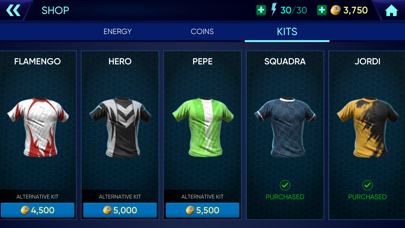
Assemble your ultimate team, wear your kits with pride, and play with professional tactics to score goals and win all football matches. Whether you're playing in career mode or representing your national team, the experience of becoming a hero is within your reach. Live your dream of a champion and win the league with your strategic shots.
Unleash the power of your team and show the world which nation has the best football players. With your strategic shots, professional tactics and skills, you'll dominate the field and lead your dream team to victory in every match, season after season. So put on your football kits, kick the ball, and win the hearts of fans in stadiums around the world, all the way to the semi-finals and finals.
Get acquainted with controls with Basics, and put on your kits for tournaments and other football events.
GAME MODES
CAREER INCLUDES
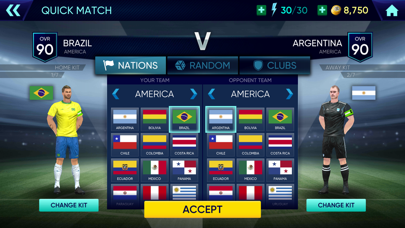
- Next match - Play football matches, improve your league progress and move up to the better league.
- Team management - Be a football manager and edit your players.
- Statistics - Follow your team's progress and statistics.
- Season objectives - Complete 4 objectives during each football season.
EVENTS INCLUDE
- Daily Challenges - A set of 5 challenges every day.
- Champions Cup - The best European teams meet every year to win the cup.
- Europa - Win the cup which is held every 4 years in Europe.
- Copa Del Sur - Compete with the best South American teams.
- Tournament - Triumph football matches of 32 national teams.
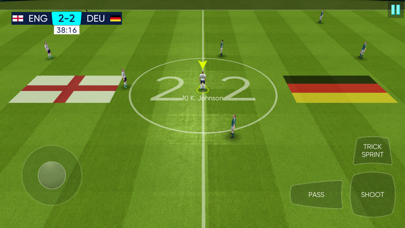
Train hard, come to the field, and triumph over all your opponents in every match to become a football legend. Score goal after goal with your precision passing, dribbling, and shooting skills. Master your penalties, free-kicks, and corner kicks with ease, while always staying alert to avoid getting caught offside. And if it comes down to a penalty shootout, respect the referee and trust your goalkeeper to make the crucial saves.
As a forward, midfielder, or defender, you will be a crucial part of your team's success on the field. So work together with your teammates and always be ready to make that crucial pass, tackle, or interception that can make you a football star. Or even score a hat trick or win the Golden Boot!
From the first whistle of the football season to the final match of the championship, this game has everything for you to become a true football legend. Whether you're playing in a league or tournament, dressing up in your ultimate team colors or just kicking the ball, it is a chance to lead your team to victory.
Work on your ball control, passing accuracy, and shooting precision, and get ready for all the tournaments. Whether you're playing in career mode, representing your national team, or leading your club to the championship, win every match. So step onto the field, and let your goals speak for themselves.
Play football games and lead your team to glory in prestigious league tournaments. Win every match, show your talents on the field, score goals, and earn the recognition of football fans and fellow players alike. Make a name in the competitive world of football. So grab your ball, hit the field, and become the football legend you were born to be!

- iPhone أو iPad بجيلبريك أو بدون جيلبريك.
- Sideloadly أو بدائلها.
- كمبيوتر يعمل بنظام Windows/macOS/Linux مع تثبيت iTunes.
الخطوة 1: قم بتنزيل ملف .IPA المعدّل مسبقًا من الرابط أعلاه إلى الكمبيوتر الخاص بك. للتنزيل من تطبيق iOSGods App، اطلع على دليل تنزيل IPA من تطبيق iOSGods App الذي يتضمن مثالًا بالفيديو.
الخطوة 2: قم بتنزيل Sideloadly وتثبيته على جهاز Windows أو Mac.
الخطوة 3: افتح Sideloadly على الكمبيوتر، ووصّل جهاز iOS الخاص بك، وانتظر حتى يظهر اسم جهازك داخل Sideloadly.
الخطوة 4: بمجرد التعرّف على جهاز iDevice الخاص بك، اسحب ملف .IPA المعدّل الذي قمت بتنزيله وأفلِته داخل تطبيق Sideloadly.
الخطوة 5: أدخل البريد الإلكتروني لحساب Apple Account الخاص بك، ثم اضغط على «Start». سيُطلب منك بعد ذلك إدخال كلمة المرور. تابع وأدخل المعلومات المطلوبة.
الخطوة 6: انتظر حتى ينتهي Sideloadly من تحميل/تثبيت ملف IPA المعدّل. في حال واجهت أي مشاكل أثناء التثبيت، يرجى قراءة الملاحظة أدناه.
الخطوة 7: بعد اكتمال التثبيت ورؤية التطبيق على الشاشة الرئيسية، انتقل إلى Settings → General → Profiles / VPN & Device Management. ثم اضغط على البريد الإلكتروني الذي أدخلته في الخطوة 6، ثم اضغط على «الوثوق بـ [email protected]».
الخطوة 8: الآن انتقل إلى الشاشة الرئيسية وافتح التطبيق الذي تم تثبيته للتو وسيعمل كل شيء بشكل صحيح. قد تحتاج إلى اتباع تعليمات إضافية خاصة بكل تطبيق داخل النافذة المنبثقة للتعديل أثناء اللعب.
ملاحظة: بدءًا من iOS/iPadOS 16 وما بعده، يجب تفعيل وضع المطور (Developer Mode). بالنسبة لحسابات Apple Developer المجانية، ستحتاج إلى تكرار هذه العملية كل 7 أيام. إذا كانت لديك أي أسئلة أو مشاكل، يرجى قراءة قسم الأسئلة الشائعة حول Sideloadly في الموضوع.





![[Project Springfield] The Simpsons™: Tapped Out](https://is1-ssl.mzstatic.com/image/thumb/Purple211/v4/8e/9d/53/8e9d530e-9421-3ab6-c52e-90d7b786dd30/AppIcon-1x_U007emarketing-0-7-0-85-220-0.png/100x100bb.jpg)





![[ Kyoutou Kotoba RPG: Kotodaman ] コトダマン-共闘ことばRPG Hack](https://is1-ssl.mzstatic.com/image/thumb/Purple126/v4/1a/00/95/1a009543-5a2c-8f8e-8c58-3ac74d754a1e/AppIcon-1x_U007emarketing-0-7-0-85-220.png/100x100bb.jpg)

![[ SAOIF ] ソードアート・オンライン インテグラル・ファクター Hack](https://is1-ssl.mzstatic.com/image/thumb/Purple116/v4/90/1e/5c/901e5cc2-988d-8c41-bb74-494cbd07a495/AppIcon-1x_U007emarketing-0-7-0-85-220.png/100x100bb.jpg)
![[VIP] SwordArtOnline: IntegralFactor SAOIF Hack](https://is1-ssl.mzstatic.com/image/thumb/Purple116/v4/6d/2b/48/6d2b4890-100a-afff-6286-f7af91d94529/AppIcon-1x_U007emarketing-0-7-0-85-220.png/100x100bb.jpg)





![[ Danmachi TW ] 地城邂逅〜記憶憧憬~ Hack](https://is5-ssl.mzstatic.com/image/thumb/Purple116/v4/c1/a8/bf/c1a8bf8c-d7df-8fd3-db2c-fc7041a97d1d/AppIcon-0-0-1x_U007emarketing-0-0-0-8-0-0-sRGB-0-0-0-GLES2_U002c0-512MB-85-220-0-0.png/100x100bb.jpg)
![[VIP] DanMachi - MEMORIA FREESE Hack](https://is5-ssl.mzstatic.com/image/thumb/Purple116/v4/6d/bc/2e/6dbc2ef8-7245-4b95-63e2-90c405b64020/AppIcon-0-0-1x_U007emarketing-0-0-0-8-0-0-sRGB-0-0-0-GLES2_U002c0-512MB-85-220-0-0.png/100x100bb.jpg)
![[ Danmachi KR ] 던만추〜메모리아프레제〜 Hack](https://is1-ssl.mzstatic.com/image/thumb/Purple126/v4/4d/c3/a4/4dc3a47a-a445-9830-cd0c-b65e52918e6f/AppIcon-0-0-1x_U007emarketing-0-0-0-8-0-0-sRGB-0-0-0-GLES2_U002c0-512MB-85-220-0-0.png/100x100bb.jpg)